Guide
Escalation of Issues: A Practical Playbook
Learn how to handle escalation of issues in social moderation with this practical guide for 2026.
12 min read
read
·


You're already seeing it: a buyer drops a question under a high-spend ad, a chargeback threat lands in public, and three teammates hesitate because nobody wants to be the one who escalates the wrong thing. That's where escalation of issues stops being a support concept and starts eating media efficiency, response speed, and senior review capacity.
The mistake many teams make is treating escalation like a ladder. It isn't. It's a routing decision made in seconds, and every bad handoff has a cost. A good system has to do four jobs at once, triage fast, route to the right owner, preserve context, and keep a human in the loop without turning that human into a bottleneck. The practical goal is not to move more conversations upward. It's to close the right ones where they start, and only hand off the ones that need a specialist or manager.
Table of Contents
What an Escalation Workflow Is Actually For
A single bad handoff under a live ad can do more damage than a week of careful moderation. If a buyer asks about shipping, gets a vague reply, then gets bounced to someone else with no context, the system has already failed twice. The issue is no longer the question itself. It's the lost time, the duplicated effort, and the senior reviewer who now has to reconstruct the thread from scratch.
A real escalation workflow exists to do four jobs in parallel. First, it spots which conversations need attention now, not later. Second, it routes the issue to the person who can resolve it. Third, it carries the history forward so nobody has to ask the customer to repeat themselves. Fourth, it keeps authority available without making management the default destination for every unresolved comment.
That's why escalation belongs in the same operating layer as the ad creative, the reply rules, and the moderation policy. A comment under an ad is part of the selling system. If the handoff is slow or sloppy, the brand pays in wasted clicks, delayed replies, and extra human work.
A better mental model is this, escalation rate is the share of interactions that can't close at first contact. That makes it a measurable process, not a vibe. The routing decision either solved the issue where it started, or it pushed cost upward. Exerta's workflow builder fits this kind of operating logic because the point is not just to reply, it's to decide which conversations stay local and which ones need another owner.
Practical rule: if a frontline agent can answer, verify, and close the issue without waiting on another team, that conversation should stay put.
The best teams treat the frontline as the first resolver, not the first passer of problems. That's where speed is won.
The Five Triggers That Decide Where a Comment Goes
The cleanest escalation systems use trigger buckets, not gut feel. “Looks important” is how teams end up over-escalating easy questions and under-escalating risky ones. A trigger should be explicit enough that two reviewers would route the same comment the same way.
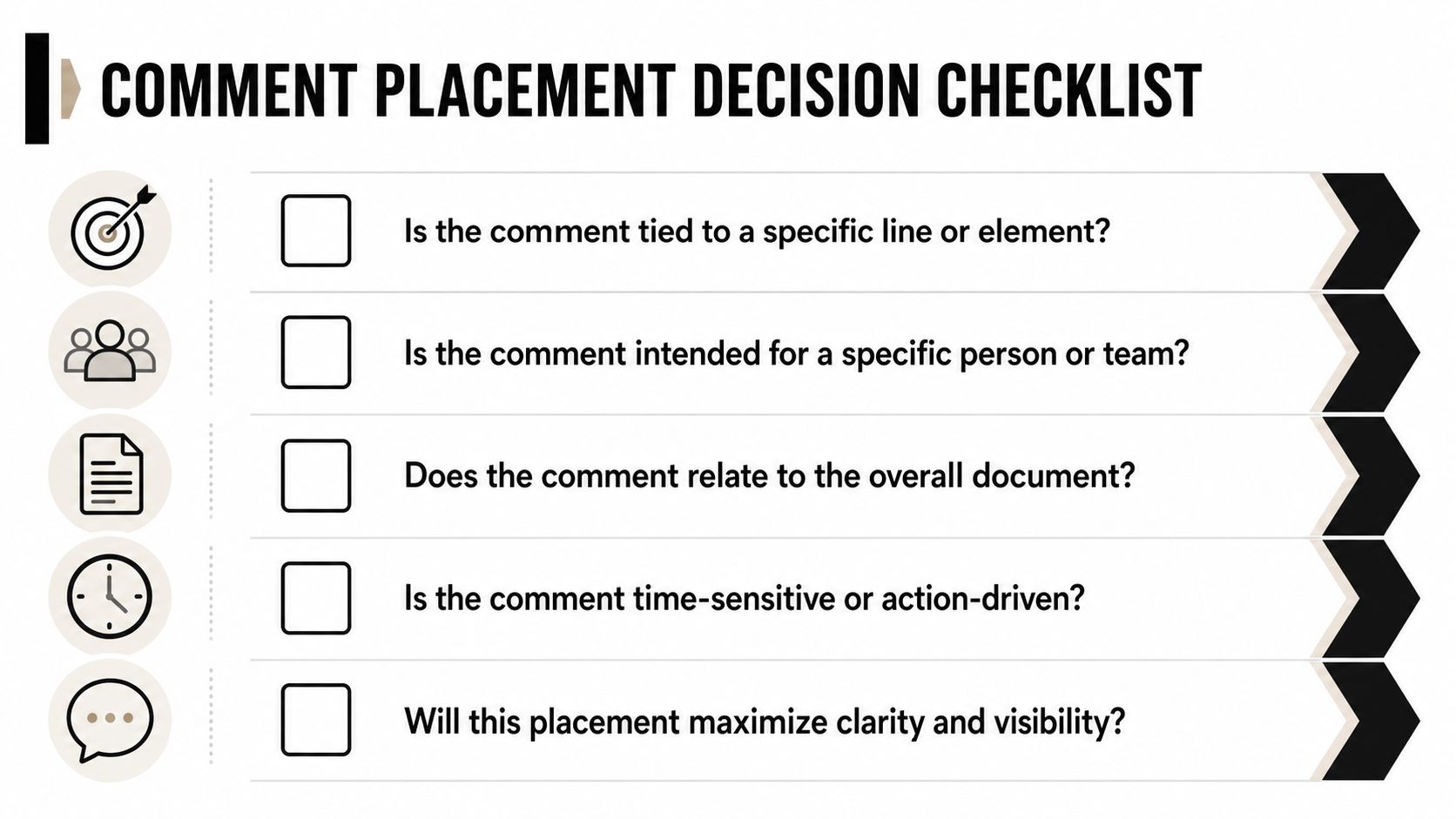
Buyer intent
This is the “wants to buy now” bucket. Route when a comment or DM includes purchase language, checkout friction, price questions, or a request for a direct link that the current responder can't handle confidently. A practical threshold is any message that asks for buying help and cannot be answered from the current asset or policy. In a TikTok comment, “Do you ship to Canada, and can I get the bundle link?” should stay close to sales recovery, not sit in a general inbox.
Compliance or regulated category
Use this for issues that touch health, insurance, financial claims, or other regulated categories where a careless reply creates risk. The trigger should be a keyword set, phrase pattern, or content classifier, not a human hunch. If a Meta comment asks about a claim, a prescription, or eligibility, that belongs in a stricter review path. Exerta's multi-branch logic matters here because the same message can need moderation, an approved reply, and a specialist handoff.
Refund or chargeback language
Any mention of a refund, dispute, chargeback, cancellation, or “I'm calling my bank” should fire fast. The threshold can be strict. If the user says they want money back, the issue is no longer a casual service question. It has financial urgency and usually needs a different owner than the one handling product questions. A public comment that says “I want my money back” is not the place for a generic brand reply.
Sentiment spike
This bucket catches a sharp shift in tone, not just an unhappy word. Set the threshold around repeated anger, threats, or public pile-ons. A single frustrated message may be resolvable at tier one. A thread that turns volatile needs a different path, especially if it's getting visibility under an active ad. The key is consistency. Use a scoring rule or clear phrase set so the system doesn't trigger on every annoyed customer.
SLA risk
Escalate when the clock is the problem. If the response window is close to expiring, the issue belongs with whoever can act immediately. Time-based triggers matter because delay is often the primary failure, not complexity. A web chat question that's been waiting too long should not sit in a queue just because the topic itself is routine.
The strongest trigger sets are specific, testable, and a little boring. That's a good sign. If a rule can't be explained in one sentence, it's probably too vague to run at volume.
A simple audit helps. Remove triggers that fire on opinion, combine overlapping ones, and keep only the rules that map to a real action. If the same comment keeps bouncing between buckets, the workflow is too loose.
Functional vs Hierarchical Escalation
A subscriber under a Meta ad says the billing amount looks wrong and threatens to cancel. That sentence can go two directions, and only one of them is useful.
Functional escalation sends the issue sideways to the person who can solve it, maybe billing, refunds, compliance, or a specialist who knows the policy. Hierarchical escalation sends it upward to a manager or on-call lead. Those are not the same move. One is about expertise. The other is about authority.
Issue Type | Functional Escalation | Hierarchical Escalation | Why |
|---|---|---|---|
Billing dispute | Yes, to billing or refunds specialist | Only if the dispute is blocked or sensitive | The owner needs payment context, not rank |
Policy-sensitive claim | Yes, to compliance reviewer | Sometimes, if risk is active or public | The specialist can rule on wording first |
Routine product question | No, keep at tier one | No | The frontline should close it fast |
Repeated complaint from a public thread | Yes, to specialist if policy or refunds are involved | Yes, if visibility or risk has spiked | The issue may need both expertise and visibility control |
The routing mistake many teams make is sending everything “up” when the issue only needs a specialist. That creates the bottleneck everyone feels later. The frontline waits for permission, the manager becomes a traffic cop, and the customer gets a slow answer.
Functional escalation should be the default for almost every comment thread that needs help. Hierarchical escalation should be reserved for cases where authority, urgency, or risk exceeds the current owner's scope. Exerta's moderation playbook for Meta ads fits this split because the right action isn't always “reply.” Sometimes it's hide, sometimes it's route, and sometimes it's close the loop locally.
If the only thing a manager adds is visibility, the issue probably didn't need a manager.
The cleanest routing rule I use is simple. Let the specialist handle the issue first. Bring in management only when the specialist can't resolve it, the risk crosses a threshold, or the response needs authority the frontline doesn't have.
SLAs That Match the 24-Hour DM Window
A DM that sits too long stops acting like a live sales conversation and starts acting like a lost lead. In social channels, timing is the constraint that shapes the whole SLA. Once the 24-hour DM window closes, the team has less room to keep the thread moving, and every handoff has to work harder to recover momentum. The operating context behind that window is laid out in The 24-hour DM window explained, and that is the right frame for SLA decisions here.
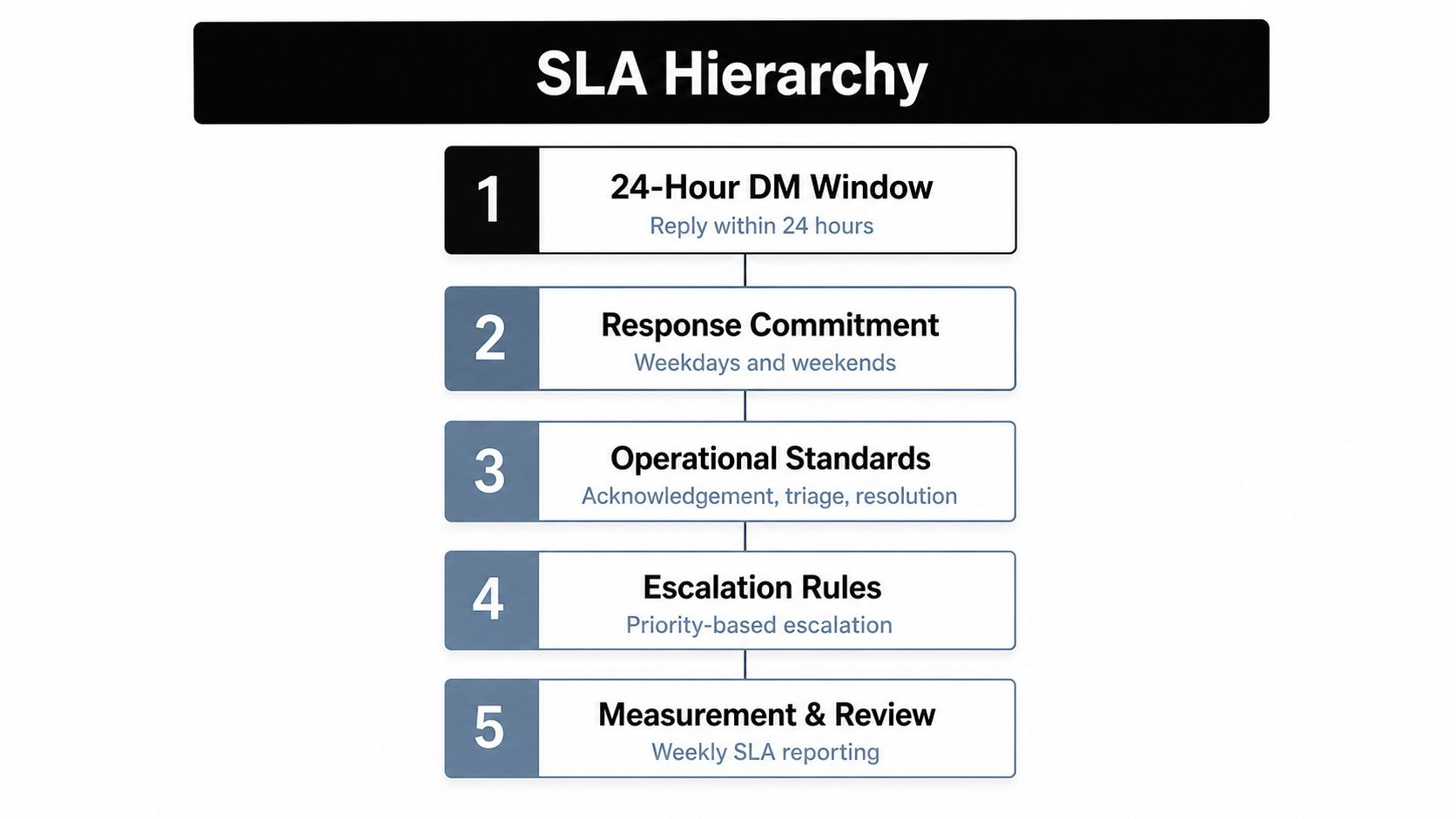
A paid social SLA does not need a long list of timers. It needs a small set of targets the team can check every day without guessing what matters.
Channel | First Response | Specialist Pickup | Final Resolution |
|---|---|---|---|
Comments | Fast enough to keep the thread warm | When risk, intent, or visibility requires it | When the answer is complete |
DMs | Before the window expires | When the frontline can't close it cleanly | As soon as the next owner can act |
Web chat | Near real time during active sessions | When the user stalls or needs deeper help | Before the lead drops off |
The cost of being late changes by channel. A DM that expires cannot keep moving. An unanswered comment can keep drawing attention while the team is offline. A slow handoff in chat turns a simple question into a retention problem because the customer has already invested attention and now expects a fast next step.
Keep the SLA set small enough to run. If nobody checks the numbers each day, the rules are too heavy for the work. The minimum useful setup is usually a first-response target, a specialist pickup target, and a resolution target by channel, plus one timer for time spent at each tier. That fits the practical timing pressure of the DM window and keeps escalation from becoming a pile of extra admin.
Agent Handoffs Without Dropped Context
A clean handoff feels boring to the customer, and that's the point. The conversation should move without forcing the person to restate the issue. If a human reviewer has to ask, “Can you paste the original comment?” the handoff already failed.
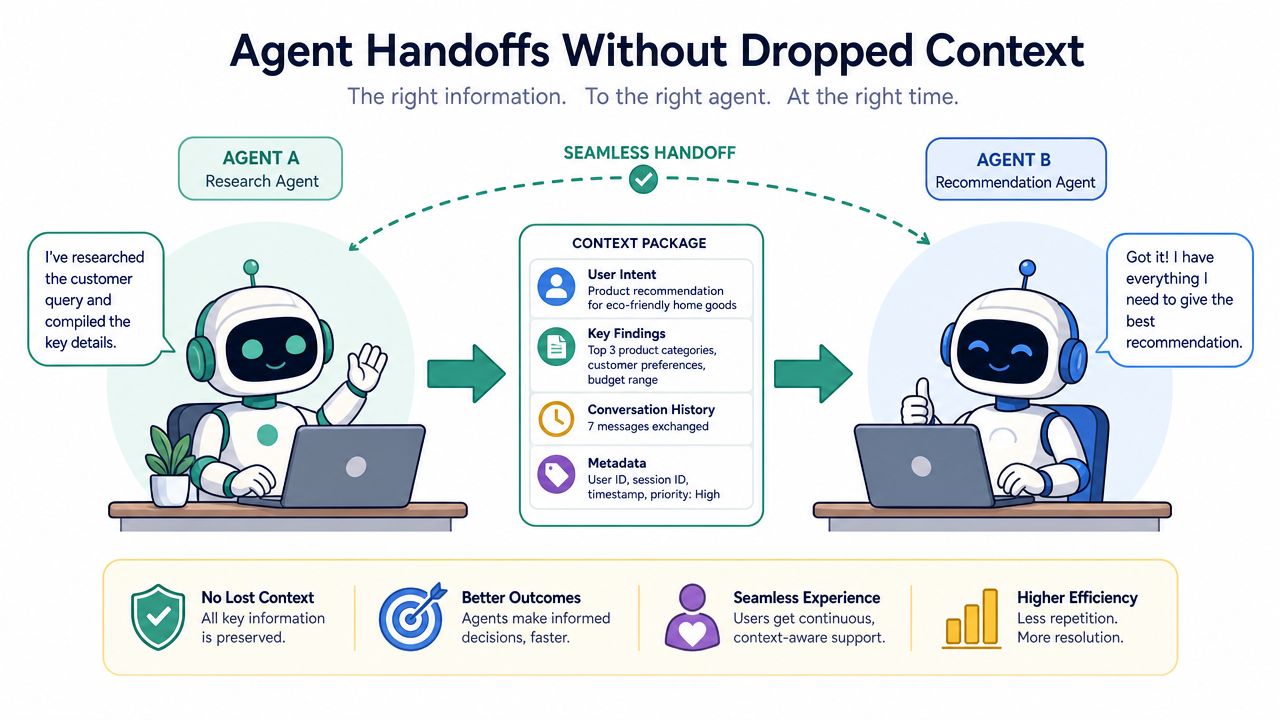
A good handoff packet carries the comment text, the channel, the sentiment score, the customer's prior interactions on that channel, the trigger that fired, and one recommended next action. That last part matters. The next owner should know what to do, not just what happened.
The bad version is familiar. Someone pastes a comment into Slack, adds “help please,” and moves on. The receiving agent now has to hunt for context, which adds another round-trip and slows the thread further. The good version includes enough information to act immediately.
A practical handoff packet might read like this:
Original message: the exact comment or DM
Channel: Facebook, Instagram, TikTok, or website chat
Trigger fired: buyer intent, compliance, refund language, sentiment spike, or SLA risk
Prior context: previous replies, prior complaints, or open order details on that channel
Recommended next action: refund review, policy check, specialist reply, or immediate closure
That list is short on purpose. If the packet becomes a novel, nobody reads it. If it's too thin, the specialist has to ask for missing pieces and the time savings disappear. Exerta's scaling engagement without scaling headcount belongs in this conversation because the only way to scale handoffs is to remove the guesswork before the human ever sees the case.
The best handoff is one where the receiving agent doesn't need to ask a clarifying question.
Log the trigger, the original text, the channel history, any previous routing attempts, and the action already taken. That's enough to keep the next owner moving.
When Not to Escalate
Many teams over-escalate. They send easy questions upward because they're nervous about making the wrong call. That instinct feels safe, but it burns the people you need most. Escalation fatigue is real, and it shows up when senior reviewers spend their day answering routine questions the frontline could have closed.
A conversation should stay at tier one when the answer already exists in the knowledge base, there's no compliance flag, no refund authority issue beyond a defined threshold, and no public visibility risk. If a sizing question sits under a Meta ad and the brand voice is already trained, an AI employee should answer it without dragging a human into the loop. Routing that simple comment to a reviewer doesn't raise quality. It just adds delay and uses scarce judgment on work that doesn't need it.
The right cutoff is authority, expertise, or time. If the frontline has enough authority to act, enough expertise to answer, and enough time before the clock forces a compromise, keep it there. If any one of those runs out, escalate.
Rule of thumb: don't escalate because a message feels uncomfortable. Escalate because the current owner can't finish the job properly.
That principle keeps the system honest. It also protects your senior reviewers from becoming the default answer desk. The more routine work they absorb, the less capacity they have for true edge cases, and the slower the whole operation becomes. The brand voice gets weaker too, because the people closest to the customer stop learning from the conversations they should own.
Measuring Whether Escalation Is Healthy
Healthy escalation has a shape. It is not flat, and it is not flooded. The numbers tell you whether the system is routing work with control or just passing problems around.
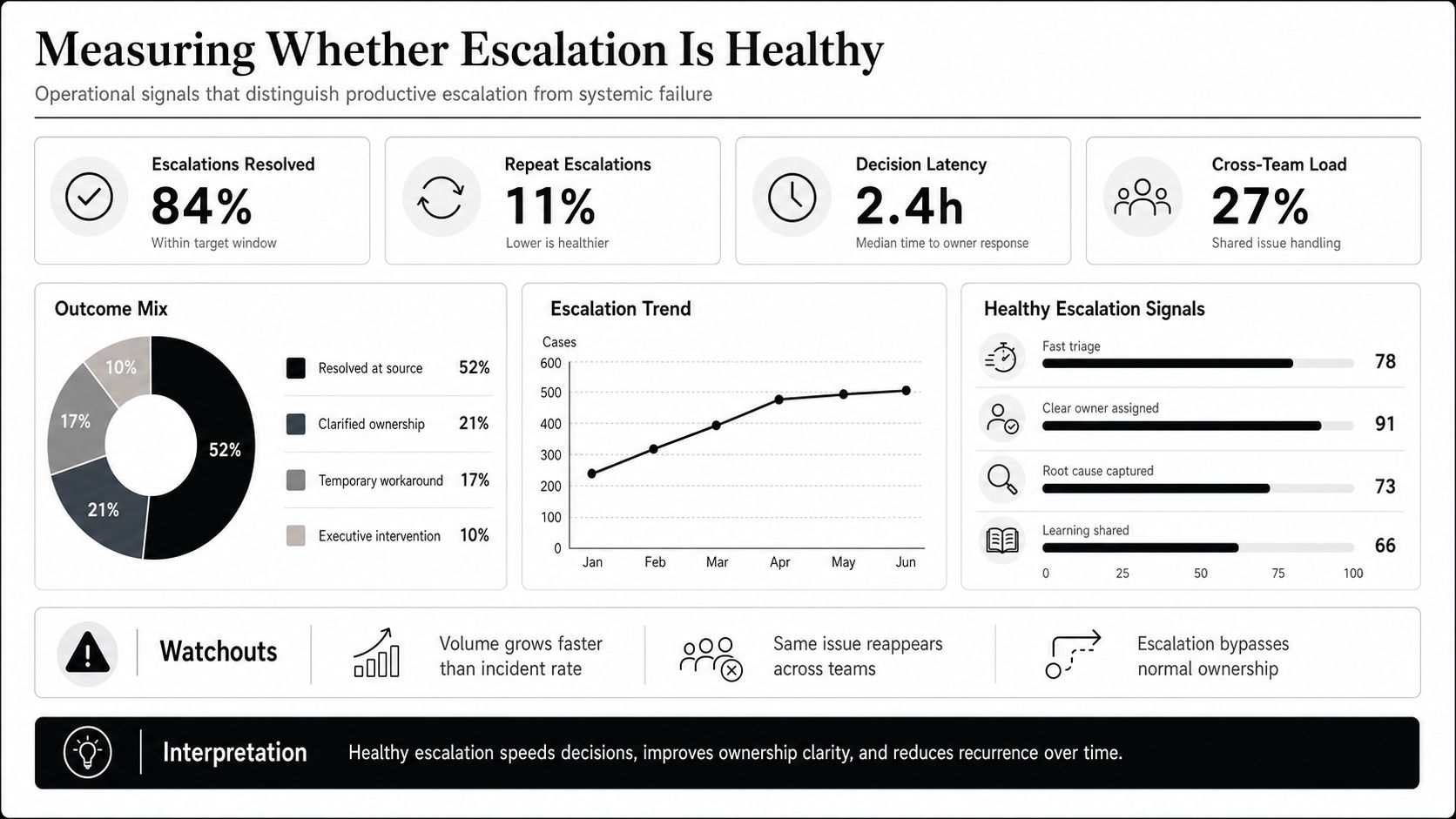
Start with escalation rate. Operational benchmarking suggests keeping routine escalations below 10% of total case volume, while rates above 15% signal a process review CX Foundation. If the rate spikes, the answer is not always “add more people.” Sometimes the frontline needs better training, a clearer trigger, or more authority.
Track time-at-tier next. That shows how long the issue sits before it moves. If cases linger too long at the first level, the routing rule may be too cautious, or the team may be waiting for permission they should already have. If everything escalates instantly, the trigger set is probably too aggressive.
The third number is repeat-escalation rate. If the same issue gets escalated twice, the system missed something upstream. That usually points to weak triage, a bad handoff packet, or a specialist path that sends the issue back without fixing the root problem. The revenue recovered by the specialist tier is the fourth metric, and it tells you whether the handoff is producing value, not just movement.
Review the dashboard weekly, but keep the meeting tight. If the team can't tie each metric to a routing change, the review is just theater.
A useful 30-minute weekly ritual is simple. Spend 10 minutes on escalations that repeated, 10 minutes on the longest time-at-tier cases, and 10 minutes on one trigger you may need to loosen or tighten. Then assign one fix, one retraining point, and one rule change. That keeps escalation of issues grounded in operations instead of debate.
Exerta helps brands route comments, DMs, and web chat with AI employees that reply in brand voice, preserve context, and keep senior reviewers focused on the cases that need them. If you want a tighter escalation system across Facebook, Instagram, TikTok, and website chat, visit Exerta and see how it handles the work without adding more manual layers.

