Guide
Social Media Moderation Tools Compared for Paid Ads
Compare social media moderation tools for ads and organic posts. See how automation stacks up against human workflows and what DTC brands actually ship.
13 min read
read
·


You can have a profitable Meta or TikTok ad running clean in Ads Manager and still lose the sale in the comments. The creative is doing its job, spend is scaling, and then the thread fills with scam replies, junk links, and real buyers asking the same question three times with nobody answering.
That’s why social media moderation tools matter to media buyers, not just community managers. Under a paid post, moderation is part of the media asset, part of the conversion path, and part of the recovery process when buyer intent shows up in public.
Category | Best at | Weakest at | Best fit |
|---|---|---|---|
Native platform controls | Fast hiding, basic filtering | Cross-channel coverage, workflow depth | Small teams with simple comment volume |
Keyword and rules engines | Blocking known spam patterns | Context, nuance, language variation | Accounts with repeatable junk and strict rules |
AI comment and DM agents | Always-on replies, triage, recovery | Messy escalations without clear policy | DTC and lead-gen teams that need revenue handling |
Trust-and-safety suites | Governance, queues, audit trails | Speed to deploy, lean setup | Larger teams with compliance or multi-brand load |
Table of Contents
Why Paid Ad Comments Are a Moderation Problem First
A strong ad doesn’t just attract buyers. It attracts every kind of noise around the offer. The first time a campaign gets real traction, the comment section turns into a live test of whether your post still looks trustworthy once strangers start piling in.
What a buyer sees under a scaled post
They don’t read your media plan. They scan the thread. If the top comments are spam, scam replies, or unanswered objections, the post feels less like an ad and more like an exposed checkout page with nobody watching it.
That matters because the comment section is visible social proof. A single prominent complaint can sit above your product answer for hours, while a buyer scrolling on mobile may never click through to the landing page. When that happens, the ad is still “live,” but the merchandising around it has gone bad.
Practical rule: treat comments on a paid post like product-page reviews, because buyers do.
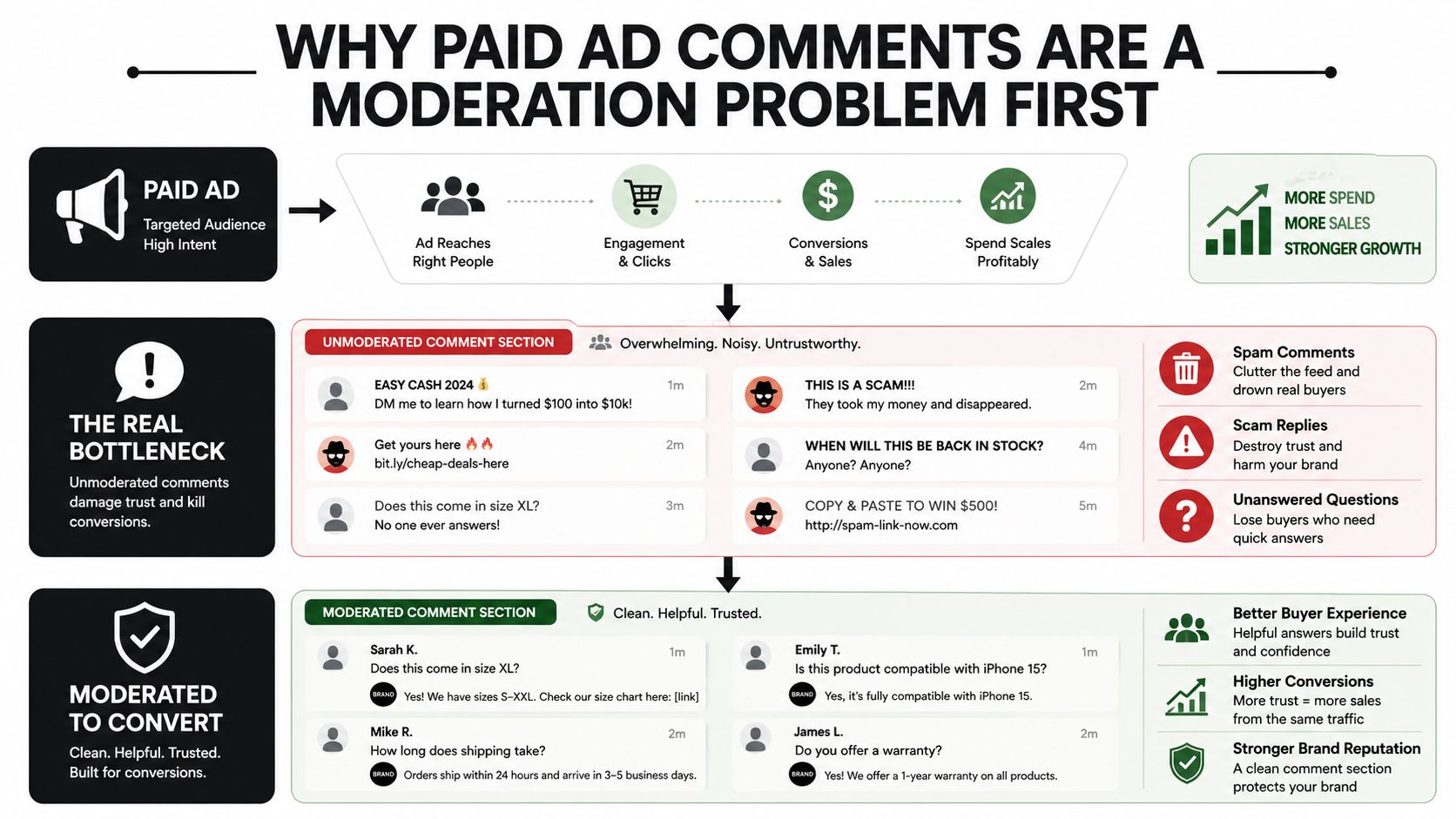
The operational failure is simple. Nobody owns the thread fast enough, and the thread becomes part of the ad itself. That’s why unanswered buyer questions, fake support replies, and obvious scam links shouldn’t be filed under “community issues,” they should be treated as revenue leakage.
For a practical deeper dive on the ad-side cost of delayed replies, see why unanswered ad comments are costing you sales.
What inaction costs
The cost usually isn’t dramatic at first. It shows up as softer engagement quality, lower trust, and more manual cleanup work every day the campaign runs. Then the media team starts spending hours policing the thread instead of adjusting creative, offers, or retargeting.
That’s the reframing. Moderation is not a side chore. It’s part of how you present the offer after the click, and that presentation influences whether a paid impression turns into a response, a DM, or nothing at all.
How Social Media Moderation Tools Work
Overcomplicating moderation before defining the mechanics is common. The useful tools sit on four building blocks, and each one maps to a specific paid-social task.
The four mechanics that matter
Content filtering removes or hides content that breaks your rules. In ad work, that usually means blocking obvious spam, scam links, profanity, or off-topic clutter before buyers see it. If a reply pattern is predictable, filtering is the first line of defense.
Spam detection catches repetitive junk and low-quality automation. On a high-volume campaign, that saves your team from manually deleting the same low-value comments all day. It also keeps buyer questions from getting buried under copy-paste replies.
Sentiment analysis flags when a thread turns negative or unstable. That is useful after a creative launch or offer change, because the thread often reveals objections faster than the dashboard does. A spike in negative tone can tell you the message is confusing long before performance reports catch up.
Moderation queue is the human review layer. It holds borderline content, routes important messages, and keeps policy decisions from being made by a blind rule set. For ad comments and DMs, high-intent messages should land here when they need context.
The platform primitives already in play
The major platforms already expose parts of this stack. A peer-reviewed analysis names Facebook’s toxic-speech classifiers, YouTube’s Content ID, Twitter’s quality filter, and Google Jigsaw’s Perspective API as examples of algorithmic moderation, while noting that humans still label training data and make takedown decisions based on flags peer-reviewed analysis. On the platform policy side, the U.S. Congressional Research Service says violations can be identified by users, human moderators, or automated systems Congressional Research Service report.
That is the workflow most advertisers need in plain terms. Auto-hide the junk, queue the gray-area replies, and route any real buyer signal somewhere that can answer fast.
Hide, reply, or escalate. If a comment cannot be answered cleanly in one pass, put it in a queue.
For a practical build-out of routing logic and rule paths, the workflow patterns in the workflow builder overview show how teams can separate routine moderation from sales follow-up.
Automation vs Human Moderation on Paid Channels
Automation is now the default on the biggest platforms, but not because it’s perfect. It’s the default because scale broke manual review.
Where machines already do the heavy lifting
In the EU’s DSA transparency database, major platforms reported more than 2 million content moderation cases in one day, and roughly 68% of all detections across those platforms were automated EU DSA transparency database review. A Le Monde review of transparency reports found that Facebook and Instagram relied on machines for 94% and 98% of moderation decisions respectively, while TikTok sat at 45% Le Monde review cited in the transparency report analysis.
The same reporting noted that Facebook teams were handling 320 times more deletions than user reports. That gap explains why a human-only workflow falls behind almost immediately on paid traffic.
Where automation breaks down
The tradeoff is accuracy. LinkedIn’s reported automatic deletion error rates were estimated at 10% for English, 30% for German, 37% for French, and 80% for Spanish same transparency analysis. Those numbers matter because ad comments are language-rich and context-heavy. A filter that works fine in one market can over-remove legitimate buyers in another.
Bottom line: automation wins on speed and scale, humans win on edge cases and context, and the best paid-channel setup uses both.
That’s also why teams should be cautious about language assumptions. If your campaigns run beyond English, moderation quality can shift sharply by market, and the wrong deletion behavior can erase good faith, not just spam.
For a useful operational contrast between scale and headcount, see scaling engagement without scaling headcount.
The Tool Categories Worth Comparing
The market looks crowded until you sort tools by what job they do under a paid post. Once you do that, the field shrinks to a few categories that matter.
1. Native platform controls
These are the built-in hides, blocklists, filters, and comment controls inside the ad platform itself. They’re good for quick reaction and simple rules. They’re weak when the same moderation job needs to span comments, DMs, multiple brands, and reporting.
Use them when the problem is obvious junk and your team can stay on top of it manually. Skip them when your real issue is workflow, because native controls don’t give you much room to route, review, or attribute outcomes.
2. Keyword and rules engines
These tools run on allowlists, blocklists, and simple routing logic. They’re strong at repeatable spam patterns, banned phrases, and basic escalation. They fail when a message is technically clean but still hostile, misleading, or sales-relevant.
They fit accounts that get the same junk over and over. They do not fit brands that need tone control, context, or a reply that can move a buyer forward.
3. AI comment and DM agents
These are the systems that can read, classify, reply, hide, and escalate in natural language. They’re good at brand voice, fast response, and handling comments that should become sales conversations. Their weakness is policy design, because without a clear playbook they can answer the wrong thing with too much confidence.
That makes them the best fit for DTC and lead-gen teams where comments and DMs carry real revenue. They’re less useful if your only goal is raw deletion.
4. Dedicated trust-and-safety suites
These are built for queues, audits, governance, and cross-team review. They shine where compliance, documentation, and process control matter most. They’re heavier than most advertisers need for a lean paid-social operation.
Pick this category if your moderation work spans several stakeholders or risk layers. Skip it if your biggest pain is unanswered buyer intent, because these systems often solve governance before they solve recovery.
Choose the category whose failure mode is not your biggest risk. That’s the cleanest filter.
Side-by-Side Comparison of Representative Tools
Paid advertisers should compare moderation stacks by what they do inside the ad workflow, not by how many social features they list. The table below keeps the focus on comment handling, DM coverage, voice control, and whether the system can connect moderation to revenue.
Moderation Tool Categories Compared for Paid Social
Category | Ad Comment Handling | DM and Inbox Coverage | Speed | Brand Voice Control | Revenue Attribution |
|---|---|---|---|---|---|
Native platform controls | Good for basic hide and block actions | Limited, usually fragmented across inboxes | Fast for simple actions | Low | Weak or absent |
Keyword and rules engines | Good for repetitive spam and obvious rules violations | Moderate if routing is built in | Fast on known patterns | Low to moderate | Usually indirect |
AI employees | Strong on comments, DMs, and recovery flows | Strong across public and private channels | Fast with natural language replies | High, because replies can be trained to brand tone | Strong when actions are logged and tied to conversions |
Trust-and-safety suites | Strong on queues, audit trails, and policy review | Strong for complex multi-team handling | Moderate, because review is structured | Moderate, often policy-first | Usually reporting-focused, not sales-first |
The big difference is workflow ownership. Native tools and rules engines remove clutter, but they rarely close the loop on buyer intent. AI employees can answer the question, surface a checkout path, and keep the thread moving without forcing a human to rewrite every response.
Trust-and-safety suites serve a different purpose. They’re built to govern decisions. That’s useful when you need process control, but it can be too much structure if you mainly need faster comment recovery and cleaner ad engagement.
What each category is good for
Native controls keep the obvious junk off the screen.
Rules engines handle repeat offenders and predictable patterns.
AI employees protect the thread and recover revenue in one workflow.
Trust-and-safety suites keep review disciplined when the risk surface is broad.
The practical takeaway is simple. If your issue is spam, start with rules. If your issue is missed sales in comments and DMs, start with AI employees. If your issue is governance across a large operation, use a suite that can keep the audit trail clean.
Two Workflows an Advertiser Can Run Today
A moderation stack proves itself in the first real account it touches. The useful question isn’t whether the tool has features, it’s whether it can clean the thread and move money without creating more admin work.
A DTC skincare brand on Meta
A skincare brand launches a conversion campaign on Meta and the comment volume jumps within hours. The team sets the system to hide scam replies, answer common objections in-brand, and route intent-rich questions into DMs with a checkout link or product recommendation.
That setup changes the daily workload fast. Instead of scanning every reply by hand, the media buyer watches the dashboard for patterns, the moderation layer handles the obvious junk, and the sales flow captures buyers who would’ve otherwise stalled in public comments. The brand can also see attribution inside the system, which matters when a comment reply turns into a purchase.
A concrete setup like this makes the published Exerta numbers matter. Exerta reports 250+ brands, an average 15% sales lift, and more than $2M in recovered revenue attributed in-product, with coverage across Facebook, Instagram, TikTok, and website chat Exerta. In practice, that means the moderation stack isn’t just deleting clutter, it’s helping recover shoppers who were already signaling intent.
An agency with 12 active client accounts
An agency managing moderation across multiple clients can’t afford a separate workflow for every account. The team needs one queue, brand-specific voice settings, and escalation rules that keep a skincare client’s tone separate from a finance client’s tone.
The time savings come from consistency. One reviewer can move through the queue faster when the system already knows which comments get hidden, which ones get a templated reply, and which ones go to a human strategist. That reduces the amount of re-reading and re-writing that usually eats the morning.
For teams that live in this setup, the integration view matters because the stack has to fit the rest of the media workflow without friction.
Where AI Employees Fit Against Bots and Human Moderators
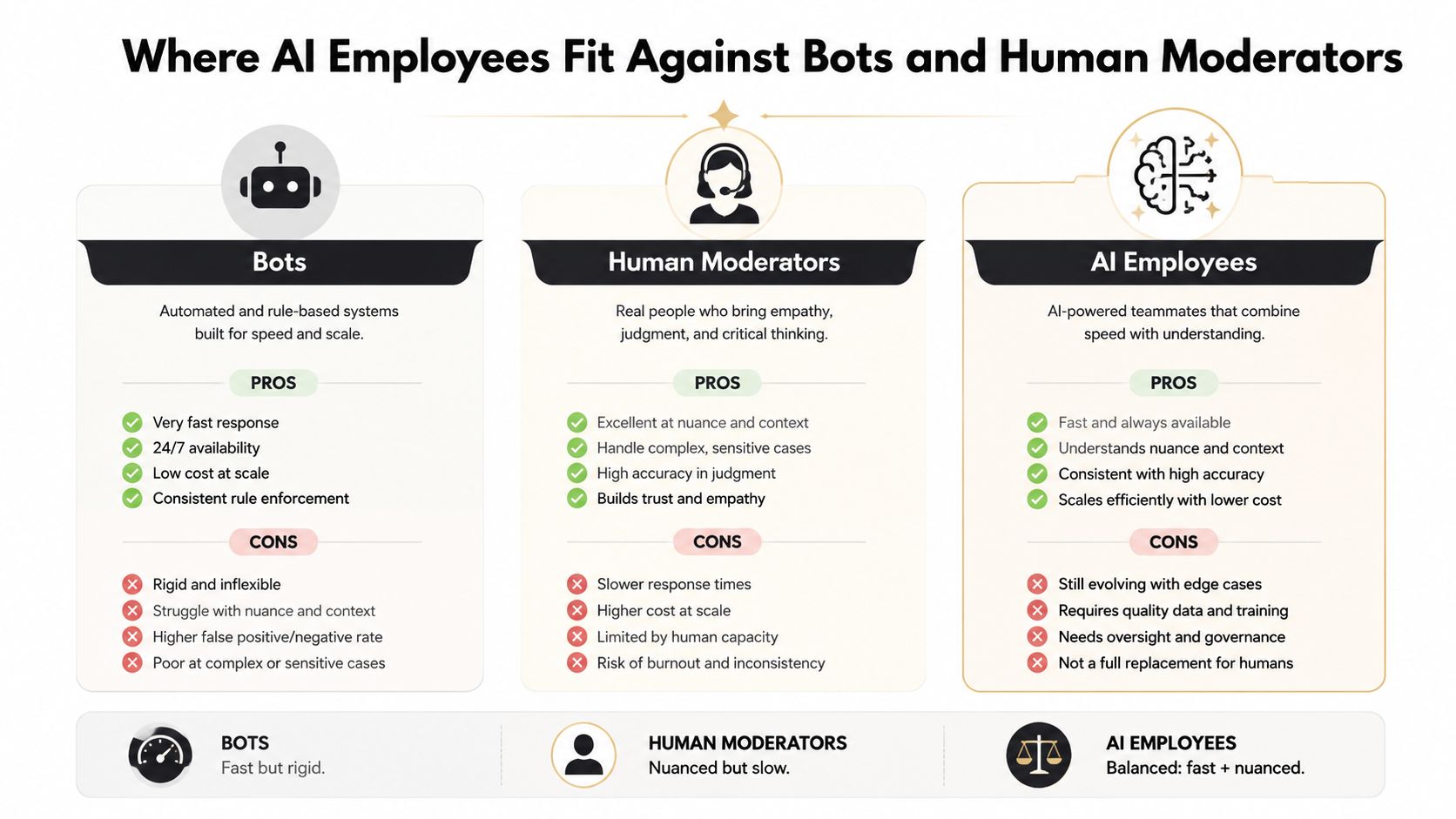
A bot works when the rule is fixed. A human works when the decision is messy. AI employees sit between those two, and that middle layer is where most paid-channel moderation work lives.
Why the middle layer matters
Simple bots are fast, but they are rigid. They work for fixed keyword blocks or a canned auto-reply, then break down when a buyer asks something slightly off script. Human moderators bring judgment, but they cannot sit inside every comment thread all day without burning time or slowing response.
AI employees work because they can read context, answer in natural language, and route edge cases upward. That makes them stronger than a bot for public comments and DMs, and faster than a human for the bulk of triage that decides whether a paid ad thread keeps moving toward revenue or stalls.
For a closer look at that operating model, what an AI employee does all day lays out the mechanics in plain terms.
Where each one belongs
Bots belong on fixed rules and known spam.
Human moderators belong on sensitive escalations and policy calls.
AI employees belong on always-on triage, reply generation, and recovery.
The useful split is operational, not philosophical. If the job is repetitive and exact, use a bot. If the job is nuanced and risky, use a human. If the job is high-volume, tied to revenue, and too dynamic for one person to keep up with during live paid campaigns, AI employees fit the gap between them.
That matters because comment sections on Meta and TikTok do more than collect noise. They answer pre-sale questions, surface buying intent, and expose objections that can drag down conversion if nobody responds. A bot can hide spam, a human can handle a complaint, and an AI employee can keep the thread moving without making a media buyer wait on every small decision.
Use humans for judgment, bots for rules, and AI employees for the gap between them.
Picking a Stack You Can Run This Week
Start with three questions. Where is your team losing hours? Where is revenue leaking from unanswered DMs or buried comments? What part of the job is already handled by native controls or existing inbox tools?
If you’re a DTC brand running Meta and TikTok ads, the default stack is an always-on moderation layer that can hide junk, answer buyer questions in brand voice, and route hot intent into a sales path. If you’re an agency, the default is a shared queue with per-client voice rules and clear escalation paths.
The point isn’t to buy more software. It’s to make the comment section behave like part of the campaign again.
Pick the stack that cleans the thread, protects the offer, and hands your team the right message at the right time.
If your ad comments and DMs are still being handled by manual refreshes and scattered inboxes, Exerta gives you a way to automate moderation, reply in brand voice, and recover revenue without adding headcount. It works across Facebook, Instagram, TikTok, and website chat, and it’s built for teams that want their paid social engagement tied back to outcomes. Visit Exerta to see how AI employees can handle the comment section around your ads.
For channel-specific comparisons, review the best Facebook comment moderation tools and the best Instagram comment moderation tools. Both use the same hide, reply, escalate, and revenue criteria for a closer platform-level decision.

