Guide
Facebook Messenger Automation Guide for DTC Brands
Facebook Messenger automation explained for DTC brands. Covers benefits, templates, DM windows, escalation, and how to recover the revenue sitting in your DMs.
12 min read
read
·


More than 40 million businesses now use Messenger to talk to customers and prospects, monthly business-consumer volume goes past 8 billion messages, and bot-triggered messages can clear 70% open rates and sometimes reach 88% under favorable conditions, according to an industry estimate on Messenger usage and performance sqmagazine.co.uk/facebook-messenger-statistics. That is not a support-channel story. That is an inbox sitting on top of paid media, sales, and revenue recovery.
For DTC brands and agencies, the problem is simple. The ad spend arrives in bursts, comments and DMs pile up fast, and buyers expect an answer while intent is still warm. If the inbox waits for office hours, you're not just slow, you're letting paid demand cool off before anyone can convert it.
Table of Contents
Why Messenger Is Now a Revenue Channel for DTC Brands
Messenger is no longer a side channel for polite replies. It now sits inside the revenue flow. Business messaging has become the operating layer for a large share of customer contact, and analyses of platform usage show that people already use the app to talk to brands at scale, not just friends and family sqmagazine.co.uk/facebook-messenger-statistics.
That changes the job for a DTC brand. An unanswered DM is not just a missed courtesy, it can be a missed order, a missed qualification, or a missed recovery from a public comment that already showed intent. Messenger also behaves differently from email or web chat because the buyer is already inside a mobile thread, where reply timing and context matter more than a polished nurture sequence. If the conversation opens while interest is hot, the sale is still alive.
Practical rule: if a comment, DM, or click starts a buying conversation, response speed belongs in the same conversation as media efficiency.
Why paid social changes the math
Paid social creates short windows of attention. People comment, ask about price, ask whether something is in stock, or want a link before they move on. Traffic arrives in spikes, so a team that waits for a normal inbox queue is already behind.
That is why facebook messenger automation belongs in the revenue stack, not the support stack. It is a recovery system tied to ad spend. It catches the buyer while the click is still warm, sends the right prompt, and logs the action the same day. For a practical breakdown of how that role works inside a configured workflow, see what an AI employee actually does all day. If the team treats Messenger like support, it usually answers after the buyer has moved on. If it treats Messenger like a sales lane, it can recover demand while the campaign is still running.

What AI Employees Are and Why They Are Not Chatbots
An AI employee is a configured agent that reads incoming messages, replies in brand voice, takes actions, logs every step, and escalates edge cases to a human. That's different from a basic chatbot that only follows rigid decision paths and usually falls apart when someone asks a question in a slightly different way. It's also different from a human moderator, because humans can't realistically sit in every inbox 24/7.
The difference is action, not just conversation
A chatbot answers. An AI employee can answer, route, moderate, and recover. That means it can send a checkout link, hide a toxic comment, flag a lead, and record what happened for attribution and review. In practice, that turns the inbox into a controlled workflow instead of a loose collection of replies.
For a DTC team, the useful question isn't whether automation can “chat.” It's whether it can do work. If it can't qualify the buyer, preserve context, and hand off the hard parts cleanly, it's just a scripted reply box.
Why the category matters for paid social
Paid social teams care about consistency. The same campaign can trigger ten similar questions in ten minutes, and the brand can't afford ten different answers. An AI agent gives you a way to keep voice stable while still letting the flow branch based on what the buyer says.
A bot that only recognizes exact keywords saves time on paper and wastes clicks in practice.
That's why the product category matters. Once the system can log actions, preserve attribution, and escalate when needed, it behaves like a staffing layer. It doesn't replace the team. It absorbs the repetitive work so the team can focus on exceptions, complaints, and closes.
For a broader breakdown of the operating model, see what an AI employee actually does all day.
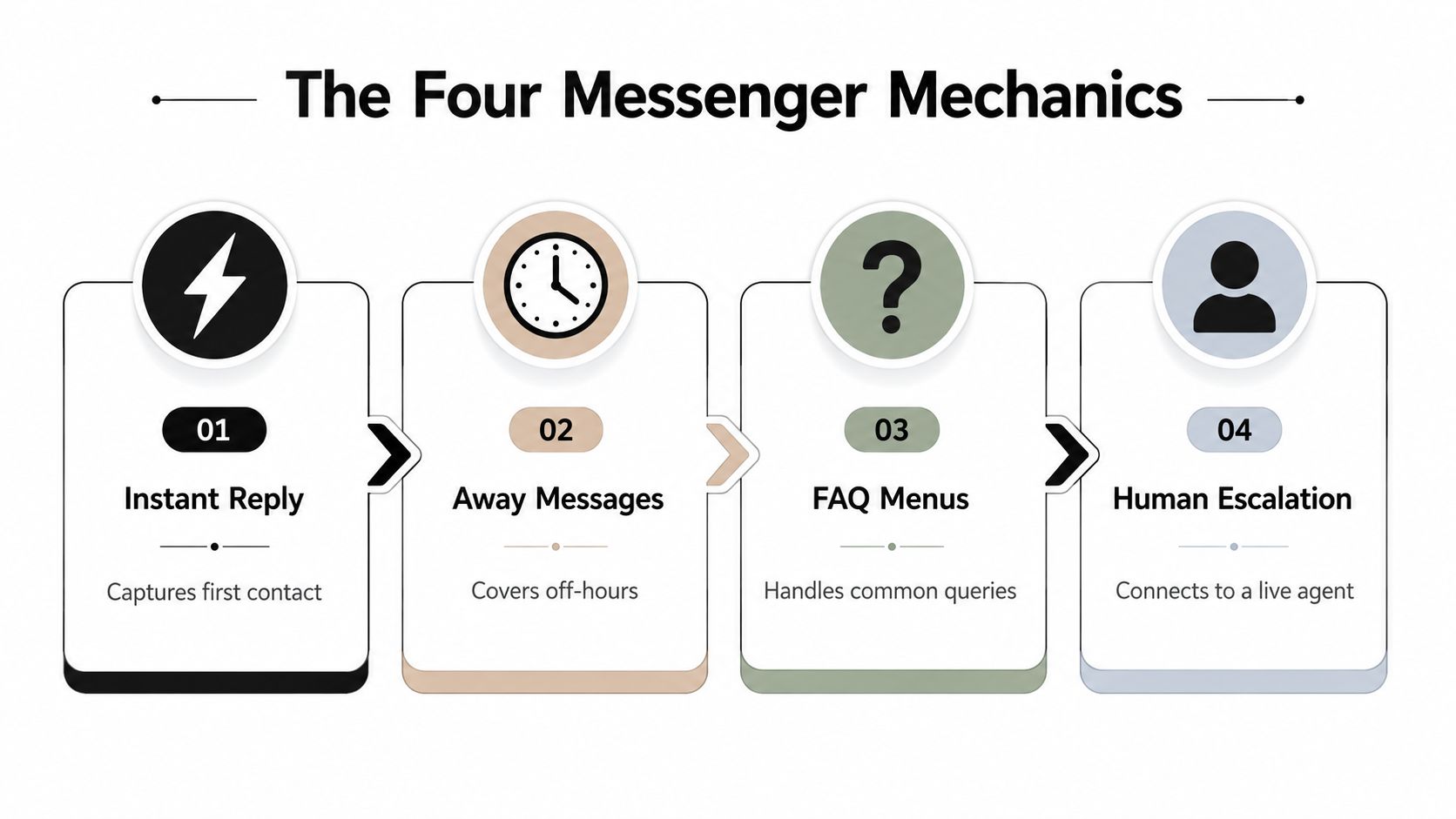
The Four Mechanics Meta Gives You to Work With
Meta gives advertisers a small but useful set of Messenger mechanics. They cover the main revenue paths if you wire them cleanly. The goal is not to automate every exchange. The goal is to automate the moments where speed matters and human judgment adds little.
Instant reply and away messages
An instant reply catches the first message while intent is still hot. If someone DMs a price question after clicking an ad, the response should go out right away with the next step, not a promise to follow up later. An away message fills the gap when no one is online, especially at night and on weekends, so the buyer does not hit silence after taking the trouble to message you.
A skincare brand can use the instant reply to answer “How much?” with a product link and a short checkout path. If the message lands after hours, the away message can confirm receipt and set expectations without pretending a human is there. That keeps the thread alive and stops a hot lead from cooling off before a rep sees it.
FAQs and comment-to-DM
FAQ menus cut repetitive friction. Instead of typing the same answer again and again, the buyer taps a prompt for shipping, ingredients, sizing, or returns. Meta's built-in NLP can pre-process incoming text and pull out common fields like greetings, dates and times, locations, money amounts, phone numbers, email addresses, and URLs before the bot sees them Meta Messenger Platform 2.1.
Comment-to-DM is the revenue move many teams underuse. A public comment on an eligible post can trigger a private conversation, which keeps the buying step out of the comment thread and into a controlled sales flow Meta Messenger automation mechanics.
Use the same pattern on a product launch post. A buyer comments “price,” the flow opens a DM, and the automation sends the price, a size question, and the next link. If the question is simple, the system handles it. If it turns into an objection, it hands off.
For building and wiring those flows, use the workflow builder.
The 24-Hour DM Window and the Cost of Sleeping on It
Meta's messaging rules force a simple discipline. Once someone messages your business, the 24-hour messaging window is the time frame that governs automated follow-up ManyChat guide on Meta's rules. Miss it, and the conversation is no longer in the same state. A buyer who wrote at 9 p.m. Friday and gets a Monday morning response isn't a warm lead anymore, they're a closed opportunity with a stale context.
Speed is a policy issue, not just a service issue
That's why reply time matters in seconds, not hours. The clock is the constraint. If the buyer is already inside Messenger and the ad click or comment created the intent, a delay doesn't just feel slow, it pushes the interaction toward expiry. The system should answer immediately, route the edge cases, and keep the conversation alive while the window is open.
The practical takeaway is blunt. If a team relies on office hours, it's accepting that a portion of inbound demand will age out before anyone responds. Automation exists to prevent that expiration from becoming normal.
Use the window to protect revenue
The useful way to think about the window is as a revenue recovery guardrail. The first reply should not be a brand essay. It should identify intent, keep the thread active, and move the buyer toward the next step while the policy clock is still on your side.
Operating rule: when the conversation starts, the response system starts too.
That rule changes team behavior. It pushes automation to the front of the flow, keeps human time for exceptions, and removes the “we'll get to it later” problem that kills inbox conversion. For the failure mode this fixes, see why unanswered ad comments are costing you sales.
A Same-Day Example for Recovering a Sale From a Comment
A buyer comments “price?” under a Meta ad. That comment is the signal. It's public, it's visible, and it usually means the buyer is close enough to consider buying if the friction drops fast. The right flow doesn't ask the team to watch the post all day. It moves the interaction into DM and starts qualifying.
From public comment to private checkout path
The comment-to-DM trigger fires, and the first private message asks for one simple reply, such as size or use case. One tap is better than a paragraph, because people answer quick questions when the path feels short. Once the buyer responds, the system sends the checkout link and, if your offer supports it, the discount or bundle detail.
That same thread can then handle the abandoned cart follow-up while the intent is still warm. If the buyer clicks but doesn't finish, the automation can nudge once more with the same link and a short reminder. The point is to recover the sale before the trail goes cold.
Attribution matters as much as the reply
The part many teams skip is logging. If the recovered order came from a comment on an ad, the source needs to stay attached to the action. Otherwise the team sees a sale but can't tell which creative, post, or response path produced it.
A clean setup does three things at once. It captures the comment, records the DM path, and marks the sale against the source. That makes the flow useful not only for one conversion, but for budget decisions the next time media is planned.
For another look at this pattern in practice, review Facebook comments that convert.
Compliance, Escalation, and Audit Trails
Messenger automation gets risky when teams ignore policy boundaries. Meta's own help guidance says automated responses need to respect the messaging window, promotional rules, human escalation paths, and policy checks before launch Meta Messenger help docs. That matters most in regulated or sensitive categories such as telehealth, insurance, and Medicare, where a sloppy flow can create a compliance problem fast.
The rules that need to be built in
Start with a hard split between routine and sensitive messages. Routine questions, like price, hours, stock, and basic qualification, can be automated. Complaints, complaints about service quality, medical questions, policy disputes, and anything legally sensitive should go to a human. That handoff should be explicit, not implied.
Then make the logging a firm requirement. Every automated reply, escalation, and handoff should be recorded so the team can prove what happened and when. That's the difference between a useful automation layer and a black box.
Practical rule: automate the routine, route the sensitive, and log every decision path.
What a compliance-ready flow should do
Respect the messaging window. Build flows that stop when the policy window closes and shift to approved re-entry paths.
Tag promotional content correctly. Don't blur support language and sales language in the same path.
Escalate edge cases fast. If the buyer is upset, confused, or regulated content appears, route it to a human immediately.
Keep audit logs. Preserve message history, actions taken, and the owner of the handoff.
That structure is what compliance-focused teams need, especially when multiple agents touch the same page. For more on escalation handling, see escalation of issues.

How AI Employees Compare to Manual Teams and Basic Bots
Manual teams, simple bots, and AI agents all handle messages, but they do it with very different trade-offs. The right choice depends on whether the inbox is a cost center or part of revenue recovery. For paid social teams, that distinction is the whole game.
Dimension | AI Employees | Manual Teams | Basic Bots |
|---|---|---|---|
Coverage | 24/7 coverage with instant response and handoff rules | Limited to office hours and staffing levels | Available only where the script matches the question |
Attribution | Every reply, handoff, and recovery can be logged | Tracking is usually manual and incomplete | Often records the trigger, not the full revenue path |
Voice consistency | Brand-trained replies stay aligned across comments and DMs | Tone varies by person, shift, and load | Scripted tone can feel stiff and break on nuance |
Cost | Elastic capacity. Add agents without adding headcount in the same way | Fixed headcount, scheduling, and overflow pain | Seat-based automation, but brittle when flows get complex |
The benchmark matters because it gives buyers something to calibrate against. Exerta says it has worked with 250+ brands, reports an average 15% sales lift, and says it has $2M+ recovered in product-attributed revenue, with 99.9% uptime. Those numbers are the right frame for comparing an automation layer against a manual inbox that misses comments, or a basic bot that can't log outcomes or escalate cleanly.
Where each model breaks
Manual teams break when volume spikes. The message queue grows, replies slow down, and the public ad thread starts collecting unanswered questions. Basic bots break when the buyer doesn't use the expected phrase or asks for a real exception.
AI agents are the useful middle ground because they can carry the first response, preserve attribution, and route weird cases out of the way. That's why brands spending on Meta and TikTok usually get better control from a logged agent layer than from a pure script or a purely human inbox.
Your Same-Day Launch Checklist
Start with the highest-volume trigger. For most DTC brands, that's price questions, sizing, or comment-to-DM from a winning ad. Pick one, not five. The goal is to get a live path into production before the next campaign scales.
Write the reply in brand voice, then strip it down. The first message should confirm the request, give the next step, and avoid clutter. If the buyer needs a human, the flow should say so and hand it off. If the buyer needs a link, send the link. If the buyer is outside the policy window, stop and use the right re-entry path.
What to set before launch
Trigger selection. Choose the one message type that already creates the most revenue pressure.
Reply copy. Keep it short, direct, and aligned to the offer.
Escalation rule. Define exactly what gets routed to a person and who owns it.
Attribution link. Tie the conversation back to the source ad or post.
Test pass. Send a real test message and check the path before turning traffic on.
If you ship that list this week, you'll know where the bottlenecks are before they cost you another ad dollar. The inbox doesn't need more monitoring. It needs a system that answers, routes, logs, and recovers revenue while the campaign is still live.
If your Meta or TikTok traffic is already feeding comments and DMs, Exerta can turn that inbox into an AI employee layer that answers in brand voice, escalates the sensitive stuff, and logs every recovery. Visit Exerta to see how it fits your paid social stack and start replacing missed replies with tracked revenue.

