AI Chatbot for Shopify: What It Does and How to Set One Up
read
·

You're running Meta or TikTok ads, the comments are busy, and the inbox is worse. Buyers keep asking the same things, price, sizing, shipping, and returns, while the team is busy in five other tabs. By the time someone replies, the click is cold and the order is gone.
An AI chatbot for Shopify fixes the gap between paid click and checkout. Exerta calls this layer AI employees, because it doesn't just answer questions, it works comments, DMs, and website chat with store data, recovery logic, and attribution attached. The point isn't to add another support widget, it's to recover demand that's already in motion.
Table of Contents
The Shopify Sales Gap Most Brands Miss
A skincare brand can buy Meta traffic, send shoppers to Shopify, and still lose the order in the ad's comment thread. Buyers ask, “How much?” “Does this clog pores?” or “What's the shipping time?” The same questions then appear in DMs. Without a timely answer, purchase intent fades before the shopper reaches checkout.
The gap lives in the conversation, and it opens or closes in public comments, private messages, and on-site chat.
Shopify reported that 75% of business owners use AI tools to help run their online stores, showing that automated assistance has become normal operating practice rather than a test (Shopify AI chatbot overview). Shopify also reported that Shopify Inbox converted pre-purchase conversations into sales in November 2023. The lesson is practical: response speed and relevant context can influence revenue before a shopper adds to cart.
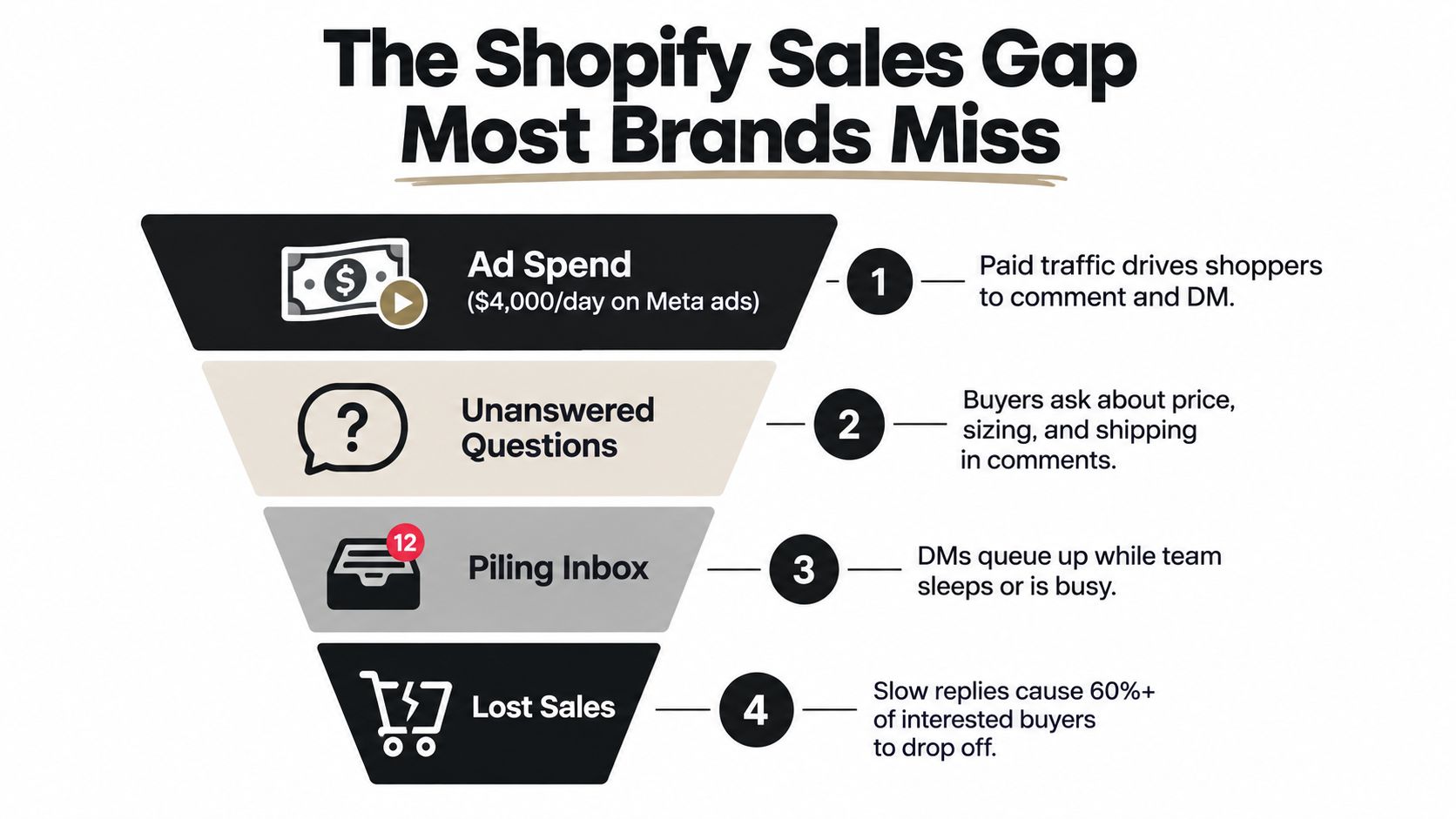
Practical rule: treat a buyer's question under an ad as a checkout-assist request, not a routine social media task.
The operational problem is fragmentation. One person monitors comments, another handles DMs, and the website chat widget follows separate rules. Buyer context gets lost between channels, so shoppers repeat their questions or receive inconsistent answers. A Shopify chatbot can connect those moments to the path from click to cart, using the conversation to address hesitation while intent remains active.
Brands that leave ad comments unanswered are also leaving recoverable demand in public view. See why unanswered ad comments are costing you sales for the revenue impact of that response gap.
What an AI Chatbot for Shopify Does
An AI chatbot for Shopify reads a shopper's message, checks store data, and replies with the right product, policy, or next step. It operates across ad comments, DMs, and on-site chat, carrying current catalog and order context from the first question toward checkout. For paid social, that makes the conversation a sales-recovery surface rather than a separate support inbox.
It has to read live store data
Shopify's guidance connects effective chatbots to real store data, including live product, policy, and order information used with natural-language processing and generative AI (Shopify chatbots guide). The practical requirement is simple: every answer should match what the store can sell and what its policies promise.
If inventory changes while the bot still recommends a sold-out variant, the conversation creates frustration instead of progress. If a returns policy changes and the bot quotes the old version, the issue reaches support later. The system needs current product titles, variants, pricing, availability, and order status so it can answer within defined limits.
A shopper asking under an ad needs a relevant response while intent is active. The bot can identify the product, clarify a hesitation, and deliver the next step without forcing the buyer to repeat the question on the website.
It has to sound like the brand
Voice affects whether a reply feels usable. The bot needs examples from the brand's messages, policy pages, and product copy, then should follow those patterns across comments, DMs, and site chat. A short answer can still sound like the store when its wording, product language, and level of detail are configured deliberately.
It has to hand off cleanly
Refund disputes, damaged items, angry buyers, and unusual cases need a human quickly, with the conversation attached. Shopify's customer-service guidance describes AI handling alongside human handoff because automation should carry repeatable work while leaving judgment-heavy cases to staff (Shopify customer service guide).
A useful bot answers questions it can verify, then routes the rest with the full thread and relevant order details. That division keeps the sales path moving without turning uncertainty into a confident but incorrect reply. For a broader view of conversational commerce mechanics, see conversational AI for ecommerce.
The Three Jobs a Shopify Chatbot Must Handle
A shopper comments on a paid ad, asks a question in a DM, and leaves before reaching the product page. A Shopify chatbot earns its place when it can recover that sale in the same conversation, answer the objection, and deliver a usable checkout path. Miss one job and the flow becomes either a support queue or a link dispenser.
Sales recovery
The first job is to catch buying intent while it is active. A reply should identify the relevant product, address the immediate hesitation, and provide a clear next step. On an ad, that may start with a public comment reply before moving the shopper into a private DM.
The mechanics need to be specific. A bot can detect a comment keyword, reply publicly, open a DM, confirm the product or variant, and send a cart link tied to the relevant SKU. A generic “Thanks, we'll get back to you” leaves the shopper waiting and gives the click time to cool off.
FAQ handling
The second job is removing objections that block checkout. Shipping windows, return rules, sizing, ingredients, compatibility, and restock timing are practical questions with direct purchase impact. Shipping and restock answers often matter because they resolve whether the product will arrive when needed, while return and sizing details reduce perceived risk.
As covered above, the bot should answer only from the merchant's defined knowledge sources. That keeps price and policy responses within approved limits. The merchant also needs a way to edit those sources when a promotion, shipping cutoff, product detail, or return rule changes.
Checkout link delivery
The third job turns conversation into a measurable purchase path. The chatbot should send a prefilled cart or checkout link containing the selected product and variant, with the originating conversation recorded where the setup supports it. If the order can be traced back to the ad comment, DM, or site chat, the team can assess the recovery flow instead of judging it by message volume.
Job | What the bot must do | What happens if it fails |
|---|---|---|
Sales recovery | Reply quickly and move the shopper toward checkout | The buying intent cools |
FAQ handling | Resolve product and policy objections | The shopper leaves or contacts support |
Checkout delivery | Send a working cart or checkout link | Revenue attribution becomes unclear |
These jobs belong in one flow. FAQ handling without checkout delivery creates a help center. Checkout links without useful answers create friction. Sales recovery connects the two, moving a qualified shopper from ad interaction to purchase.

How a Chatbot Connects to Shopify and Your Ad Channels
A paid-social click often produces a question before it produces a checkout. The connection should let the chatbot carry that intent from the ad comment or DM into Shopify, answer with current store data, and return a trackable path to purchase.
Shopify supplies the store truth
Connect Shopify before adding messaging channels. The app should request only the data the flow needs, including products, variants, inventory, orders, customers, discounts, and checkout creation. Product and variant access prevents incorrect answers. Checkout creation lets the bot send the shopper to the item they discussed instead of making them search again.
The connection also needs clear permission boundaries. A merchant should be able to update product details, stock, promotions, shipping cutoffs, and return rules without rebuilding every conversation. If the chatbot cannot create a working cart or checkout link, it remains a support layer rather than a sales-recovery surface.
Ad channels capture buying intent
Paid social usually creates the first buying signal in a comment or private message. Meta's messaging rules allow promotional messages within a 24-hour window after a qualifying interaction, with the window resetting when the user acts again. A business can also send one private reply to a comment within 7 days (Meta messaging policy summary). Build the reply and follow-up around those limits, and do not treat a public comment as permission for unlimited promotional messaging.
TikTok comment controls support manual review and automated moderation. Teams can filter unwanted comments, hold risky or spam comments for review, and manage ad comments in Ads Manager by replying, liking, hiding, or filtering by ad group or specific ads (TikTok comments controls). Use those controls to separate product questions from abuse and route qualified comments into the sales flow.
On-site chat completes the handoff
The website widget catches shoppers who arrive from an ad but hesitate on the product page. It can answer a product or policy question, confirm the selected variant, and provide a cart or checkout link without sending the shopper back to the ad.
Attribution depends on preserving the conversation context. Pass the originating campaign, ad, comment, DM, or site session into the chatbot record where the setup supports it, then connect that record to the resulting order. Without that identifier, recovered revenue blends into ordinary online sales.
The Exerta Shopify integration provides an implementation reference for connecting store data with a recovery layer. The AI chatbot Shopify by ECORN offers another technical reference for integration patterns.
Before launch, test product and inventory reads, checkout creation, policy updates, channel permissions, and order attribution in the same conversation thread.
Day-One Examples a Brand Can Ship This Week
A brand does not need a full support system to test chatbot-assisted sales recovery. Start with one flow tied to a paid social click, watch where shoppers hesitate, then add the next use case. The first version should be narrow enough to debug and close enough to checkout that revenue can be measured.
Comment to DM recovery
A shopper comments on a paid post with a product keyword, sizing question, or buying signal. The chatbot replies publicly, then sends a DM containing the product from the ad creative and a checkout link. Keep the public reply brief, and make the private message useful rather than promotional.
A workable message is: “Saw your comment. Here's the product you asked about, plus the checkout link if you want to grab it now.” The value comes from removing a handoff. The shopper does not need to search the catalog, reopen the ad, or find the product again.
Set rules for ambiguous comments. A clear product keyword can trigger the flow automatically, while questions about refunds, complaints, or personal data should wait for review.
FAQ handling on product-fit questions
Use a second flow for questions that block purchase intent. Shoppers may ask about sizing, ingredients, compatibility, materials, shades, or available variations. The chatbot should answer from current catalog data and store policies, then link to the relevant product or variant instead of sending the shopper to a contact form.
Specific answers convert better than generic reassurance. If the shopper asks about a medium option, name that option and its availability. If the requested shade or material is unavailable, offer the closest suitable product and explain the difference in one sentence.
Abandoned-cart rescue
The third flow begins when a shopper creates a cart or starts checkout, then leaves. A follow-up can send the cart link first, address a likely objection next, and reserve a small discount for a later message when the offer fits the brand's margin.
Use this sequence:
Trigger: cart created or checkout started
First touch: short reminder with the cart link
Second touch: answer the likely objection, such as shipping, fit, or price
Final touch: add the discount only if the earlier message is ignored
Keep the checkout URL tied to the original cart and conversation where possible. That preserves the recovery path and makes performance easier to review. For a deeper abandoned-cart recovery sequence, Exerta outlines the same comment-to-DM logic used to move shoppers from intent to checkout.
How to Evaluate a Shopify Chatbot Before You Buy
A chatbot can answer product questions in a demo and still lose sales when paid traffic spikes. Test it between the ad click and checkout, where response speed, catalog accuracy, attribution, and handoff affect revenue.
Criterion | What to test | Pass signal |
|---|---|---|
Response latency | Run repeated questions during a busy period | Replies remain fast and stable |
Store data depth | Ask about a variant, stock status, and current price | The bot names the correct option |
Attribution | Move from a comment, DM, or site chat to checkout | The order retains its source |
Escalation | Send a refund request or angry message | A human receives the full context |
Channel coverage | Ask the same question in comments, DMs, and chat | Answers remain consistent |
Test performance under load
The buying test should include repeated conversations, not only a polished product demonstration. Ask the same sizing, shipping, and product questions from several sessions while traffic is busy. Check whether latency stays stable, the bot gives the same answer, and checkout links still open the intended product or cart.
A study of chatbot response times reported an industry average of 2.8 seconds compared with 0.9 seconds for top performers, while the faster group recorded 22% higher CSAT (chatbot response time study). The exact benchmark will vary by channel, but the buying requirement is practical: slow replies can reduce satisfaction before a shopper reaches checkout.
Price the workflow, not the chat window
A free plan can support early testing if it reads store data, handles real product questions, and allows human escalation. Paid plans may range from $50 to $500 per month, while enterprise tools can cost thousands, so compare the fee with the work the chatbot removes and the orders it helps recover.
Check whether the plan includes order lookup, returns handling, catalog updates, channel connections, and conversation history. A low entry price is less useful if the store must purchase separate features to answer purchase-blocking questions or pass context to support staff.
Run this 30-minute acceptance test
Variant question: ask about a specific size or shade, then verify the answer against the live catalog.
Discount check: ask about a current offer and confirm that the bot explains or applies it correctly.
Escalation trigger: send an angry return request and confirm that a human receives the conversation history.
Cross-channel identity check: start in comments, continue in a DM, and verify that both interactions connect to the same buyer.
Attribution check: click through to checkout and confirm that the source and conversation remain available for reporting.
For a low-cost comparison point, review free AI chatbot options in 2026. The decision should rest on live store data, reliable checkout paths, and measurable sales recovery, not on the number of generic answers shown in a demo.
Implementing Your First Chatbot on Shopify
Start with the ad-to-checkout path. Connect Shopify, sync the product feed, and confirm which customer, inventory, and order fields the chatbot can read before writing replies. Then launch two revenue flows: comment-to-DM recovery and abandoned-cart follow-up. Keeping the first release narrow makes failures easier to trace.
Use short, specific answers. A buyer asking about fit, stock, shipping, or a promotion needs a clear next action, such as a product link or checkout link. Test each response against the live catalog so the chatbot does not promise an unavailable variant or invent a product detail.
Set handoff rules before traffic arrives. Angry messages, refund requests, and questions outside the approved order policy should reach a human with the conversation history attached. The Exerta workflow builder provides a visible place to set branches, approval steps, and escalation rules.
Review performance during the first week:
DM response rate
Checkout-link click-through
Recovered-order count
Escalation volume in the inbox
Read the numbers by flow, channel, and campaign. High clicks with few recovered orders usually points to a checkout, offer, or product-page problem. High escalation volume may mean the replies lack policy details. Exclude existing customers from comment-to-DM campaigns when those messages would add noise, and keep a human available for exceptions.
What Changes Once Your Chatbot Is Live
Once live, the chatbot becomes a sales-recovery surface between paid clicks and checkout. It answers product questions in comments, DMs, and website chat, handles routine objections, and sends qualified buyers to checkout. Human agents see fewer repetitive conversations and can focus on exceptions, policy issues, and high-intent buyers.
Exerta works across Facebook, Instagram, TikTok, and website chat. That coverage lets a brand connect ad engagement with downstream orders instead of judging campaigns only by last-click checkout data. Review each channel's recovered orders, checkout activity, and escalation patterns before expanding. A second channel may be the right next step, while retention flows such as post-purchase upsells and reorder prompts can extend the same system beyond the first sale.
The practical shift is accountability. Comments and DMs become measurable sales paths, not isolated support queues. The Exerta workflow layer routes conversations, sends replies, and connects buyer intent with tracked revenue.