Ecommerce Live Chat Software Built for DTC Brands
read
·

Chat-engaged visitors bought 2.8 times more often than non-chat visitors in a benchmark summarized by WhosOn, and chatters purchased 12% of the time overall. Exerta applies that revenue-recovery logic through AI employees that reply across Meta, TikTok, and website chat, with 250+ brands, an average 15% sales lift, $2M+ in recovered revenue, and 99.9% uptime.
The practical distinction matters. A support widget waits for a customer to ask for help. An AI employee watches the conversation created by paid traffic, identifies buying intent, answers in brand voice, moderates harmful replies, sends the next useful link, and records whether the interaction produced revenue.
For DTC brands and agencies, that makes ecommerce live chat software part of the ad stack. The question isn't whether chat looks polished on a storefront. The question is whether it converts comments, DMs, and high-intent website sessions into measurable orders.
Table of Contents
Why Ecommerce Live Chat Software Is Now a Paid-Traffic Lever
What AI Employees Do Differently Inside Ecommerce Live Chat Software
How Revenue Attribution Works in Ecommerce Live Chat Software
Choosing the Right Ecommerce Live Chat Software for Your Brand
Why Ecommerce Live Chat Software Is Now a Paid-Traffic Lever
Paid social creates demand in public. A shopper asks about price, shipping, ingredients, sizing, or availability in a comment thread. If nobody answers, the brand has paid for the impression and click but failed to work the intent already sitting underneath the ad.
The conversion gap is measurable. The same benchmark found that chatters were 2.8 times more likely to convert, bought 12% of the time, and spent 60% more per purchase than non-chatters. On mobile, chatters spent 68% more than mobile non-chatters, which shows that chat can influence order value as well as conversion rate. The benchmark details also reported repeat-visitor conversion of 21% on mobile and 25% on desktop.
Metric | Silent Browsers | Chat Engaged Visitors |
|---|---|---|
Likelihood to convert | Baseline | 2.8x higher |
Purchase rate | Lower | 12% overall |
Average purchase value | Baseline | 60% higher |
Mobile purchase value | Baseline | 68% higher |
Treat the conversation as part of the funnel
A website chat window sits between the ad click and the cart. It can answer the objection that would otherwise stop a purchase, attach a product or checkout link, and pass the resulting event into the measurement system used for paid media.
The same logic applies to social comments. A Facebook or TikTok comment asking for a link is not merely a community-management task. It's a public expression of intent. A reply that arrives quickly can move the shopper into a DM or website session while the product is still relevant.
That's why omnichannel engagement deserves a place in the growth plan, not only the support plan. The operating model described in this guide to omnichannel customer engagement is useful because it treats channels as one customer path rather than separate inboxes.
Practical rule: Judge chat by recovered orders, qualified conversations, and revenue per paid-traffic session. Don't judge it by the number of messages sent.
A small ad set can expose the problem quickly. If a campaign brings qualified visitors to a product page but shoppers repeatedly ask unanswered questions, the issue resembles a slow page or a broken checkout step. The brand is losing value after the click.
The Four Categories of Ecommerce Live Chat Software
The market has four practical categories. They overlap in features, but they behave very differently when paid social creates a sudden comment spike.
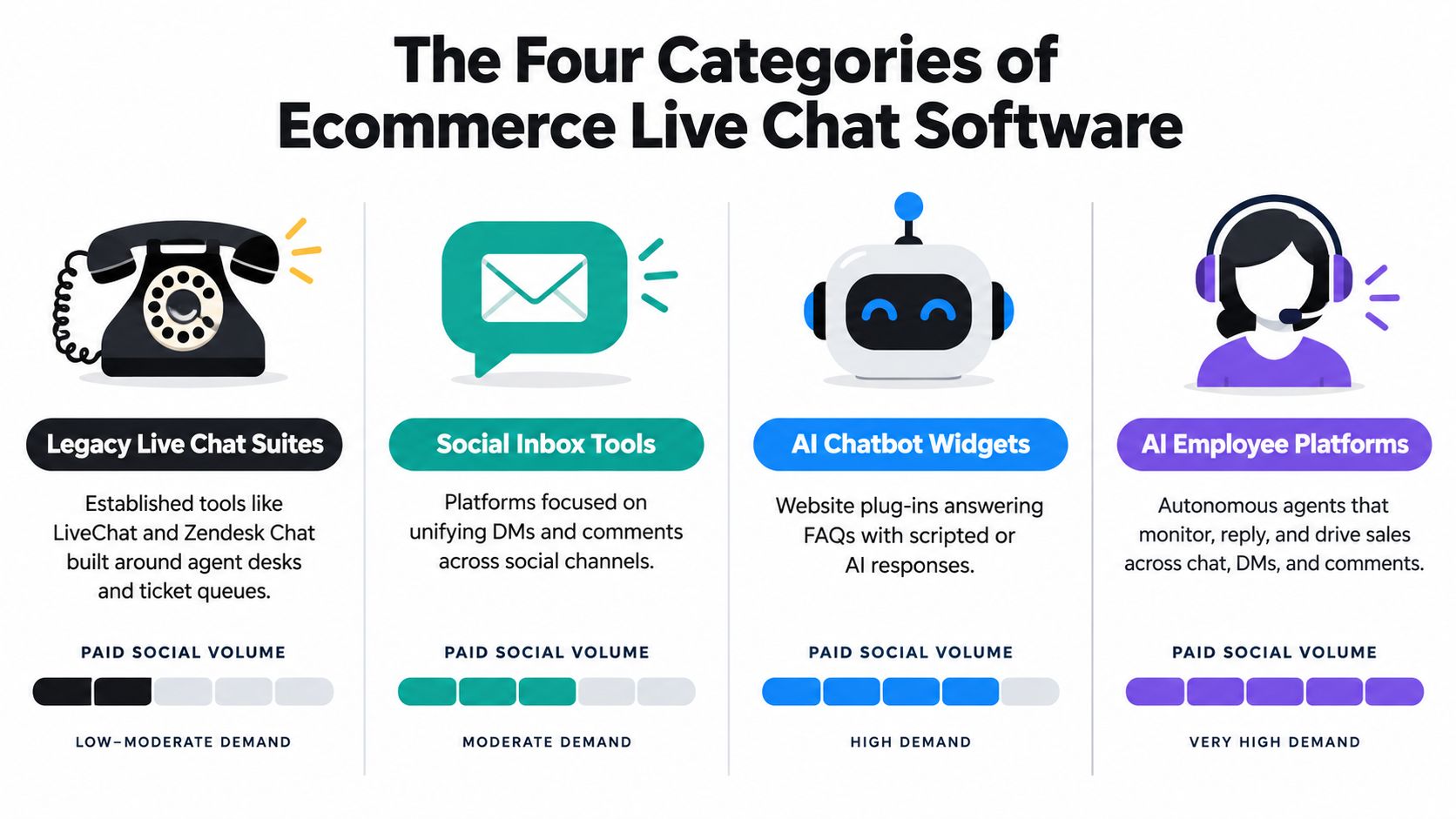
Legacy live chat suites
These tools grew around agent desks, ticket queues, and service-level reporting. They're dependable for teams that need structured support, assignment rules, and escalation histories. The trade-off is that they usually price around human seats and require more operational work before a new brand voice or campaign workflow goes live.
They can scale support operations. They don't naturally turn every ad comment into a tracked sales opportunity.
Store-native chat and helpdesk widgets
These products install quickly on an ecommerce storefront and usually provide order context, saved replies, and a shared inbox. They simplify ticket handling and can work well for teams whose main problem is shipping, returns, or product questions on the website.
Their weakness appears outside the storefront. Social comments may feed into the system, but comment-level moderation, campaign context, and direct ad-platform revenue feedback often need additional configuration.
Rule-based bots
Keyword flows and scripted bots are inexpensive to launch. They can respond to phrases such as “size,” “discount,” or “link,” then send a preset message. That works for narrow intents and predictable FAQs.
Paid social is less predictable. People use slang, sarcasm, misspellings, objections, and product comparisons. A keyword bot can miss the intent, answer the wrong question, or continue a flow after the shopper has already changed direction. It also needs separate moderation logic and often can't connect a conversation to a completed order.
AI employee platforms
AI employees monitor comments and DMs, handle website chat, follow brand rules, moderate unsuitable content, and escalate conversations that need human judgment. Their value comes from combining response, action, and measurement in one workflow.
The trade-off is governance. Teams must define approved claims, escalation triggers, privacy handling, and review processes. A platform that answers quickly but invents product details creates a different kind of cost.
The chatbot versus AI employee comparison is helpful for separating scripted automation from an operator that can interpret open-ended buying questions.
In simple terms, legacy suites scale support, native widgets simplify tickets, keyword bots reduce repetitive replies, and AI employees connect paid conversations to revenue.
How the Ecommerce Live Chat Software Market Actually Scaled
Live chat moved beyond a small website widget because brands needed a way to respond while a shopper was still deciding. Independent 2026 coverage citing Grand View Research valued the global live chat software market at $1.1 billion in 2024 and projected $1.7 billion by 2030, implying a 7.9% CAGR from 2024 through 2030. The market overview and benchmark discussion also places live chat among the strongest support channels for conversion activity.
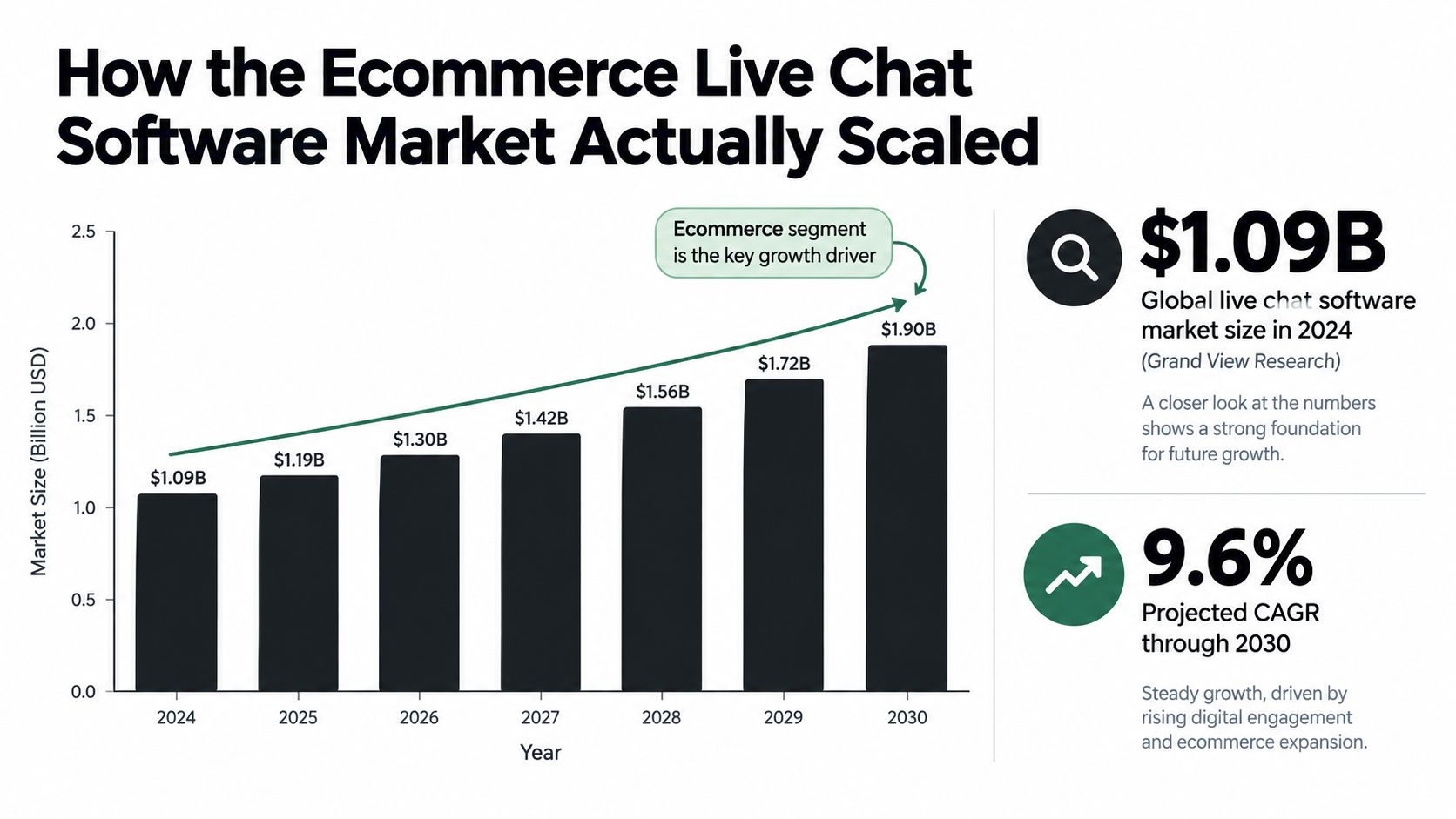
The category expanded because the commercial use case became clearer. The same source set reports that live chat typically raises conversions by about 20%, chat users are 2.8 times more likely to convert, and revenue per chat hour can rise by 48% in some benchmark datasets. Those figures don't prove that every widget will produce the same result. They do explain why marketers began testing chat on high-intent pages instead of treating it as a passive help feature.
From agent seats to operating capacity
The old cost model asks how many agents need access. The newer model asks how much conversation the system can handle, which interactions it can resolve, and how much attributable revenue it recovers.
That shift matters during launches and paid-social spikes. A human team can prioritize urgent threads, but it can't watch every comment, answer every product question, and maintain consistent moderation across every active page without adding capacity. AI employees expand coverage while humans focus on exceptions, approvals, and complex customer situations.
The category only earns a growth budget when attribution is credible. If the software reports messages but can't connect them to sessions, orders, and campaign sources, finance will eventually classify it as support overhead. Revenue reporting changes that conversation because the operator can compare the cost of coverage with the value of recovered demand.
What AI Employees Do Differently Inside Ecommerce Live Chat Software
An AI employee works across the places where paid traffic creates conversation. That includes Facebook and Instagram comments, TikTok comments, social DMs, and website chat. It isn't just a pop-up that waits for a shopper to type into a box.
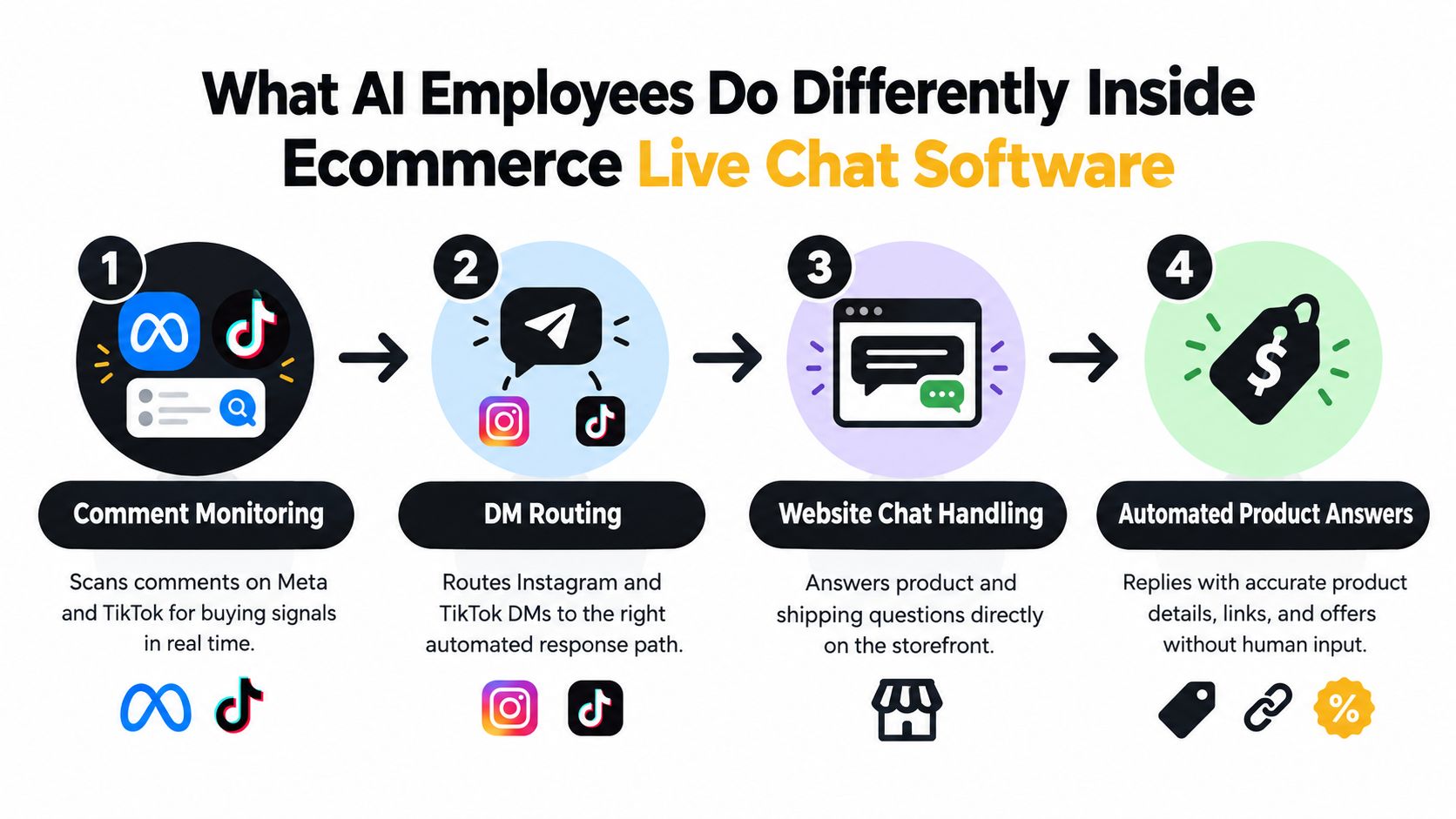
Build the operating layer before switching it on
A practical deployment starts with the product catalog and policies. Connect the store catalog, load shipping and returns rules, define approved claims, and set the tone that the AI employee should use. Then create moderation rules for spam, scams, profanity, competitor attacks, and off-topic replies.
Next, define escalation triggers. A refund dispute, medical question, legal threat, angry repeat customer, or unclear product request should move to a human with the conversation history attached. This prevents the common failure mode where automation keeps replying after the situation has become sensitive.
The system should also know which action to take. Depending on the conversation, that might mean:
Answering a product question: Use catalog data rather than a generic script.
Sending a buying link: Direct the shopper to the correct product, collection, checkout, booking page, or offer.
Handling an objection: Explain shipping, price, ingredients, availability, or policy within approved boundaries.
Escalating: Route the thread when confidence is low or the request needs human judgment.
Retrieval beats a brittle intent tree
Scripted trees work when customers follow the paths the marketer predicted. Paid social comments rarely behave that way. A catalog-grounded response can use product attributes, policy content, and conversation context to answer a question that wasn't written as an exact keyword.
That flexibility creates risk, so review logs and sample replies before expanding coverage. Teams evaluating the category should also understand AI assistant risks explained, especially hallucinated answers, weak escalation, and unclear ownership when an automated reply causes a customer problem.
A same-day setup can start with one campaign and a narrow policy set. Configure a response target of under 60 seconds for paid comments and under 15 seconds for website chat, then measure reply quality, link clicks, qualified conversations, and attributed orders. The day-to-day work of an AI employee becomes manageable when operators review exceptions instead of manually composing every response.
Comparing the Top Ecommerce Live Chat Software Options
A useful comparison starts with the buying model. Agent-based platforms charge for seats. Helpdesk suites bundle chat with ticketing and service operations. Entry-level automation tools focus on website conversations, while ecommerce-native systems connect support with store data. The cost and operating burden change sharply as paid-social comment volume grows.
Category | Starting Price | AI Automation | Meta/TikTok Comments | Commerce Actions | Attribution | Store Integration |
|---|---|---|---|---|---|---|
Exerta | Contact vendor | AI employees across comments, DMs, and web chat | Native workflow focus | Product links, offers, checkout flows, escalation | Recovered-revenue reporting | Supported |
Agent-based platform | Around $20 to $25 per agent/month | Add-on automation and agent assistance | Usually requires additional workflows | Chat-based product assistance | Conversation reporting, depending on setup | Available through integrations |
Helpdesk suite | Around $19 per agent/month | AI and service automation | Helpdesk routing, rather than comment-led workflows | Order support through connected systems | Broad service reporting | Available through integrations |
Entry-level automation tool | Free entry, paid tiers around $29/month | Website and messaging automation | Limited comment automation, with Messenger coverage | Product and support flows | Basic to moderate reporting | Supported |
Ecommerce-native helpdesk | Usage and plan dependent | Ecommerce support automation and AI-agent capabilities | Social support workflows, with paid-social attribution requiring validation | Order-related support and revenue tracking | Revenue-oriented reporting | Strong ecommerce integration |
Pricing needs the same scrutiny as ad spend. The ecommerce pricing comparison places agent-based plans around $20 to $25 per agent per month, helpdesk-suite pricing near $19 per agent per month, and entry-level automation plans at a free starting point with paid tiers around $29 per month. Those figures describe entry points, not the full cost of handling paid conversations. Seat expansion, message volume, automation limits, integrations, and attribution work can matter more than the first monthly price.
Where each model fits
An agent-based platform fits teams where trained representatives handle the buying conversation. It becomes harder to justify when the requirement is monitoring public comments across many campaigns without adding seats. Manual moderation may offer judgment and flexibility, but response coverage depends on staffing, shift timing, and consistent execution.
A helpdesk suite suits service organizations with structured workflows, escalations, and broad reporting requirements. Smaller direct-to-consumer teams can inherit more operational overhead than sales value if they need a fast comment-to-checkout workflow.
An entry-level automation tool can launch quickly for website conversations and basic messaging. Test its paid-social comment coverage before assigning it responsibility for campaign-level buying questions. An ecommerce-native helpdesk is a stronger fit when order lookups and store support drive the workload, though teams should verify whether its reporting connects a public comment to an attributed order.
Exerta combines comment moderation, DM automation, and website chat through AI employees. Its current channel coverage includes Facebook, Instagram, TikTok, and website chat. SMS, email, and voice are planned next.
Decision rule: Choose a service suite when support complexity is the bottleneck. Choose an AI employee layer when paid-conversation volume, response speed, and revenue attribution are the bottlenecks. Judge both against manual moderation and simple bots using the same measures as paid media: qualified conversations, action rate, recovered orders, and cost per recovered order.
How Revenue Attribution Works in Ecommerce Live Chat Software
A chat interaction becomes commercially useful when the platform can connect four things: intent, response, action, and order. Without that chain, the dashboard shows activity but not recovered revenue.
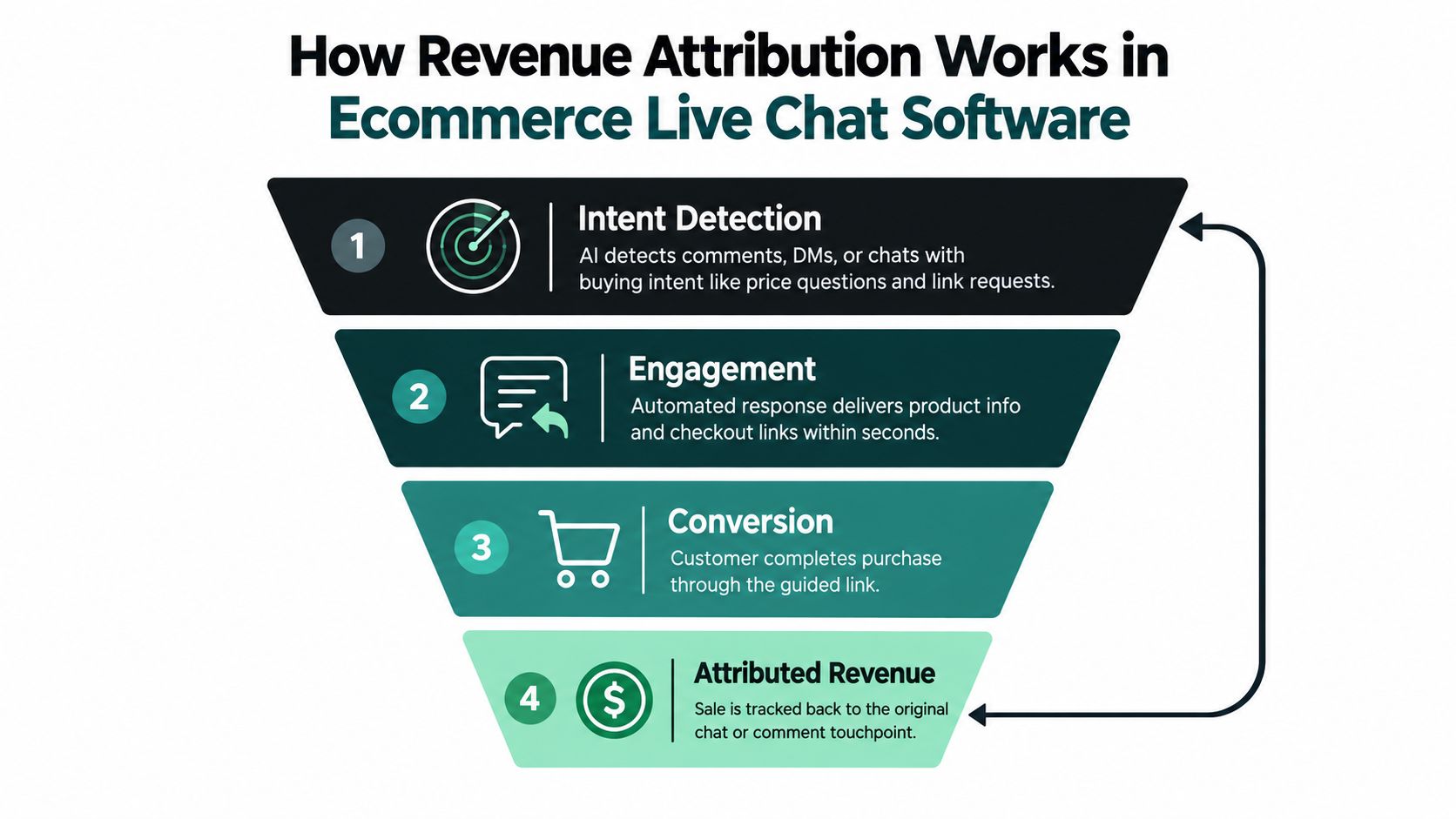
The recovery loop
Detect intent. The AI employee identifies a price question, link request, stock concern, shipping objection, or other buying signal in a comment, DM, or website chat.
Reply with a useful action. It answers the question, asks a qualifying question, sends a product link, or provides an approved offer.
Log the touchpoint. The platform records the visitor or user identifier, channel, campaign source, conversation, and timestamp.
Match the order. The store order connects back through an order ID, email, session identifier, or platform event, producing a revenue record tied to the original interaction.
On Meta and TikTok, the measurement layer typically combines click-through parameters with server-side event tracking and deduplication. Website chat can use session-level UTM capture and first-party identifiers. The exact implementation depends on the channel and consent state, but the principle stays the same: preserve the source before the shopper moves to checkout.
A revenue dashboard should answer operational questions. Which campaign produced the most qualified conversations? Which objections appeared most often? Which channel generated the strongest average order value? How much revenue came from automated replies versus human handoffs?
The measurement language used by a conversation intelligence platform can help teams think beyond transcripts and toward structured signals from every interaction. For ecommerce, that means connecting conversation data to the order record rather than storing messages in isolation.
The revenue attribution model should also define credit rules before launch. Decide whether a sale needs a direct chat click, a reply view, or a session match. Keep the rule consistent across campaigns so agencies can report performance without changing the definition after seeing the result.
Same-Day Use Cases for Ecommerce Live Chat Software
A skincare brand launches a new product through Meta video ads. Comments arrive with questions about ingredients, skin type, and delivery. The AI employee identifies those questions, answers from the approved product information, sends the relevant product page, and records the thread as a paid-social interaction.
The operator doesn't need to automate every conversation on day one. Start with the launch post, allow the AI employee to handle known ingredient and shipping questions, and route medical or unusual claims to a person. The reporting view should separate comment volume, product-link clicks, human escalations, and orders connected to those threads.
An agency managing multiple client pages
An agency handles 12 client pages with different products, claims, tones, and moderation rules. A shared workspace routes comments and DMs into the right client environment, while each brand keeps its own catalog, response rules, and escalation policy.
The useful workflow is not a single generic bot. It's a set of controlled brand profiles. One client may allow discount links in comments, another may require DM routing, and a third may prohibit automated responses to certain product claims. The agency can review moderation actions centrally while reporting attributed revenue by page and campaign.
This also changes staffing. Humans review high-risk threads and approve new response patterns. They don't spend the entire day copying links into repetitive comment replies.
A subscription funnel from a creator drop
A subscription business sends TikTok traffic to a landing page after a creator promotion. Website visitors ask about trial terms, delivery timing, and cancellation. The AI employee answers those questions, qualifies the visitor, and sends an approved discount after capturing the contact details required for follow-up.
The system then passes the lead into the nurture workflow and preserves the original campaign source. The marketer can compare chat-qualified leads, trial starts, and paid conversions rather than counting every chat as a success.
The same-day test should stay narrow:
Trigger: Choose one active ad, launch, or creator campaign.
Reply logic: Approve answers for the top product and objection questions.
Commerce action: Send one product, checkout, booking, or signup link.
Captured metric: Record qualified conversations, action clicks, handoffs, and matched revenue.
Choosing the Right Ecommerce Live Chat Software for Your Brand
Ecommerce live chat software built around paid-traffic recovery makes sense for DTC brands and agencies spending at least $10K per month on Meta or TikTok. It isn't the right first purchase for a team that only needs a basic helpdesk or a small website contact box.
Before signing, score each vendor out of 10 against the same checklist:
Paid-comment speed: Verify that the system can respond in under one minute on active ad threads.
Closed-loop attribution: Test whether an order connects back to the original ad, creator, comment, or DM.
Moderation control: Run toxic, spam, competitor, and misleading-comment examples through the rules.
Commerce integrations: Check Shopify, Klaviyo, and Meta CAPI connections in a working environment.
Pricing model: Compare per-seat, conversation, resolution, and usage charges during peak volume.
Reliability: Review the uptime commitment and escalation process.
Agency support: Confirm multi-page, multi-brand permissions and reporting.
Voice control: Test whether operators can tune tone, claims, offers, and approval requirements.
Revenue dashboard: Ask to see live reporting for recovered revenue, channel, campaign, and order data.
Privacy handling: Confirm consent, zero-party data controls, deletion processes, and GDPR requirements.
A vendor should earn its place by proving the full loop, not by showing the longest feature list. Run a controlled campaign, compare unanswered and answered intent, inspect the transcripts, and verify the order matches manually before scaling spend.
For Shopify teams, this guide to live chat for Shopify provides a useful starting point for evaluating storefront chat alongside social engagement. The right choice depends on where your lost revenue occurs. If the loss happens in ticket queues, prioritize support workflow. If it happens in comments, DMs, and checkout objections, prioritize an AI employee with moderation and attribution.
Exerta deploys AI employees across Facebook, Instagram, TikTok, and website chat to answer buying questions, moderate harmful comments, send purchase links, and connect interactions to recovered revenue. Visit Exerta to see how your team can turn paid-social conversations into a measurable conversion workflow.