What Are Bots on Facebook and Why Advertisers Care
17 min read
read
·

Your ad is scaling. The click costs look stable. Then a comment saying “scam” rises to the top, another account drops a suspicious link, and the inbox fills with buyers asking whether the offer is real. By Friday, the campaign looks tired, so the team blames the creative. Often, the problem is sitting beneath the creative in the public conversation.
If you're asking what are bots on Facebook, the practical answer is not one thing. A bot can be useful Page automation, a spam account that distributes unwanted links, or a scam operation that imitates your brand and steals credentials. Those categories create different risks, require different actions, and consume different amounts of moderation time.
For DTC brands and agencies buying traffic on Meta and TikTok, the distinction matters because every unanswered question, visible scam comment, and delayed DM can turn paid attention into lost revenue.
Table of Contents
The Comment Section Under Your Ad Is Full of Bots
A paid social manager sees the pattern quickly. A product ad starts producing purchases, the comments become active, and the brand team celebrates the engagement. Overnight, automated accounts post unrelated links. A fake profile replies to a buyer with a warning about account verification. A real customer asks about shipping, but the question gets buried under repetitive comments.
By morning, the ad still has the same video, copy, and targeting. The buying environment has changed.
Three bot categories matter
Legitimate automation answers comments, DMs, and website chat. It can share a product page, explain a promotion, collect an email address, or route a complex issue to a person. Meta's Messenger bot platform launched in beta on April 12, 2016, and Facebook said the platform had been used to create 300,000 bots by May 1, 2018, compared with 100,000 at the prior year's developer conference. That early adoption shows why automation became a normal part of Page operations, not inherently a threat. (Read the history of Facebook's Messenger bot platform)
Spam bots scrape profiles, repeat promotional messages, and drop links under ads or posts. Their objective usually isn't to create a convincing customer interaction. They want visibility, clicks, or access to more accounts. Facebook has said fake accounts remain a measurable share of its user base, with earlier disclosures placing likely fake accounts around 3% to 4% of monthly active users. Reporting based on Facebook's figures also noted that more than 2.8 billion fake accounts were disabled in the 12 months ending September 30, 2018, roughly 7.7 million per day. (Review the discussion of fake-account prevalence and removals)
Scam bots are more dangerous. They mimic a brand Page, answer a customer as if they represent the business, and move the conversation toward a login, payment, verification code, or business account credential. The interface looks familiar, which is why customers and junior support staff can trust the wrong account.
Practical rule: Don't label every automated account “a bot problem.” First decide whether the account is helping a buyer, distributing noise, or trying to steal something.
That classification determines the response. Useful automation needs training and controls. Spam needs filtering and removal. Scam activity needs reporting, customer warnings, and account-security escalation. A moderation team that treats all three alike either blocks useful engagement or leaves a serious threat visible.
Your comments also contain customer research, objections, and product language. A structured process can turn that activity into campaign insight, as shown in this guide to using your comment section as free ad research. For removal guidance when an impersonator or harmful post creates a broader reputation issue, ContentRemoval.com for Facebook offers a separate resource.
How Meta Defines Bots and Where the Platform Allows Them
Meta doesn't treat every automated interaction as abusive. The useful distinction is whether a Page or approved application responds to a user action inside the platform's allowed interfaces, or whether an account behaves like an unauthorized network that manipulates people and distribution.
A Page can use built-in automation for instant replies and saved responses. Messenger Platform bots can receive events and send replies through Meta's APIs. Third-party applications can connect to business assets through approved permissions and the Graph API. The underlying technology differs, but the operational question stays the same: who initiated the interaction, what information is being sent, and how quickly does the system respond?
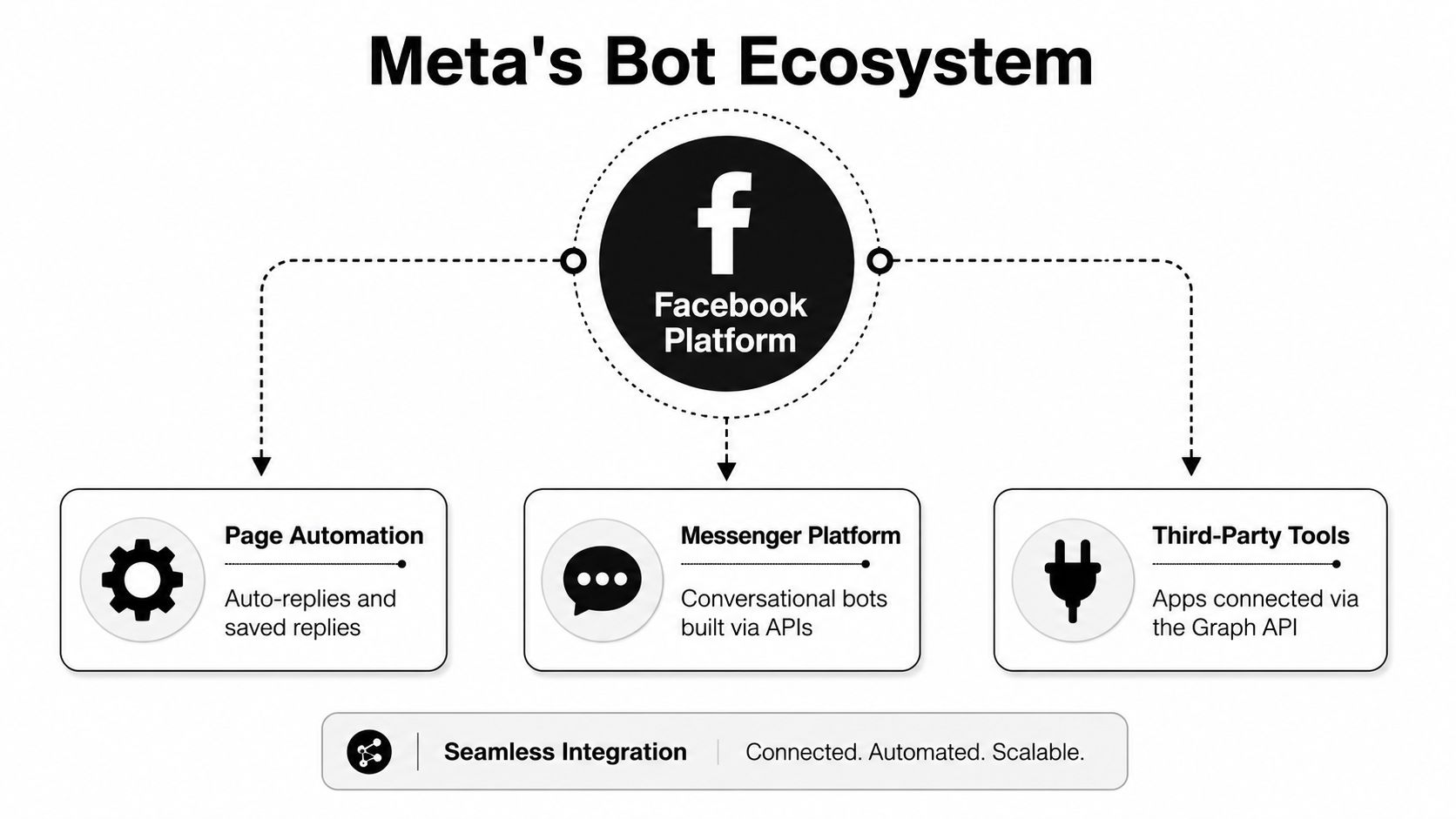
Where Page owners use automation
A practical Facebook setup usually includes four surfaces:
Page replies: Answer common questions under posts or ads, particularly questions about price, availability, shipping, and sizing.
Messenger and Instagram DMs: Capture intent, provide product information, qualify a lead, or route a customer to a human.
Comment moderation: Hide or remove spam, abusive language, suspicious links, and repeated scam patterns.
Website chat: Give paid visitors immediate answers while preserving the brand's product context and handoff rules.
Meta's responsiveness policy requires automated bots to respond to user input within 30 seconds, including freeform text, quick replies, CTA buttons, and persistent menu clicks. (Read Meta's responsiveness policy) That makes event handling and latency part of compliance, not merely a technical preference. A bot that responds quickly to text but fails to process button clicks can still create an unreliable experience.
A compliant DTC flow
Suppose a customer lands on a product page from a paid ad and asks the website assistant whether the item ships to a particular region. The assistant answers with the relevant delivery information and asks whether the customer wants help choosing a size. If the customer opts into a Page conversation, the business can continue that Messenger interaction within the permitted messaging period.
The brand should capture intent while the customer is active. It shouldn't wait until the next day to send an unsolicited promotional sequence. The same principle applies to Instagram automation, where comment handling and private replies need a clear purpose and a controlled handoff. For a focused look at that workflow, see how automated Instagram comments can be managed.
Why Spam and Negative Comments Quietly Tax Your Ad Spend
The comment section is part of the ad. Buyers don't experience the video, headline, landing page, and comments as separate departments. They see one offer, then scan the public reactions for evidence that the business is legitimate and the product works.
A visible “scam” comment changes the question in the buyer's mind. Instead of asking whether the product solves a problem, the buyer starts asking whether the brand can be trusted. A comment claiming “waste of money” can make a strong product demonstration look like a defensive sales pitch.
The benchmark that should change your reporting
Independent ad-moderation coverage cites a benchmark where strongly negative comment sentiment can reduce ecommerce click-through rate by up to 37%. (Review the Facebook ad comment moderation benchmark) That figure isn't a universal forecast for every campaign, but it gives media buyers a useful diagnostic: comment sentiment can affect delivery and response, so it belongs in the performance conversation.
The damage often appears as a creative problem. CTR falls, acquisition costs rise, and the team rotates the video. But if the same negative comments remain attached to the replacement ad, the new creative inherits the old trust problem.
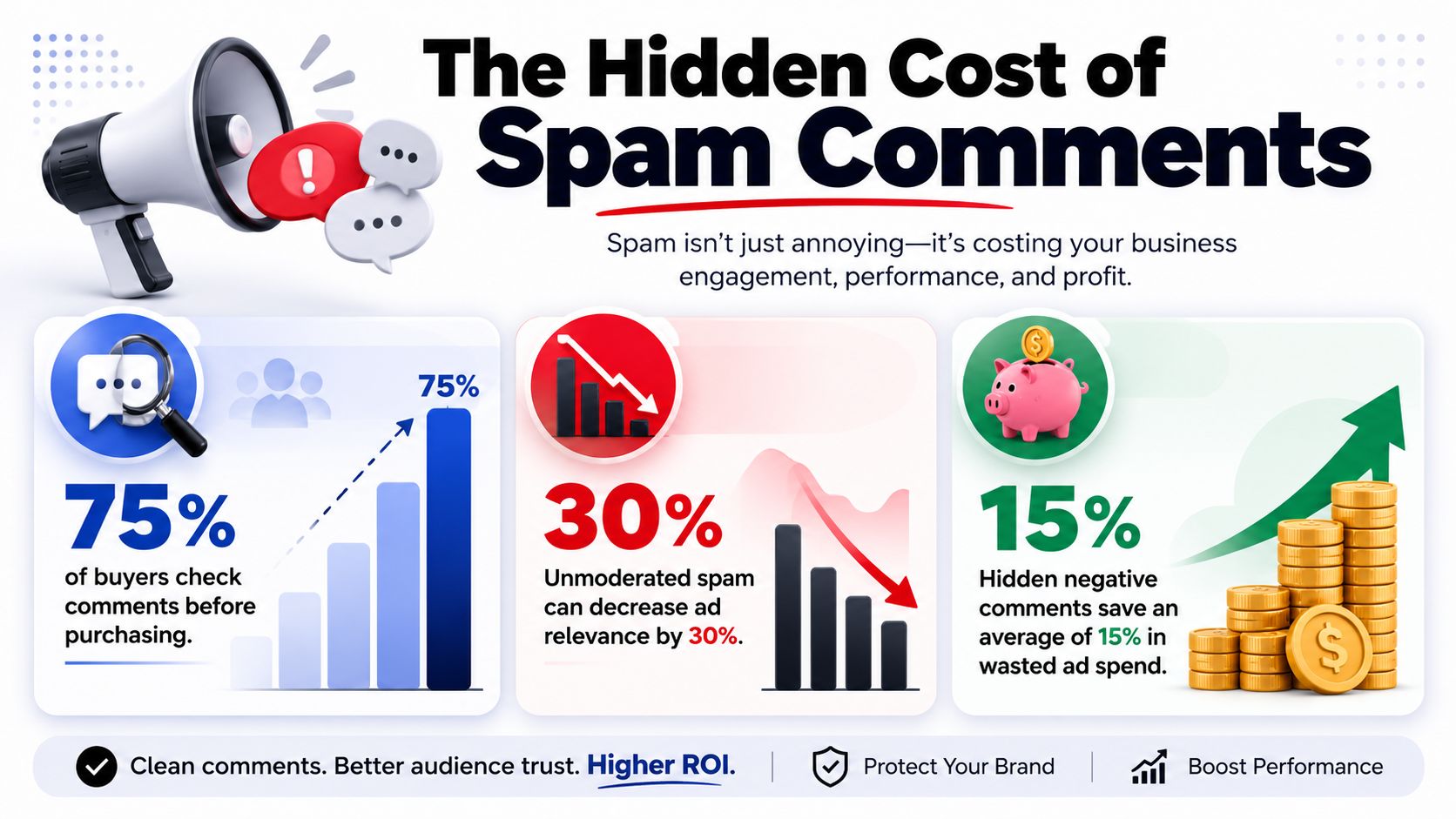
Why office-hours moderation fails
Spam doesn't follow the support calendar. A comment posted late at night can sit near the top of an ad while buyers continue scrolling. By the time a moderator opens Business Manager, the comment may have shaped dozens of purchase decisions.
The practical fix is to separate immediate protection from thoughtful response:
Hide obvious spam quickly: Links, crypto promotions, fake giveaways, and unrelated offers shouldn't remain public while someone waits for approval.
Reply to genuine buying questions: Price, shipping, sizing, stock, and product-fit questions need useful answers, not a generic “contact support.”
Escalate real dissatisfaction: Refund claims, damaged orders, and angry customer stories require context and a person with access to the order record.
The ad manager should review comment sentiment alongside creative metrics. If the ad is underperforming, check the top visible comments before declaring creative fatigue. This breakdown of unanswered ad comments explains why a missed reply can become a missed transaction rather than a minor community-management issue.
Simple Rule Bots versus AI Employees versus Human Teams
A rule bot follows a script. An AI employee interprets intent, selects a response, and can move a buyer toward the next useful action. A human team handles ambiguity, emotion, exceptions, and decisions that need judgment.
Those differences matter most after hours. Consider a buyer who sends a DM at 9 p.m. asking whether an order can reach a particular ZIP code before a planned event.
The rule bot may recognize “shipping” and return a generic policy page. That answer is technically relevant but leaves the buyer to find the actual delivery estimate. An AI employee can identify the purchase intent, request the ZIP code if necessary, provide the applicable shipping link, and record the conversation for attribution. The human moderator may give the best answer, but if nobody is working, the buyer waits or leaves.
Comparing Moderation Approaches on Facebook and Instagram
Capability | Rule bot | AI employee | Human team |
|---|---|---|---|
Response time | Fast when a keyword matches | Fast across natural-language requests | Depends on staffing and queue |
Coverage hours | Continuous, but narrow | Continuous across configured channels | Limited by shifts and workload |
Common questions | Strong for fixed FAQs | Strong for FAQs plus intent and context | Strong, but costly for repetitive work |
Objections | Often fails outside the script | Can answer within approved brand guidance | Best for sensitive or unusual objections |
Revenue attribution | Usually limited to clicks or replies | Can log conversations and outcomes when configured | Requires manual tagging and reporting |
Escalation | Basic trigger or inbox handoff | Configurable handoff based on intent and risk | Direct ownership of the case |
Best use | Repetitive, low-risk actions | Buyer assistance, moderation, and recovery | Complaints, refunds, exceptions, and judgment |
A rule bot wins when the request is predictable. “Where can I find the size chart?” needs a stable link, not an elaborate conversation. It fails when the customer asks a compound question, changes intent, or uses words the designer didn't anticipate.
Put the handoff where risk increases
An AI employee shouldn't make every decision. It can answer product questions, share order-tracking links, explain a discount, and identify a buyer who is ready to purchase. A human should take over for refund disputes, threats, legal concerns, safety issues, account access, and any case where the source data is incomplete.
The right design doesn't replace the human team. It gives them a cleaner queue. For a practical explanation of this operating model, see what an AI employee actually does all day.
Exerta is one example of the AI employee category. It handles comments, DMs, moderation, and website chat across Facebook, Instagram, TikTok, and website chat, with SMS, email, and voice planned next. The useful evaluation question isn't whether the system sounds intelligent. It's whether the team can inspect its actions, measure assisted revenue, and take control when the conversation leaves the approved path.
Scam Bots and the Phishing Risk Behind a Familiar Interface
A customer comments on your ad asking whether a discount is still active. A look-alike account replies with a friendly message and asks the customer to “verify” the order through a link. The link opens a Messenger-style flow that requests a Meta business login, a payment detail, or a multi-factor authentication code.
The customer sees familiar branding and assumes the reply came from the Page. The scam succeeds because the attacker doesn't need to recreate the whole customer journey. They only need to insert one credible-looking step.
Signals that should stop the conversation
Teach buyers and support staff to pause when a message contains:
Urgency: The sender claims the account, order, or ad will be disabled unless the recipient acts immediately.
Off-platform handoff: The message pushes the recipient to an unfamiliar website or private contact channel.
Credential requests: A brand asks for a password, verification code, MFA code, or business login.
Payment pressure: The sender requests a transfer, card details, gift card, or crypto payment to resolve a routine issue.
Look-alike identity: The Page name, handle, profile image, or URL resembles the brand but doesn't match the verified business asset.
Meta said in 2026 that it was testing new warnings for suspicious friend requests and introducing anti-scam measures. A separate 2026 report described cybercriminals using Messenger chatbots in phishing campaigns aimed at Meta business credentials and MFA codes. (Read Meta's 2026 update on scam-fighting technology and partnerships)
Warnings help, but they don't replace a brand-side process. Attackers can use social engineering, familiar language, and a customer's existing concern about an order or promotion. A support team should know which domains the brand uses, which information it will never request, and where customers should report a suspicious reply.
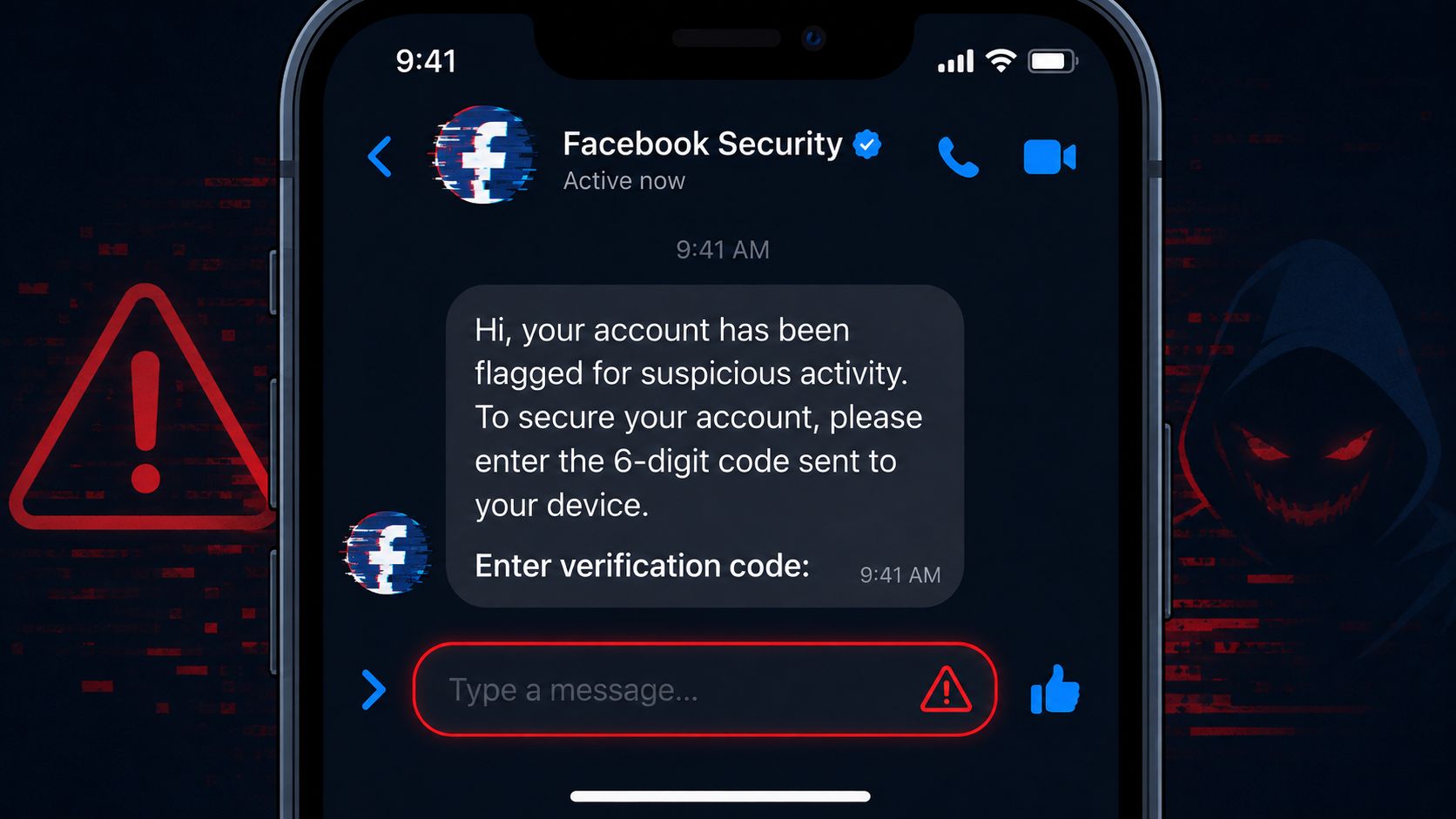
For more detail on spotting impersonation on Facebook Messenger, give the team a short red-flag checklist and rehearse the escalation path. Your brand should never ask a customer to send a login credential or security code in a comment or DM. A clear public reply can protect other buyers, while brand reputation protection gives the team a broader framework for handling impersonation and harmful content.
A Same-Day Detection and Moderation Playbook
A small team can improve protection without building a complex operation. Start in Meta Business Manager, review the comments attached to the ads spending the most, and separate public visibility from customer support.
Use native controls first
When a comment is clearly harmful, hide it so other users don't see it while the original commenter may still see it. Delete messages that violate your moderation standard, block repeat offenders, and add keyword filters for recurring spam and scam language. Practitioner guidance on Facebook ad moderation describes these hide and keyword-filter workflows as practical ways to catch repeat offenders and bot-like patterns.
The first pass should be mechanical. Don't spend a human's time debating an obvious crypto promotion or an unrelated competitor link. Reserve judgment for comments that contain a real customer issue mixed with frustration.
Apply three working lists
Always hide: crypto spam, fake collaboration bait, competitor links, suspicious verification requests, and repeated promotional links. These comments don't need a brand reply before removal.
Always reply: pricing questions, sizing requests, stock checks, shipping questions, and requests for a product link. Give a direct answer or link, then move the conversation to a private channel when order-specific information is needed.
Escalate: angry customers, refund claims, damaged-order complaints, safety concerns, and accusations that require investigation. Keep the public response calm, acknowledge the issue, and move the case to a human workflow.
An AI employee can extend this system with intent detection, brand-voice controls, escalation rules, and revenue attribution. Native filters can identify words. They don't know whether “I want a refund” is a genuine order issue, a pre-purchase objection, or a scammer testing the Page. Your workflow needs both layers.
Paste this checklist into your project tool:
Review comments on the top-spend ads.
Add the week's recurring spam and scam terms to filters.
Hide suspicious comments before replying.
Answer buying questions with a useful link.
Escalate complaints and refund requests.
Review moderation logs and update the rules.
What Meta's 24-Hour Window Means for Automation Choices
The 24-hour rule changes the timing of every Messenger workflow. Meta's standard messaging policy gives a business 24 hours to respond after a person messages the business, and messages sent inside that window may include promotional content. Outside the window, free-form promotional messaging is restricted. (Read Meta's standard messaging policy)
The window refreshes when the user replies. That means a buyer who asks a follow-up question creates another active opportunity for the business to answer. Some policy summaries describe a limited additional permission after the window as the 24+1 policy, but teams shouldn't build a revenue process around an exception they haven't verified for their use case. (Review the 24-hour messaging explanation)
Design for the active window
A paid social team should capture intent early. Ask the question that separates browsing from buying, provide the product or checkout link, and collect the information needed for a human handoff while the conversation is open.
A weak flow says, “Thanks for reaching out. We'll get back to you soon.” A stronger flow identifies the product, answers the objection, and gives the customer a clear next step. If the customer doesn't respond, the business can't assume it can continue sending free-form promotional follow-ups indefinitely.
Recent policy commentary says Meta's recurring marketing messages feature ended in early 2026, with further limits on marketing messages outside the standard window. (Review the 2026 messaging-window changes) Treat that as an operational constraint, not a minor policy detail. Your automation should convert or collect permission before the window closes.
Once Meta messaging expires, a permitted cross-channel handoff can change the economics. SMS, email, and voice can support later follow-up when the customer has provided the necessary consent and the channel rules allow it. Those channels shouldn't become a workaround for unwanted outreach. They should be part of a clear, customer-initiated journey.
What to Automate, What to Hide and What to Leave Human
The answer to what are bots on Facebook becomes useful when it changes your operating decisions.
Automate harmless, repetitive work. Instant answers, product links, order-tracking links, sizing guidance, stock checks, and approved discount handling belong in a fast response layer. These interactions help buyers move forward without forcing a support agent to repeat the same answer all day.
Hide spam bots before they shape the conversation. Filter crypto promotions, competitor links, fake collaboration offers, suspicious verification language, and repeated link drops. Don't waste time writing a polished reply to an account that exists only to distribute noise.
Leave scam signals and genuine complaints in a controlled escalation path. A suspected impersonator needs reporting and a customer warning. A refund claim needs order context. A frustrated customer may need empathy, judgment, and a person who can fix the issue.
A practical Facebook decision list looks like this:
Today: Turn on keyword filters in Business Manager.
Today: Audit the comments under the three ads receiving the most spend.
This week: Separate always-hide, always-reply, and escalate rules.
This week: Test after-hours coverage on buyer questions instead of automating every conversation.
Ongoing: Review logs, false positives, response quality, and attributed outcomes.
The Messenger bot guide for small businesses is useful background for teams planning the initial setup. But implementation should start with the comments and DMs already costing you sales, not with a broad automation project.
Exerta provides AI employees for Facebook, Instagram, TikTok, and website chat, with comment and DM replies, moderation, and logged engagement in one workflow. If slow inboxes and visible spam are leaking revenue from paid traffic, visit Exerta to review how an AI employee can cover buyer conversations after hours, protect ad comment sections, and hand higher-risk cases to your team. Start with the three ads and the unanswered questions you can already see.