Guide
Instagram Automated Comments: A Practical Playbook
Instagram automated comments explained: policy rules, real risks, and how DTC brands use AI employees to reply, moderate, and recover sales.
13 min read
read
·


Friday night, someone drops a sizing question under your ad. The post is getting clicks, the comments look busy, and the thread is sitting there with a few spam replies and one real buyer asking if the jacket runs small. By Monday morning, the prospect has bought somewhere else, or worse, the visible silence has already made your creative look weak.
That’s why Instagram automated comments stopped being a nice-to-have and became a paid-social control point. Comment threads sit inside the ad itself, so every reply, every hidden spam post, and every unanswered objection affects how people judge the offer before they click. On scale accounts, even a small delay in the first public reply matters, because the audience is huge and the thread is public. One industry guide estimates Instagram at 1.74 billion people and cites a drop in organic engagement from 2.94% to 0.61% in a single year, which is exactly the kind of environment where comment handling turns into infrastructure, not decoration. FeedGuardians on automated Instagram comments
Table of Contents
Why Your Ad Comment Section Is a Revenue Channel
A buyer lands on your ad, reads the caption, then scans the comments like reviews. If the thread is full of unanswered pricing questions, visible complaints, or spam, the ad doesn’t just look messy. It starts to look untrusted.
That’s the part many overlook. The comment section isn’t a side job for community management. It’s part of the offer presentation, and it changes whether someone clicks, waits, or bounces. When a Friday-night question sits unanswered until Monday, the sale is already gone. The person who asked the question didn’t need a brand essay. They needed a fast reply, a price check, or a sizing answer before they moved on.
Practical rule: treat every public comment under a paid post like a small piece of product merchandising. If it helps the buyer decide, surface it. If it scares the buyer, remove it or answer it fast.
A good paid-social team reads the thread the same way a merchandiser reads a shelf. What’s visible shapes demand. What’s missing creates doubt. That’s why comment response speed, moderation, and intent qualification belong in the same budget conversation as creative testing and bid management.
The old setup, where someone checks comments during office hours, can’t keep up with ads that run all weekend. The result is simple. The creative pays for attention, then loses it in public view. If you want the deeper operating logic, there’s a useful internal breakdown on why unanswered ad comments are costing you sales.
What Instagram Automated Comments Are
Instagram automated comments gets used as a catch-all term, but the jobs are different. If you don’t separate them, the setup gets messy fast. One part is moderation. One part is comment-to-DM. One part is public reply automation.
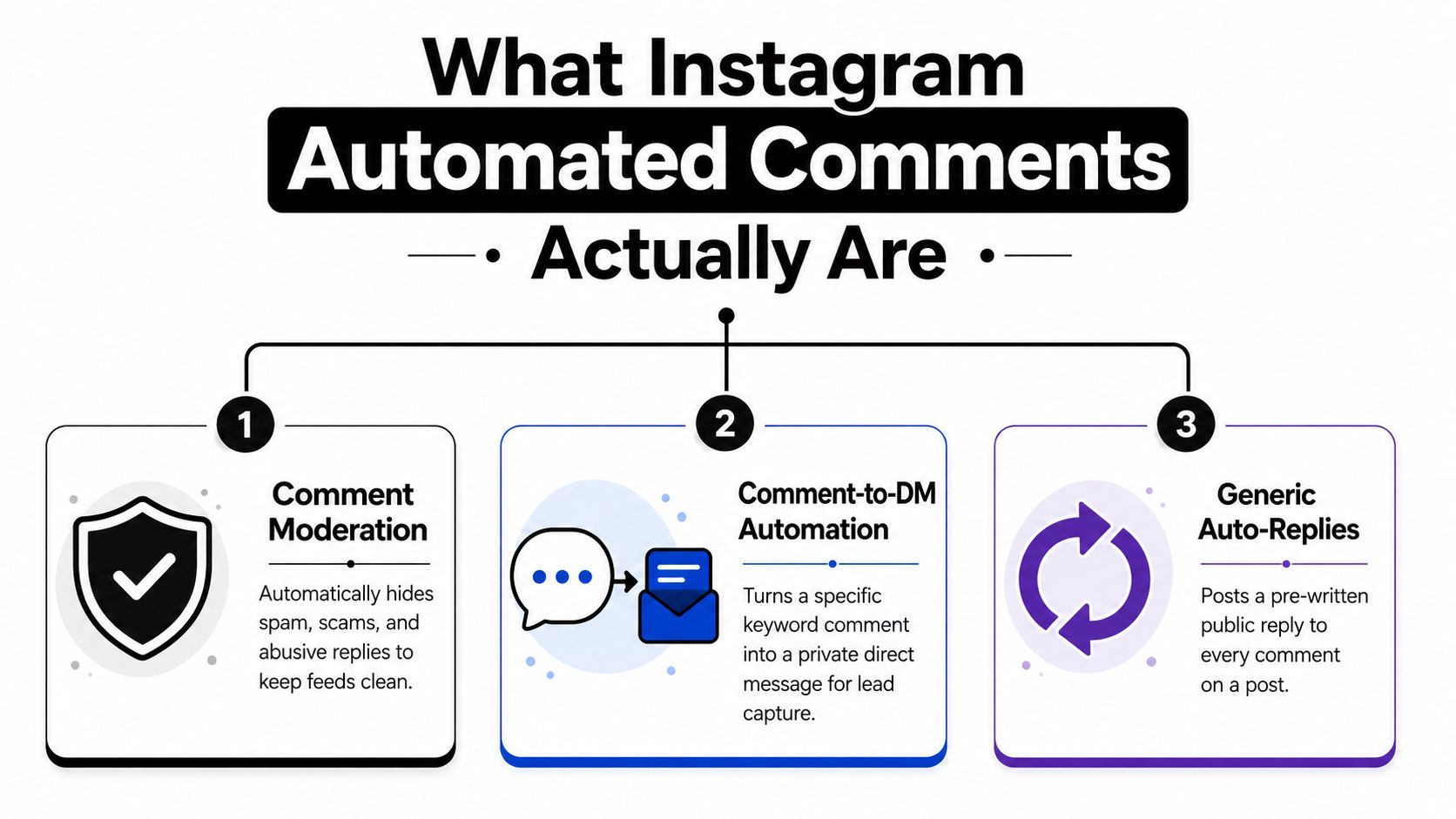
The three jobs do different work
Comment moderation hides spam, scams, and abusive replies so the thread stays readable. That protects the ad from looking broken or unsafe, and it supports brand reputation protection when comments start attracting junk or hostile replies.
Comment-to-DM automation takes a keyword comment, then moves the conversation into private messages with an offer, link, or qualification step. That is the cleanest way to capture intent without cluttering the public thread.
Full reply automation posts public answers that acknowledge the comment, answer a question, or route the buyer to the next step. This matters when the question itself is part of the purchase decision, like price, fit, availability, or shipping.
A brand running paid traffic usually needs all three, but not for the same reason. Moderation protects the spend. Comment-to-DM captures demand. Public replies build proof and remove friction. If you use only one layer, the rest of the thread still leaks money.
AI employee is different from a rule bot. A rule bot follows a fixed trigger. An AI employee reads the comment, decides what kind of intent it is, then routes it to reply, DM, hide, or escalation.
That distinction matters because buyers do not write in keywords. They write in half-questions, slang, misspellings, complaints, and edge cases. A rigid trigger can catch the easy stuff. It struggles when a comment is trying to buy, object, or complain in the same sentence.
The Policy Lines That Decide Whether You Get to Keep Advertising
A paid account can lose useful reach fast when comment activity starts looking synthetic. Meta draws a line around activity-based automation that imitates human behavior, including auto-liking, auto-following, and bulk commenting. API-based workflows sit in a different category because they are built around approved messaging and comment actions. In practice, that means the risk changes based on how the system behaves. If it looks like a person clicking around inside the app, the account is in a worse spot. If it runs through the official API and stays inside platform rules, the exposure is lower. Instagram automation policy guide
The DM side has its own rules. Automated messages stay inside the 24-hour messaging window after a user engages, and outside that window you need special allowances for certain support cases. One operating guide also cites a rate limit of about 200 automated DMs per hour per account, while compliant systems can still reply quickly once the user has already triggered the flow. Instagram DM automation rules
Dimension | Official API Automation | Browser-Bot Automation |
|---|---|---|
Detection risk | Lower when configured cleanly | Higher because behavior looks machine-like |
Ban profile | One guide reports about 0.4% quarterly ban risk | One guide reports 11% to 17% ban risk |
Use case fit | Comment analysis, message-triggered replies, compliant workflows | Unofficial bulk activity, higher policy exposure |
The core issue is behavior, not the label on the tool. Repeated public replies, broad triggers, and reply volume that does not fit the size of the account build a pattern that can get flagged. Identical replies, unnatural speed, and spraying the same template across weak triggers can lead to action blocks or reach suppression. How automated comments get detected
A public thread also affects paid-social risk in another way. Toxic replies can make the ad look broken or unsafe, which is exactly where brand reputation protection starts to overlap with media buying. If a prospect sees scams, abuse, or junk under the post, the ad loses trust before the click even happens.
Keep public replies short, specific, and tied to a real user action. Route the deeper conversation into a private channel only after the user has already signaled intent.
Rule-based bots can handle that narrow path. They do not qualify intent well when comments come in as half-questions, slang, misspellings, complaints, or objections mixed together. That is the gap Exerta’s what an AI employee actually does all day piece is meant to explain. An AI employee can read the meaning of the comment, decide whether to reply, hide, DM, or escalate, then push the user toward checkout or support. A rigid trigger only catches the easy cases.
That is why this belongs in the ad-risk layer, not the community-management bucket. The account cannot afford sloppy triggers, repeated public templates, or outbound behavior on other people’s posts. The setup needs discipline, because the wrong pattern can put spend at risk.
Native Rules, Third-Party Tools, and AI Employees Compared
A paid-social team usually has three paths: native rules, third-party workflows, or AI employees. The right choice depends on comment volume, how messy the intent is, and how much revenue sits behind the thread.
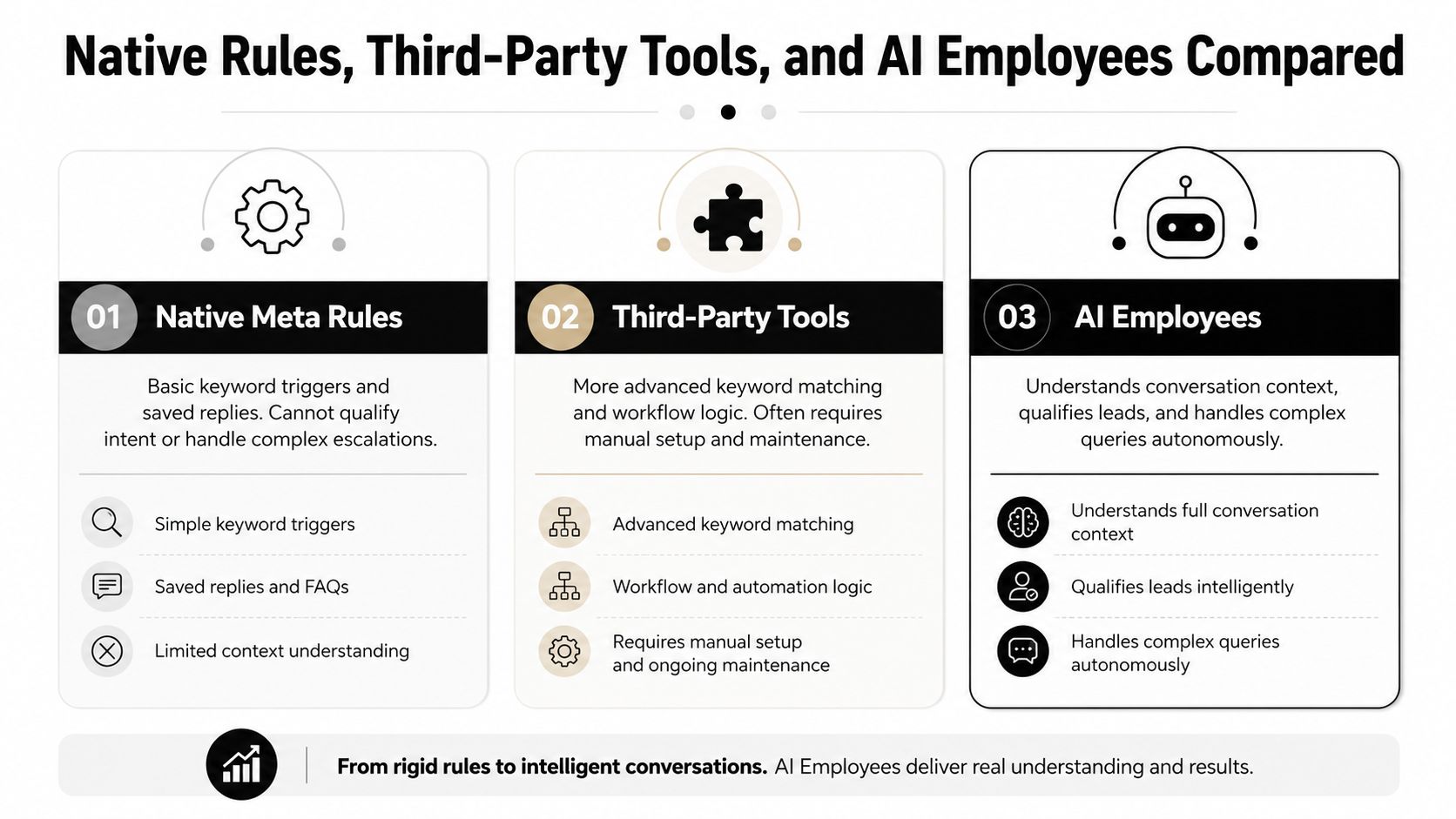
Native rules handle the easy layer
Native rules work for basic keyword triggers and saved replies. They fit cases where the goal is to acknowledge a comment, send a simple DM, or hide obvious spam. They break down when the comment needs interpretation. A pricing question, a complaint, or a fit objection usually needs more than a canned response.
Workflow tools add structure
Third-party workflow tools add branching logic, dashboards, and more flexible triggers. That helps when the ad account has enough volume to justify tighter routing. The trade-off is setup and maintenance. Someone still has to tune the prompts, trigger words, escalation rules, and exception handling, and those rules need upkeep when the offer or campaign changes.
AI employees qualify intent
AI employees go further. They read the meaning of the comment, decide whether the right move is a public reply, a DM, a hide action, or a handoff, then route the user toward checkout or support. Exerta’s what an AI employee does all day piece maps that workflow in plain terms.
One option in that category is Exerta, which runs on Facebook, Instagram, TikTok, and website chat, with no-code setup through Meta Business Manager, brand-trained replies, moderation rules, and Shopify attribution that ties a reply to closed revenue. It is documented as adopted by 250+ brands, with a 15% average sales lift, $2M+ recovered revenue, and a 99.9% uptime SLA. Exerta
Use native rules when the thread is simple. Use workflow tools when the logic gets branched. Use an AI employee when the comment section is tied directly to revenue and the buyer’s intent is not clean.
The practical test is simple. If the same team is only hiding spam and sending one canned offer, native automation can do enough. If the team needs to qualify, escalate, recover, and attribute, the thread has become a revenue system.
The 24-hour reply window changes the decision too. The 24-hour DM window explained covers why a fast route from comment to private message matters, and why rule-based setups can miss the timing once the thread starts getting messy. A rigid trigger can fire a DM, but it cannot always tell whether the message should go to checkout, to support, or to a human rep.
Comment-to-DM Mechanics and the 24-Hour Window
A usable flow starts with a comment that signals intent. Someone drops INFO, LINK, or PRICE under a post, the automation layer receives the event through Meta’s official API, and the system sends a private message right away. That handoff moves the buyer out of the public thread and into a channel where the brand can qualify interest, answer questions, and route the conversation toward checkout. Comment-to-DM automation guide
The constraint is the 24-hour window. Once the user has engaged, the brand can send automated messages inside that window, and the timing matters because comment intent cools fast. If a buyer comments on a post and the useful DM arrives the next day, the window has already done some of the damage.
The 24-hour DM window explained goes into the timing rules in more detail, but the practical takeaway is simple. Fast follow-up protects revenue. Slow follow-up turns a live signal into a dead lead.
A same-day offer flow
A DTC brand running a Reel can attach a keyword CTA, then trigger a DM only after the comment lands. The first message can carry the product link, a short discount, or a shipping answer. If the user replies with a sizing question, the flow can branch into a human handoff or a second qualifying prompt. The useful version stays restrained. One automated DM per user per day is the practical limit for a given trigger, so repeating the same send burns trust and creates operational noise.
Volume limits matter too. Sources describe a ceiling of about 200 automated DMs per hour per account, so bursts need to be planned. That is not a reason to avoid the workflow. It is a reason to reserve it for posts that carry buying intent, not for every post that gets attention.
The cleanest use case is boring in the right way. A comment comes in, the reply is fast, the DM is relevant, and the user gets the link before the curiosity fades.
If the trigger is vague, the DM gets ignored. If the DM is long, the user drops off. If the account sends the same message twice, the flow looks lazy. The tight version is still the one that holds up, comment keyword, private follow-up, one relevant offer, then stop.
Moderation as Ad-Spend Protection
Visible negativity is a tax on ad spend. A prospect does not separate the comment section from the ad creative. They read both as one experience, and a few toxic replies can undercut a carefully tested headline in seconds. If the team waits until office hours to clean it up, the damage has already been shown to the people most likely to convert.
What to hide and what to answer
An effective moderation layer should hide crypto spam, scam DMs, competitor links, and straight abuse on sight. Real questions need answers in brand voice. Real objections need a fast public response that makes the thread look active and credible. Real complaints need escalation, not argument. A quick acknowledgment in public, then a private handoff, usually protects both trust and sanity.
That is the operating logic behind how to hide Instagram comments. The goal is not to scrub every negative note. It is to stop junk from becoming the loudest voice under the ad.
Don’t let spam become social proof for the wrong side.
The public reply matters because silence reads like avoidance. The public reply cannot become a debate either. Keep the answer short, useful, and tied to the next action. If the issue is genuine and sensitive, escalate it. If the comment is only trying to derail the thread, hide it.
The stronger systems do this without alerting the commenter that they have been blocked or filtered. That keeps the thread cleaner and avoids needless back-and-forth. For a paid-social team, the job is straightforward. Protect the ad, keep the thread useful, and spend human attention only on comments that can still turn into revenue or save an account relationship.
The moderation layer also needs clear rules for where what an AI employee does all day, because the feed under paid creative moves fast. An AI employee can sort low-risk questions, tag sentiment, and route qualified intent to a human. It can also spot replies that are safe to answer publicly versus comments that should disappear from view. That matters more than the old habit of treating comments as a community task after the fact. Under paid media pressure, moderation is part of spend protection, and the faster the system separates signal from noise, the less budget gets wasted on traffic that never had a chance to convert.
Attribution, Dashboards, and the Recovery Loop
Reply count is vanity. The question is whether the comment system recovers revenue, protects spend, and helps the next creative work better. That means tracking time to first reply, hide rate, escalation rate, and DM-to-checkout conversion, then tying closed orders back to the original comment and ad.

An AI employee should log every action. A hide should be logged. A public reply should be logged. A DM should be logged. A handoff should be logged. When the order closes, the system should attribute the recovery back to the conversation that moved it forward. That’s how comment automation stops being a cost center and starts showing up in weekly media reviews.
What the dashboard should show
The dashboard should answer four questions fast.
How fast did we answer? Track time to first reply.
What did we suppress? Track hide rate for spam and scams.
Where did humans step in? Track escalation rate.
What revenue came back? Track recovered revenue and closed orders tied to the thread.
Exerta’s workflow logs and Shopify attribution are a useful reference point for this model because they connect the reply to the purchase rather than treating the comment as a dead-end event. That feedback loop matters when creative is failing in public. It gives the media buyer a reason to pause, fix, or rewrite instead of guessing. It also creates a cleaner story for budget owners. The team can show that the comment section is not just active, it’s measurable.
A Monday-Morning Playbook for Paid Social Teams
Start with the current thread. Find unanswered questions, visible negativity, and spam that’s still sitting under live ads. Then build one keyword-driven comment-to-DM flow around the offer that gets the most buying intent. Keep the message short. Keep the trigger specific. Keep the follow-up inside the allowed messaging window.
Next, set moderation rules that hide junk and escalate real complaints. Connect revenue attribution so the team can see which comments turned into orders. Then put the reporting in front of the people who buy media. If the dashboard doesn’t show recovered revenue, it’s not helping the decision.
The hard boundary is still the same. Stay on Meta’s official API. Respect the 24-hour window. Respect the DM rate limits. Treat automation as a role you staff, not a script you forget. That’s the line between protecting spend and putting the account at risk.
If your ad comments are leaking revenue, Exerta can run the moderation, reply, and recovery layer as AI employees across Facebook, Instagram, TikTok, and website chat. It’s built to tie each conversation back to closed revenue, so you can see what the comment thread paid for. Visit Exerta if you want that workflow in place before the next campaign goes live.
Multilingual teams should pair automated replies with the workflow in How to Translate Instagram Comments Automatically and keep the Instagram Hidden Words guide nearby for the native safety layer.

