Social Media Automation Tools Compared for Paid Social ROI
read
·


Your Meta campaign is live. The creative is strong, the targeting is tested, and spend is moving. Then the comments fill with questions about price, delivery, sizing, or trust. A buyer asks for the link. A scam account replies first. Someone posts a hostile claim that sits under the ad for hours. Each unanswered interaction can weaken the buying path while your budget keeps generating impressions.
Social media automation tools need to do more than schedule posts. For paid social, they must help answer high-intent questions, remove harmful content, route complex conversations, and show which actions contributed to revenue. This guide compares automation by those criteria, not by calendar design alone.
Moderation is merchandising. The comment section is part of the product page your ad creates. Clean it, answer it, and guide buyers to the next action.
The right system protects attention without flattening your brand voice. It also knows when a human should take over. For a deeper look at the research value hidden in ad conversations, see why your comment section is free ad research.
Table of Contents
Detailed Comparison of Social Media Automation Tools by Paid Social Criteria
Governance Logs and Compliance for Agencies and Regulated Brands
Introduction Why Comment Sections Decide Paid Social ROI
A common paid-social failure starts after the ad has already done its job. Someone sees a product demonstration and asks, “Does this work for sensitive skin?” Another person wants to know whether a discount applies. A third user comments “buy,” but nobody sends the checkout path. The ad keeps running, yet the most valuable part of the interaction remains unmanaged.
The risk isn't limited to missed sales. Spam, scams, and aggressive replies can sit beneath a live ad and change how the next visitor evaluates the brand. A buyer doesn't separate the creative from the conversation around it. The comment section becomes supporting copy, objection handling, social proof, and sometimes a warning sign.
Automation now belongs in the revenue stack because paid-social teams need coverage while campaigns run, not only during office hours. Meta's Messenger policy gives a business a 24-hour window to send free-form messages after a user's last action, and promotional content may be included inside that window. The window resets when the user acts again, so a comment-triggered DM needs prompt handling when the goal is to send an offer or checkout link the same day. Meta messaging window guidance explains the practical implication for advertisers.
The buying decision should therefore start with operational questions:
Can the tool detect intent? It should distinguish “love this” from “send me the price.”
Can it moderate safely? It needs rules for spam, scams, abuse, and uncertain cases.
Can it preserve voice? Scripted replies often fail when buyers ask a question outside the preset path.
Can it prove impact? Ticket volume isn't the same as recovered revenue.
Can it escalate? Sensitive complaints, legal questions, and unusual requests need human review.
This is the standard I use for evaluating social media automation tools. A scheduler can support content distribution. A revenue-focused system must also manage the conversations that paid distribution creates.
What Social Media Automation Tools Actually Automate Today
The category has expanded beyond the publishing calendar. A 2025 industry summary valued the worldwide AI market for social media at USD 2.45 billion in 2024 and projected it to reach nearly USD 3.34 billion by 2025, while reporting that about 18.1% of organizations already relied on AI-powered tools for automated content creation and curation. AI social media tools market data shows why automation spend increasingly covers operational work, not just post timing.
A broader 2025 compilation reported that 83% of marketing departments automate social media posting, while 49% of marketing decision-makers said they automated social media in 2024. The same compilation put the social media automation tools market at USD 4.5 billion in 2024, with a projection of USD 12.8 billion by 2033. Social media marketing automation benchmarks point to a category moving from isolated scheduling toward integrated publishing, reporting, and engagement.
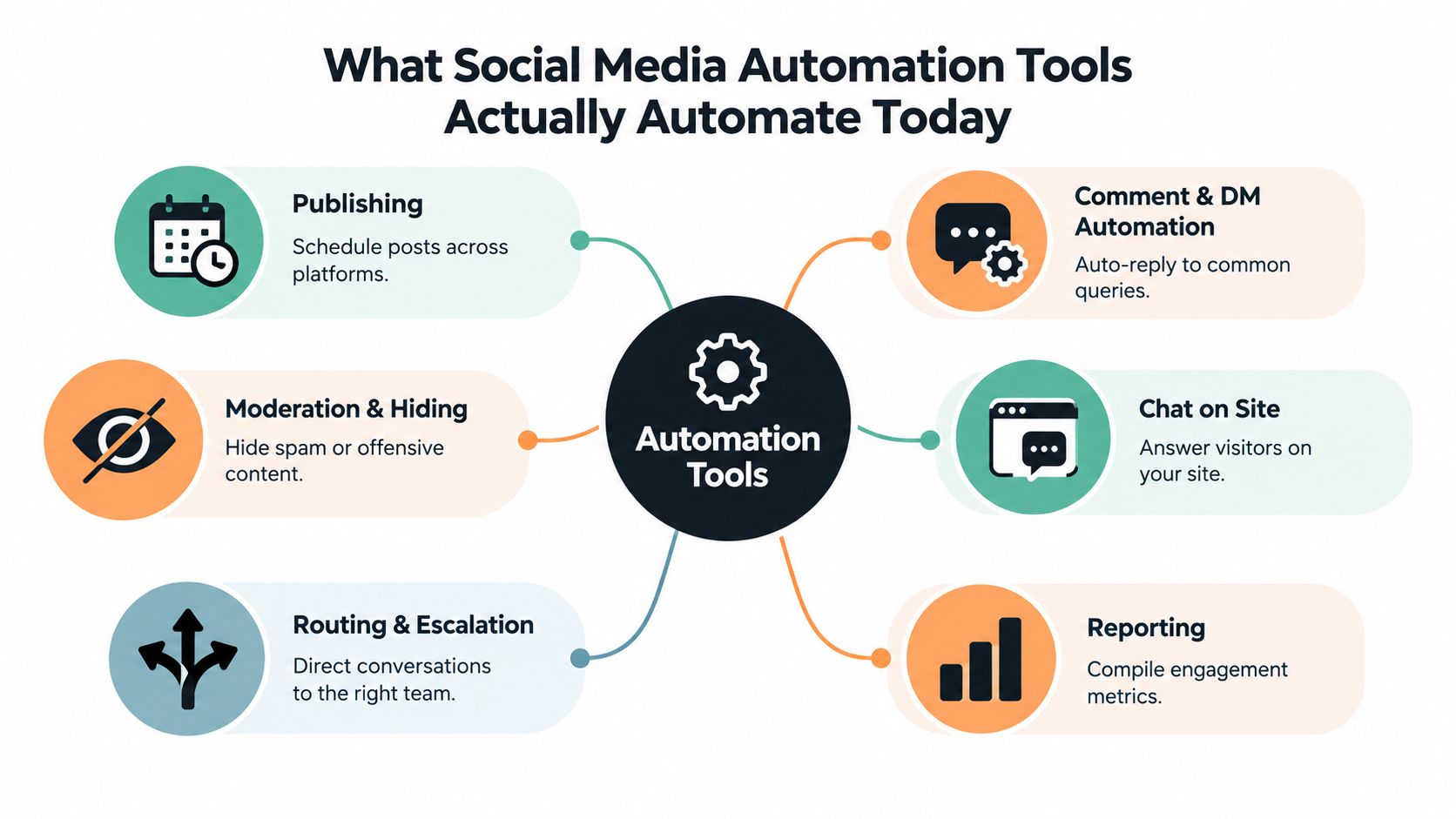
The four operational jobs
Publishing handles planned distribution. It queues posts, adapts formats where supported, and keeps organic content moving across connected accounts. This is useful, but it sits at the low-intent end of the funnel.
Engagement automation handles comments and DMs. A stronger system can recognize purchase questions, provide a product link, answer approved FAQs, and continue a conversation without forcing a buyer through a rigid menu. Tools that only send canned replies struggle when a customer changes topic mid-conversation.
Moderation and routing protect the public buying environment. Rules can hide spam or scams, flag risky language, and send complaints or sensitive inquiries to the right person. A virtual number for social media can also help teams separate account verification and operational messaging from personal contact details, using a virtual number for social media when that fits their account-management process.
Reporting and attribution connect actions to outcomes. The useful dashboard doesn't stop at likes or response counts. It should show which conversations received a link, which flows created intent, which cases escalated, and what revenue the system can connect to those interactions.
Where AI employees fit
The term AI employees describes a broader operating role than a basic bot. They can work across Facebook, Instagram, TikTok, and website chat, apply brand guidance, follow branching workflows, and leave records of their actions. Exerta operates in this category, with those channels live today and SMS, email, and voice planned next. The AI social media agent overview provides additional context on that model.
Detailed Comparison of Social Media Automation Tools by Paid Social Criteria
A useful comparison starts with the job your team needs completed. Scheduling suites are built around planned publishing. Engagement automation focuses on inbox and comment handling. AI employees combine conversation management, moderation, routing, and revenue workflows.
Capability | Scheduling Suites | Engagement Automation | AI Employees |
|---|---|---|---|
Speed to first reply | Strong for scheduled posts, limited for live buying questions | Strong for defined triggers and FAQs | Strong for intent-based replies across multiple conversation types |
Brand-voice control | Caption and approval controls | Templates and rule-based responses | Brand training, response controls, and escalation logic |
Moderation rules | Often basic or separate | Usually supports keyword and inbox rules | Can combine hiding, classification, routing, and review |
DM window handling | Not usually the central workflow | Supports triggered replies where connected | Can prioritize time-sensitive conversations and follow-up |
Workflow depth | Calendar and approval flows | Trigger and response rules | Multi-branch logic tied to intent, channel, and escalation |
Attribution and logs | Publishing and engagement reports | Conversation activity reports | Action logs, workflow visibility, and revenue attribution |
Paid-social fit | Content operations | Comment and DM coverage | Ad-comment recovery, moderation, and cross-channel engagement |
Best fit | Teams focused on organic publishing | Teams with recurring inbox volume | Brands and agencies managing high-intent paid conversations |
Speed matters, but speed without control creates noise
A fast reply has little value if it gives the wrong price, makes an unsupported promise, or sends a generic answer to a complex complaint. Evaluate the tool on response speed plus approval logic. Ask whether your team can define approved offers, product facts, discount rules, and escalation conditions without rebuilding every workflow.
Moderation needs the same balance. Hiding obvious scams protects the ad environment. Hiding a legitimate product complaint can make the brand look evasive and remove valuable feedback. The system should support separate actions for hide, reply, flag, and escalate.
The differentiator isn't automation volume. It's the quality of the decision made before the reply or moderation action.
Choose based on account complexity
A lean team with low comment volume may only need scheduled publishing and saved responses. An agency managing multiple client pages needs permissions, approval layers, clear ownership, and client-ready records. A DTC brand scaling paid campaigns needs intent detection, checkout-link workflows, and a way to connect conversations with orders.
For a broader category orientation, the best social media automation tools can help identify common feature groupings. The buying filter should still come from your paid-social workflow. A workflow automation software guide is useful when you need to map triggers, branches, approvals, and outcomes before choosing a platform.
How Automation Protects Ad Spend and Recovers Revenue
Comment moderation affects the environment around an ad. A spam reply can divert a buyer, create confusion, or make the offer look less credible. The practical response is to moderate continuously while the campaign runs, rather than wait for a daily inbox review.
Independent analysis of 96 brands spending USD 1.3 billion on Meta ads reported a 7.35% increase in ROAS and a 33% decrease in CPC when comment moderation was active. Social ad optimization analysis connects moderation with the metrics media buyers already monitor. The same-day application is direct: hide scams, spam, and hostile replies under live ads before they collect further attention.
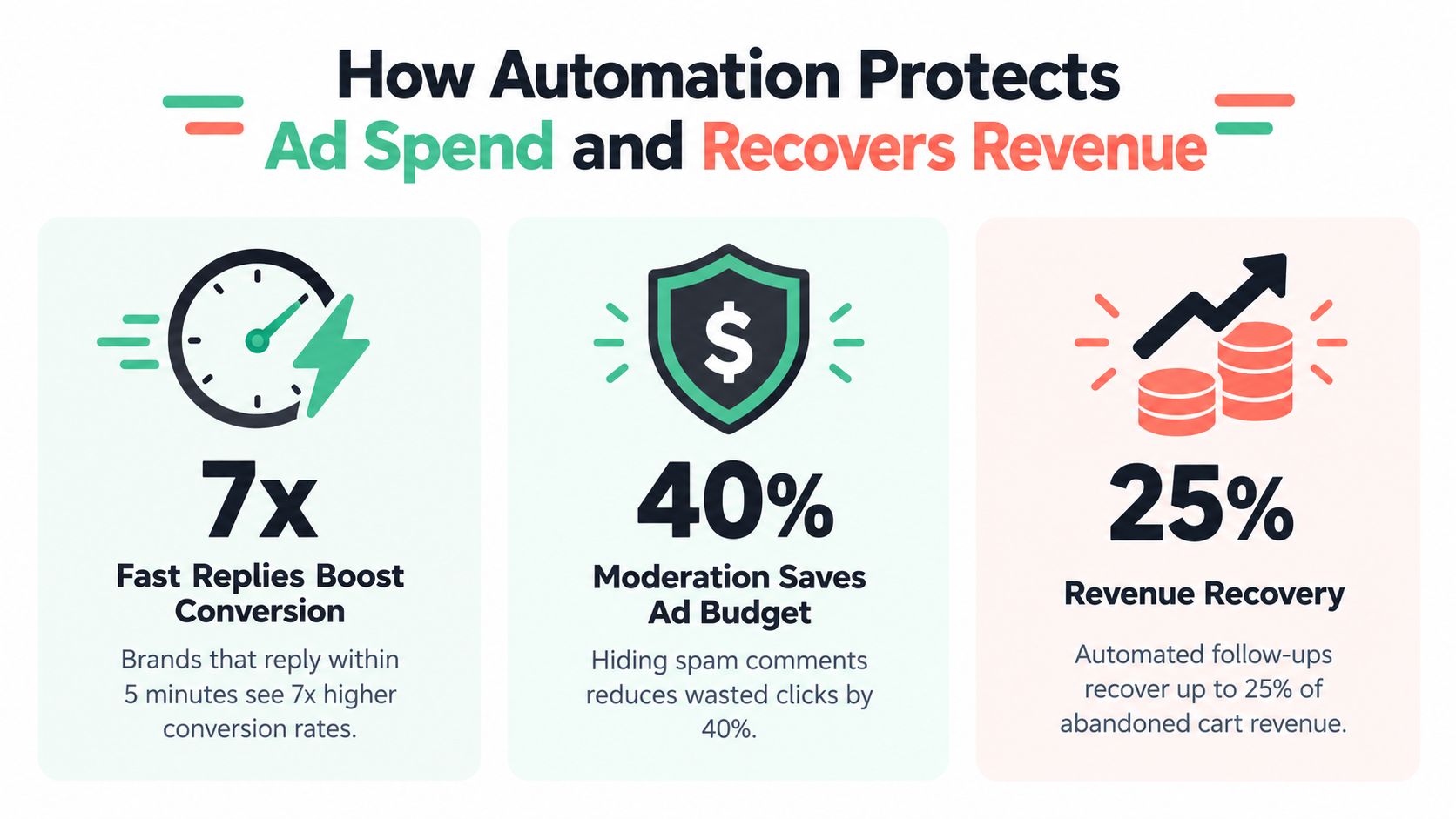
Treat the inbox as a conversion surface
A comment asking for price is not just engagement. It can signal purchase intent. A DM asking about delivery is closer to a sales conversation than a support ticket. If the team answers late, the buyer may move on before receiving the product link or offer.
The 24-hour messaging window makes timing operationally important. Handle comment-triggered DMs and inbound messages while the window is active, especially when the intended response includes a promotional link or checkout prompt. The goal isn't to send more messages. It's to prevent high-intent conversations from expiring without a useful next step.
A Harvard Business School paper on automated comment moderation found that real ad campaigns combining automated moderation and engagement generated substantially greater monetary return per dollar spent than the control group. Harvard Business School research on automated comment moderation supports a hybrid operating model: automate first-response handling, then use human escalation for edge cases.
Measure recovered value, not activity
A dashboard full of response counts can hide weak commercial performance. Track the path from trigger to action:
Intent detected: Was the comment or DM classified as a buying signal?
Next step delivered: Did the buyer receive the correct product, offer, or checkout link?
Conversation advanced: Did the buyer ask a follow-up question or move to site chat?
Order attributed: Can the system connect the interaction with a purchase?
Exception escalated: Did a human receive the case with enough context to act?
The right automation protects media efficiency and captures demand that already exists. It doesn't manufacture purchase intent from every comment.
For practical moderation policy design, use social media moderation workflows to define what the system should hide, answer, flag, or escalate.
Use Cases You Can Launch the Same Day
You don't need a large technical project to test revenue recovery. Start with one active campaign, one product, and a narrow set of triggers. Write the approved response before turning the workflow on.
Comment-triggered DM with a checkout link
Use a keyword such as “price,” “buy,” or “link” as the trigger. The public reply should acknowledge the request without exposing private details, while the DM sends the correct product page or checkout path.
Workflow:
Detect the trigger: Match approved buying words and close variations.
Reply publicly: “I've sent the details by DM.”
Send the link: Include the product, offer, and any approved qualification.
Record the action: Store the trigger, reply, link, and resulting conversation.
Escalate exceptions: Route questions about unusual orders, refunds, or sensitive needs to a human.
Test the flow from a real user account before activating it on every campaign. Check the link, discount behavior, and response tone.
Handle price and trust objections
Create separate branches for common hesitations. A price objection may need a value explanation, payment information, or an approved offer. A trust question may need shipping details, returns information, product credentials, or a human handoff.
Don't force every objection into a sales reply. If the buyer asks for evidence your approved knowledge doesn't contain, escalate. The system should say it needs a specialist rather than improvise.
A safe answer is better than a confident answer built on missing product information.
Hide spam and scams under live ads
Define obvious signals for scam replies, impersonation, malicious links, and abusive content. Hide those comments automatically when confidence is high. Flag ambiguous cases for review instead of deleting criticism by default.
Then add intent follow-up. A buyer who comments with a product question should enter a sales flow. A customer reporting a damaged order should enter support routing. A hostile but legitimate complaint should remain visible when policy allows, with a measured response and human oversight.
For a same-day launch, connect the relevant account, train the system on approved brand language, set moderation rules, and create two recovery flows. Review the first conversations manually and adjust the branches before expanding coverage.
Governance Logs and Compliance for Agencies and Regulated Brands
More automation increases the need for control. An agency can't safely manage multiple client pages if nobody can tell which workflow replied, which rule hid a comment, or who approved an exception. A regulated brand needs the same record for different reasons. Replies involving medical, insurance, financial, or legal topics may require reviewable handling.
Require these controls before deployment:
Action logs: Record the message, action, workflow, and timestamp.
Moderation reports: Separate hidden, flagged, approved, and escalated content.
Routing rules: Send issues to the correct client, department, or specialist.
Role-based approvals: Restrict who can change offers, responses, and hide policies.
Human escalation: Make sensitive or uncertain cases visible before an automated answer goes out.
Attribution records: Preserve the path from conversation to downstream outcome.
A governance layer should make tuning easier, not merely satisfy an audit. Review false positives, missed buying signals, and replies that required edits. Those findings should improve the rules and training material.
Agencies should also keep client data separated and make ownership clear. Regulated teams should document prohibited claims, required disclosures, escalation paths, and approval responsibilities. For teams evaluating broader control frameworks, SOC 2 compliance software guidance can help structure the conversation around evidence, access, and auditability.
Recommendation Which Tool Fits Your Team and How to Start
A scheduling suite is enough when your main problem is planned publishing. Choose engagement automation when comments and DMs repeat the same questions but still need clear rules and saved responses. Choose AI employees when paid campaigns create sustained conversation volume, buyers need context-aware replies, and revenue recovery matters alongside moderation.
For agencies, prioritize permissions, logs, routing, and client reporting. For DTC teams, prioritize intent detection, checkout links, product knowledge, and order attribution. For regulated brands, put approval gates and audit trails ahead of response speed.
Exerta is one option in the AI employee category. It supports automated comment and DM replies, moderation, sales-recovery workflows, and website chat across Facebook, Instagram, TikTok, and web chat. Its documented adoption includes 250+ brands, an average 15% sales lift, more than $2 million in recovered revenue, and 99.9% uptime. These product figures should be evaluated alongside your own attribution setup and campaign economics.
Start with a controlled workflow:
Connect one paid-social account.
Train the system on brand voice, products, offers, and prohibited claims.
Set hide, flag, reply, and escalation rules.
Launch a comment-to-DM purchase flow.
Launch an objection-handling or follow-up flow.
Review logs and attributed outcomes before expanding.
Don't automate every conversation on day one. Automate the repeatable path, protect the public comment environment, and reserve human attention for cases where judgment changes the outcome.
Exerta deploys AI employees that reply to comments and DMs, moderate harmful content, and recover revenue across Facebook, Instagram, TikTok, and website chat. Visit Exerta to connect your paid-social workflow, train the brand voice, and launch measurable conversation recovery.

