Guide
How to Turn Off Comments on Facebook: Posts, Pages & Ads
Master disabling comments on Facebook posts and ads with our step-by-step guide. Save ad spend and boost engagement starting today.
9 min read
read
·


You’re running a good campaign, the creative is sharp, and then one ugly comment sits under the ad all night. By morning, prospects have read it, your team has already lost spend, and the post looks less like an offer and more like a public argument. That’s why disabling comments on Facebook is never just a moderation task, it’s a paid media decision.
For DTC and ecommerce brands, the comment section is part of the ad. If you want a cleaner framework for why unanswered comments can drain sales, Exerta has a useful breakdown on why unanswered ad comments are costing you sales. If you also need to measure what happens after the click, a practical guide to monitor form ad conversions helps connect ad traffic to downstream behavior.
Table of Contents
Why Your Ad’s Comment Section Is Costing You Money
A Facebook ad does not stop at the headline. The first visible comment often becomes the review page buyers read, and they treat it that way. One negative remark can reset the entire promise of the creative, especially when it sits there overnight while your team is offline. Meta’s help docs still describe comment control as a post-level setting, which is a clear sign that the platform treats this as a per-post decision, not a page-wide switch.
That matters because comments change how people read the offer. A sharp objection, a pricing complaint, or a spam reply can move a prospect from curiosity to doubt in seconds. For paid social, that is not abstract reputation risk, it is a spend efficiency problem. If your ad is attracting attention but the comments read like a public pile-on, you are paying to amplify hesitation. That is also why teams trying to monitor form ad conversions need to treat the comment thread as part of the same path, because the surrounding discussion can change whether a click turns into a lead.
The comment thread is part of the conversion path
A good media buyer watches comments the same way they watch CTR, CPA, and hold rate. The thread can answer objections or create them. When it is unmanaged, the wrong message rises to the top and becomes the story.
The decision to suppress comments or leave them open comes down to intent. A launch post with a sensitive claim needs different treatment than a standard product ad. The more public the complaint, the more it affects the next viewer’s trust. If you need a reason to keep the thread under control, see the pattern in why unanswered ad comments are costing you sales.
Practical rule: if the comment section changes the meaning of the ad, it is affecting performance whether you track it or not.
There is also a workflow angle. Teams managing spend across many posts do not have time to babysit every thread, which is why comment control becomes part of campaign operations. Exerta’s guide on social media moderation tools is a useful companion when you are deciding whether to suppress, review, or route replies.
How to Disable Comments on Facebook Posts and Ads
A post goes live, the comments start filling with objections, and the ad is already spending. At that point, Page admins usually want one thing, a clean way to shut the thread down before it drags the rest of the campaign with it. Facebook does not offer a universal off switch for comments on every post. The control that comes closest on regular posts and ads is Who can comment on your post?, and the strictest setting is Profiles and Pages you mention.
Regular posts and ads
Open the exact post you want to control. Tap or click the three-dot menu, then choose Who can comment on your post?. Select Profiles and Pages you mention. If nobody is tagged, that setting blocks new comments on that post, which is the closest practical equivalent to disabling comments on a standard Facebook post or ad.
Many Page admins look for a page-wide switch, do not find one, and assume the feature is missing. The feature exists, but it is scoped to the individual post rather than the account level. That means every high-risk ad, announcement, or sensitive offer needs the same sequence repeated by hand.
The cleanest mental model is simple.
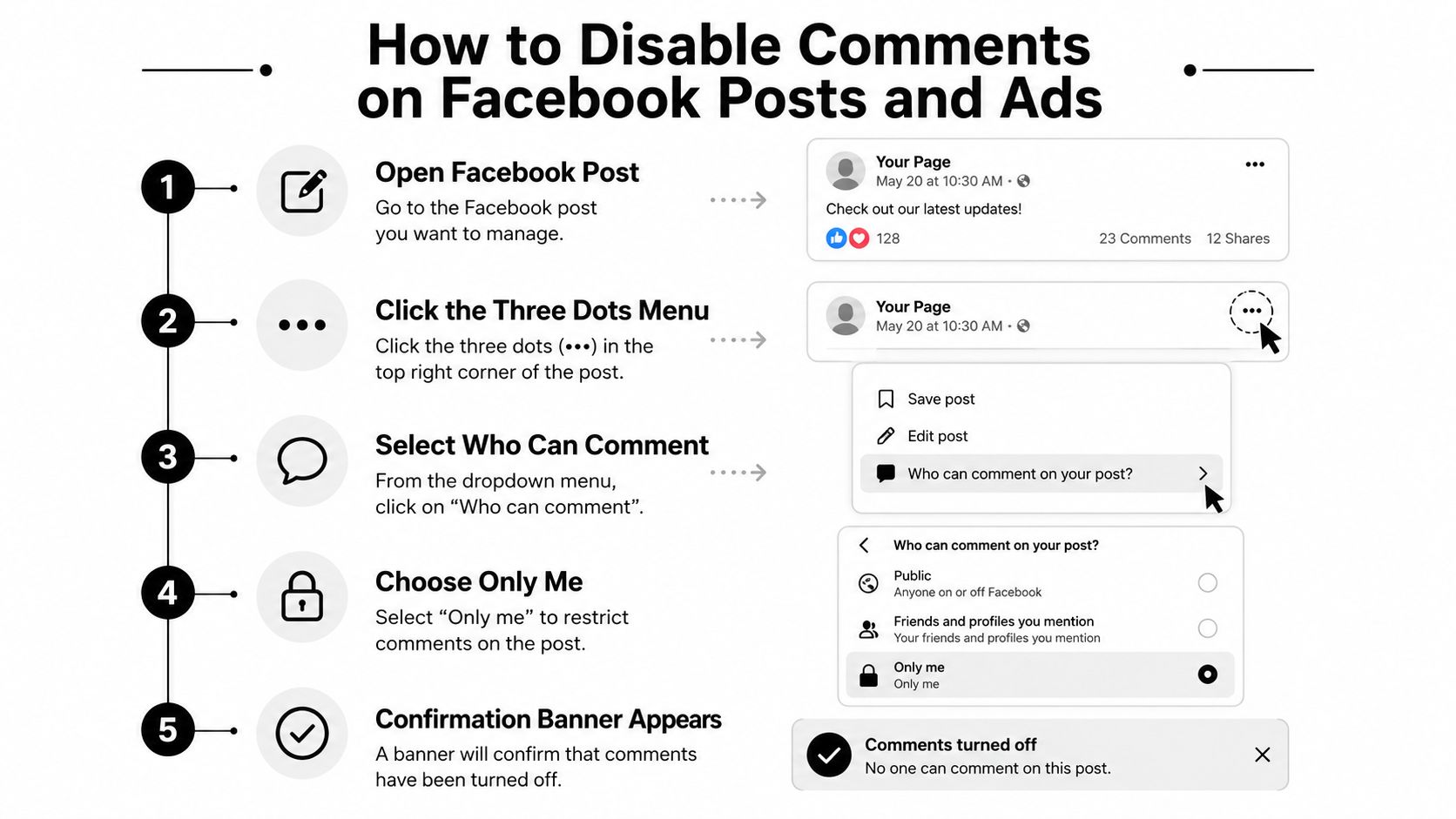
Open the post first, then lock the comment rule on that specific post. Do not go hunting through page settings for a master control that is not there.
Group posts use a different path
Group posts follow a different flow. Open the post in the group, tap the menu, and choose Turn off commenting. Facebook’s Help Center treats that as the official group workflow, and it is simpler than the Page-post workaround (Facebook Help Center).
That distinction matters because a lot of teams mix up group controls with Page controls. If the post lives in a group, use the group menu. If it is a Page post or ad, use the post-level comment audience setting instead. For a visual walkthrough of hiding comment activity on another network, see how to hide Instagram comments.
If you are connecting Meta traffic to automation, it helps to think in workflow terms. A practical reference on how to connect Meta Ads to AI agents can clarify how comment handling fits into a broader response system, even though the comment-control decision itself still happens post by post.
The Audience Setting Trap That Breaks Comment Controls
The biggest failure point is audience context. The comment-control option tends to work properly when the post is Public. If the post is set to a narrower audience, like Friends or Only Me, the workflow may not appear or may behave inconsistently across surfaces. That’s why comment control breaks in real accounts, even when the user thinks they followed the steps correctly.
Standardize the sequence
Use the same order every time. First, verify the post is Public. Then reopen the three-dot menu. Then set commenting to Profiles and Pages you mention. That sequence is the difference between a clean lock and a messy, inconsistent result across mobile and desktop.
If the audience isn’t public, don’t assume the comment control failed because the platform is broken. Recheck the audience first.
For high-volume teams, this becomes a bottleneck fast. A marketer can manage one launch post by hand. They can’t do that consistently across dozens of ads, boosted posts, and page updates without creating errors. That’s why many teams end up building a policy around the posting workflow instead of treating comment control as a last-minute fix.
The operational lesson is plain. Comment controls are tied to the post, and the post is tied to its audience. Miss one part of that chain and the moderation setting won’t stick the way you expect. If you want a detailed example of why page-level controls behave differently in real campaigns, Exerta’s note on whitelisted ads without the chaos gives a useful operational angle.
Disable, Moderate, or Automate, Which Option Fits Your Workflow
A paid post goes live, the first comments arrive, and the thread immediately tells you what kind of campaign you are running. Sometimes the safest move is to shut comments off. Other times the thread should stay open, but under control. The wrong choice costs money fast, either through bad-faith replies, wasted team time, or a missed chance to turn buyer intent into revenue.
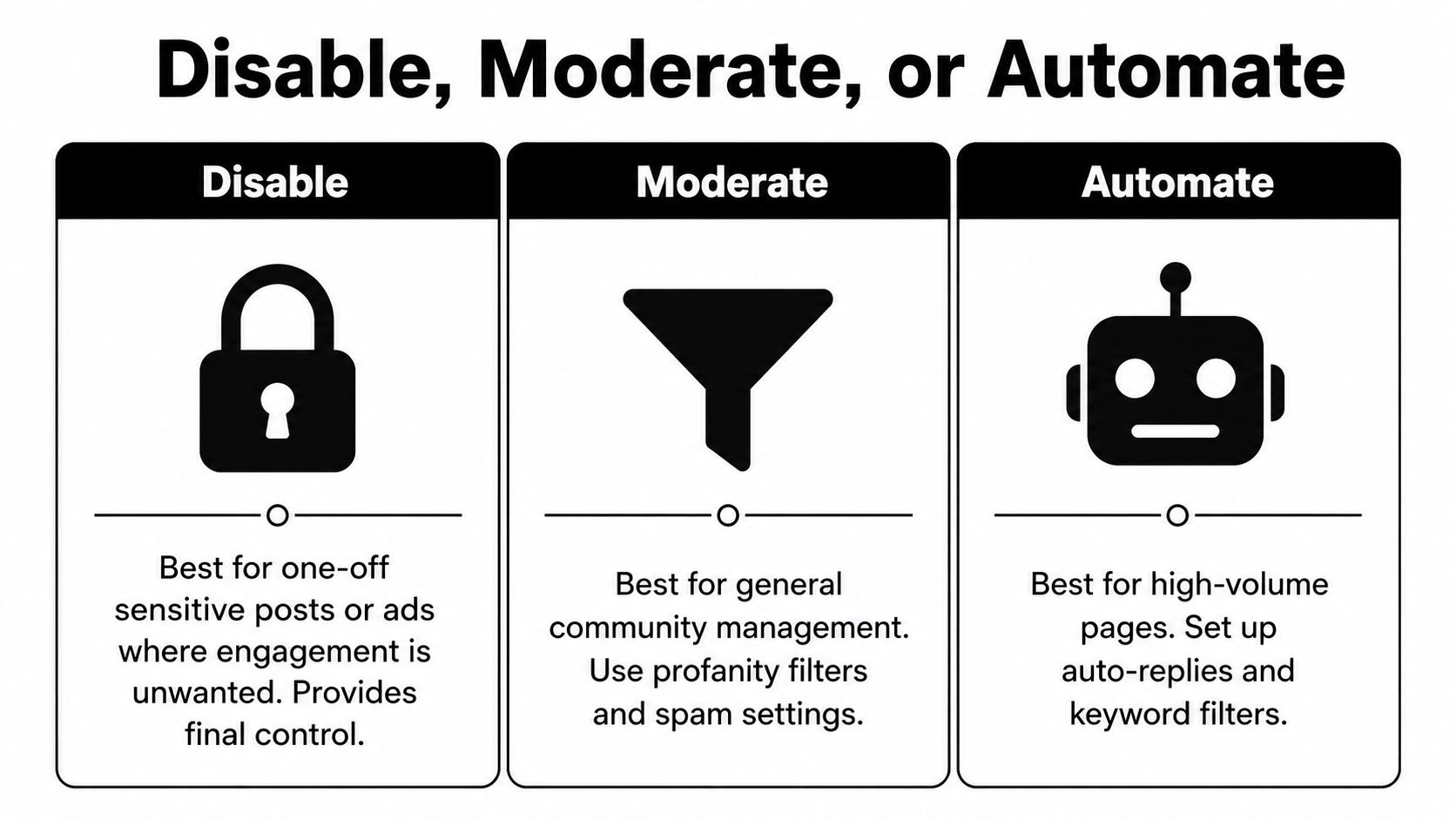
Pick the level of control, not the easiest switch
Disabling comments fits posts where public discussion creates more risk than value. That includes sensitive announcements, limited-time offers that attract bad-faith replies, and launches where the team needs full control over what buyers see first. In those cases, silence is a deliberate operational choice.
Moderation works better when the thread still has business value. Facebook’s page-level Hide posts and comments with profanity filter lives under Settings & Privacy → Settings → Followers and Public Content, and it hides profanity across public content without locking the thread entirely. That suits spam, insults, and low-value noise, while still leaving room for real questions.
Automation is the right move when comments contain buying intent. A what is conversational intelligence workflow helps teams recognize patterns in questions, objections, and intent signals, then route them into a response process instead of leaving them unmanaged. Exerta is one option in that category. It currently supports Facebook, Instagram, TikTok and website chat, with SMS, email and voice launching next, and it’s used by 250+ brands, with a reported 15% average sales lift, $2M+ recovered, and 99.9% uptime.
Simple rule: disable for risk, moderate for noise, automate for revenue.
The choice depends on the job you want the thread to do. If you want no public discussion, disable it. If you want a cleaner thread, filter it. If you want the comment section to answer objections and recover demand, automate it. For teams comparing workflow options, a practical overview of social media moderation tools helps frame the decision around process, not guesswork.
Manual moderation protects the post, but it still consumes attention. Automation can reply in brand voice, hide spam, and route likely buyers without forcing the team to sit in the inbox all day. That is the difference between keeping the ad clean and making the comment section work for you.
What to Do Instead of Blindly Disabling Comments
A paid post goes live, the comments fill up fast, and the team has two bad options. Leave the thread open and let spam, sarcasm, and off-topic noise bury the useful replies, or shut it down and lose the questions that often reveal buying intent. That trade-off is the core issue.
Use comments as a revenue signal
The better approach is to sort weak content from useful intent. Hide spam. Hide bad-faith replies. Answer real questions quickly. If someone asks about shipping, sizing, or availability under an ad, that is a buying signal, not just chatter.
The thread stays credible when it is handled well, and the team keeps the chance to recover sales from people who were already close to buying.
That is why a system matters more than a manual reaction. Exerta’s comment and DM workflows can reply in brand voice, hide spam and negativity, and trigger sales recovery flows when buyer intent shows up. The thread can stay visible without turning into an unmanaged inbox.
You do not need every post to behave the same way.
Disable: Use it on one-off posts where discussion creates more risk than value.
Moderate: Use it when you want to keep the thread clean without cutting off engagement.
Automate: Use it when the comment section is part of the conversion path and you want scale.
The expensive lesson is simple. Disable too early, and you lose signal. Leave comments open without a system, and you pay for noise. Set the level of control by post type and campaign goal, then use automation where the thread can still drive revenue. For a closer look at how comment handling changes outcomes, keep Facebook comments as a working reference.
Before disabling a whole thread, learn exactly what happens when a Page hides a Facebook comment and configure the Facebook profanity filter and blocked-word list. Those controls often protect the post without eliminating useful buyer questions.

