Guide
How to Hide Instagram Comments on Ads and Posts
Learn how to hide Instagram comments on ads and posts to protect brand reputation. Step-by-step moderation tactics for DTC brands running Meta campaigns.
11 min read
read
·


You’re looking at an ad that should be working. The offer is strong, the creative is clean, and clicks are coming in. Then the comment section fills with spam links, lazy scam accusations, or one angry complaint that sits at the top all night and makes the whole post look risky.
That’s where how to hide Instagram comments stops being a housekeeping task and becomes a revenue control. On paid social, the first visible comments shape what buyers think about the ad before they read the caption. If your thread looks unmanaged, you’re paying for traffic that bounces before it even considers the offer.
Table of Contents
Why Hidden Comments Protect Your Ad Spend
A winning ad can turn into a weak one fast when the comment thread looks messy. I’ve seen campaigns with solid creative get dragged by visible spam, unresolved complaints, and bad-faith replies that stay up longer than they should. The ad still gets impressions, but the comment section taxes the conversion rate because prospects read the thread as social proof.

The thread is part of the offer
A comment section under an ad isn’t a side channel. It’s part of the buying experience, especially on Meta placements where people pause, scan reactions, and decide whether the brand feels safe. If the first visible replies are hostile or off-topic, your creative has to work against that friction before a prospect ever hits the landing page.
That’s why Instagram’s moderation workflow matters. Meta’s help documentation shows that comment control is built around manual moderation and comment filtering, not one universal switch. You can hide a comment by tapping Hide under that comment in the mobile app, and you can also hide comments or message requests you don’t want to see on Instagram, which keeps the public thread cleaner while preserving the original context for the author Meta help documentation.
Practical rule: treat the comment thread like ad copy. If the first screen looks unsafe, buyers hesitate.
Night and weekend damage adds up
The worst comment damage usually happens when nobody is watching. A post gets traction after hours, spam lands under the thread, and a real customer complaint gets buried beneath junk. By the time someone from the team notices, the post has already spent hours showing the wrong signal to new visitors.
Instagram’s moderation tools were built for exactly this kind of layered control. Updated how-to guidance describes Turn off commenting, hidden-words filters, and other post-level moderation controls as part of a broader shift toward AI-assisted filtering and configurable comment management on high-traffic surfaces updated moderation overview. For advertisers, that means the job isn’t just deleting noise after the fact. It’s shaping what the next buyer sees before they make a decision.
Why unanswered ad comments are costing you sales
Hiding Individual Comments on Instagram Posts and Ads
The fastest way to clean a post is still the simplest one. Instagram’s native mobile workflow lets you hide a single comment in place, which is exactly what you want when one reply is damaging the thread but the rest of the conversation is fine. The action is surgical, and that matters when you’re managing ad comments from real customers, not just spam bots.
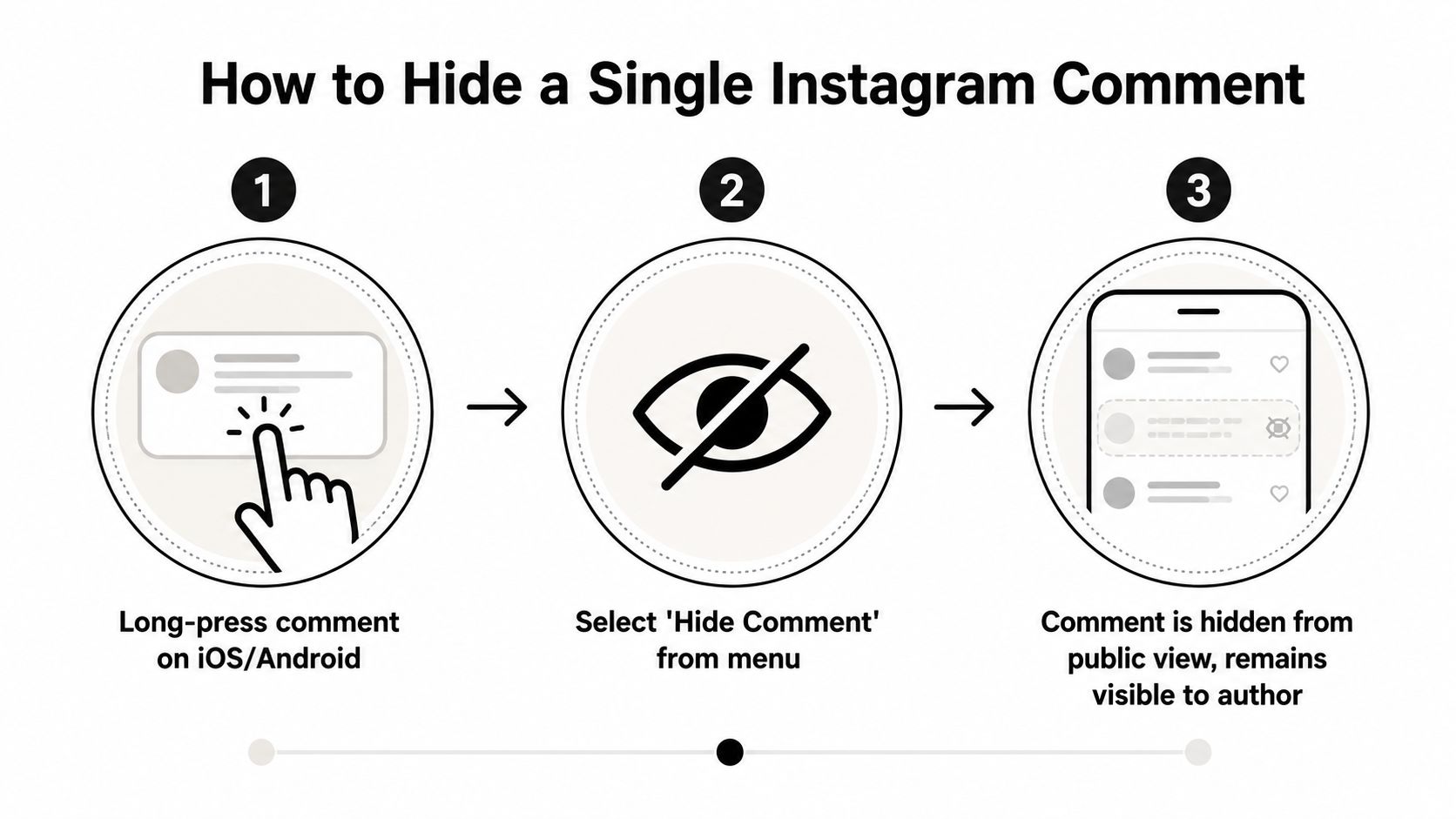
The mobile tap path
Open the post or ad in the Instagram app, find the comment, and long-press it on iOS or Android. Tap Hide when the menu appears. If you’re reviewing a live thread on a brand account, this is the cleanest move because it removes the comment from public view without forcing a public exchange.
A practical tutorial shows the review path too. You can open See hidden comments inside the post thread and tap Unhide if you made the wrong call or if a comment was hidden too aggressively step-by-step workflow. That’s important for paid campaigns, because a rushed moderation pass during a spike can hide a real customer question along with the junk.
Hidden doesn’t mean gone. It means the public stops seeing it while you keep the option to audit and restore.
What the public sees and what the author sees
The public thread looks cleaner right away. The commenter, however, can still see their own comment, which reduces the chance of a direct confrontation. That’s the value of hiding over deleting in an ad environment. You protect the surface that prospects see without turning moderation into a visible fight.
For brand teams, the operational benefit is simple. You can remove the damage from view, preserve the original discussion context, and then decide later whether the comment deserves to stay hidden, be restored, or be deleted entirely. If you manage ads across multiple posts, that makes comment control a lot more usable than waiting for one person to manually clean every thread by hand. For Instagram-specific ad workflows, keep your moderation process tied to the posting cadence and the campaign calendar, not to random inbox checks Instagram integration workflow.
Setting Up Automated Comment Filters in Instagram
A fast-moving ad thread can turn into a moderation queue in minutes. That is where Instagram’s automated comment filters help, because they remove the obvious junk before someone on your team has to inspect every reply.
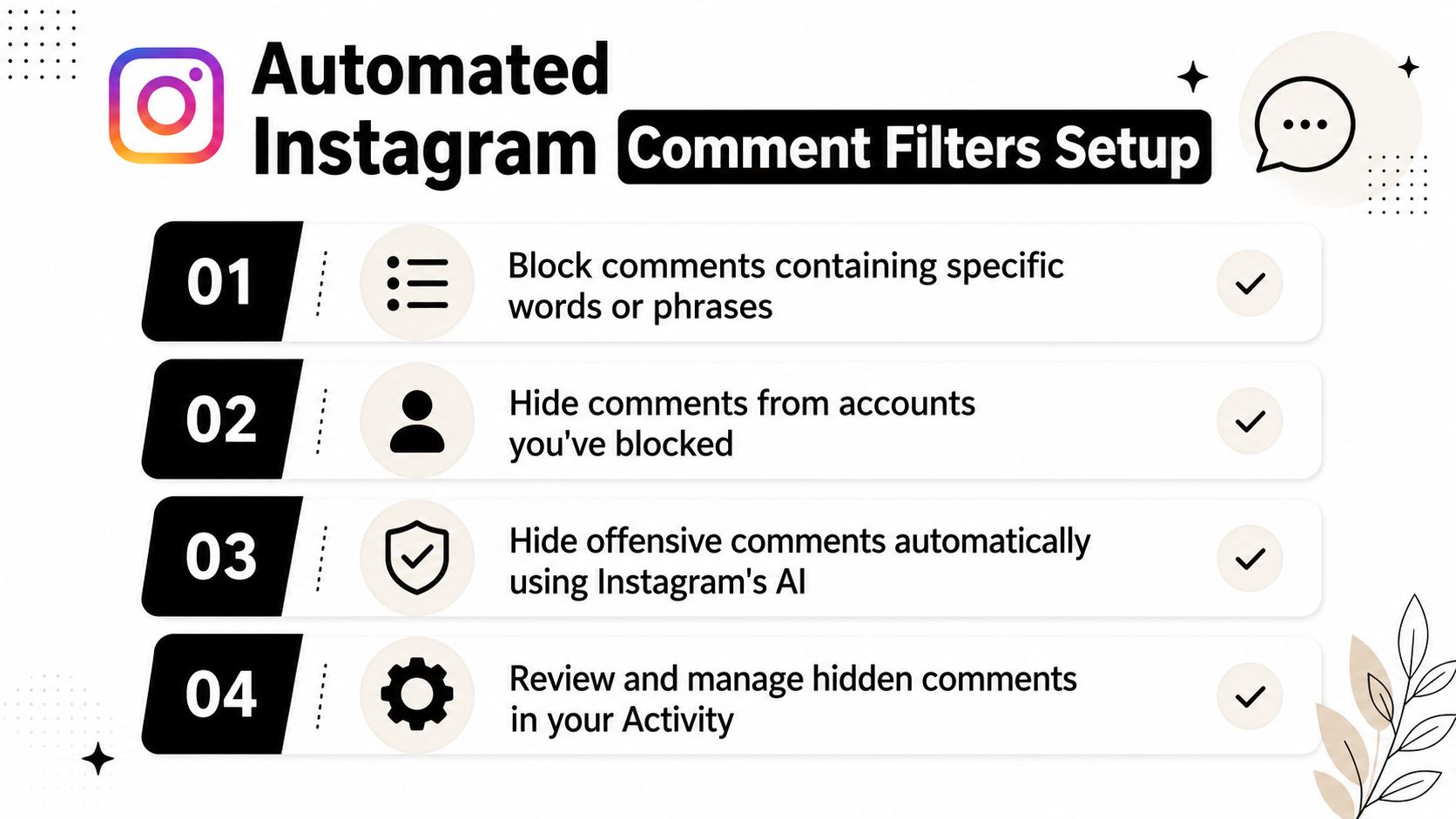
Baseline protection inside settings
Business Insider reports that in Settings > Privacy > Comments, you can turn on Hide Offensive Comments to filter comments Instagram deems offensive, bullying, or spam, and you can also enable Hide More Comments for another layer of filtering Business Insider reference. For advertisers, that gives you a standing filter that works without daily intervention.
The trade-off is clear. These controls catch the obvious stuff, but they will not catch every brand-damaging phrase or every disguised scam. Use them as the first pass, not the whole moderation plan.
Keyword filters and reporting patterns
Instagram’s comment controls also support manual keyword filters and the most reported words filter for higher-volume moderation Heepsy guide. That matters when spam keeps repeating the same phrasing, because the filter can do the repetitive work instead of forcing your team to hide the same type of comment over and over.
A useful keyword list starts with the language that shows up in your own ad threads. For a skincare offer, that might include promo, free, DM me, cheap, or common scam lines about “earnings” and “guaranteed results.” For ecommerce, it can include competitor names, coupon bait, refund bait, and fake support claims. Update the list as patterns shift.
When to shut comments off on one post
Some posts need a harder move. A launch post, a controversial offer, or a thread that keeps getting brigaded may need Turn off commenting at the post level. That is a blunt control, but it is better than letting a runaway thread hurt the ad’s trust signal.
For a controlled moderation setup, pair the native filter stack with a workflow builder that routes the right comments to the right response path. The goal is not to hide everything. It is to stop predictable junk before it hits the public thread and creates more work for the team.
Use filters for repeat patterns. Use manual review for edge cases. Use shutdowns only when the post itself has become the problem.
Comparing Manual Hiding and Automated Moderation Approaches
Different comment volumes call for different moderation habits. A small account can survive on manual hiding. A busy ad account can’t. The core question isn’t whether to hide comments, it’s how much of the work should be done by a person, by Instagram’s native filters, or by a rules-based system that watches the thread continuously.
Criteria | Manual Hiding | Native Filters | AI Moderation |
|---|---|---|---|
Response speed | Depends on human availability | Immediate for matched phrases and offensive patterns | Immediate on routed rules and volume spikes |
Off-hours coverage | Weak | Moderate | Strong |
Handles one-off objections | Good | Limited | Good when configured well |
Handles spam patterns | Good if seen quickly | Good for known terms | Strong across repeated patterns |
Review burden | High | Lower | Lowest |
Best use case | Small threads and sensitive replies | Always-on baseline protection | High-volume paid campaigns |
What each method is good at
Manual hiding is best when nuance matters. If a real customer asks a legitimate question in a rude tone, a human can decide whether to hide, reply, or escalate. It’s also the safest option when a comment thread contains mixed signals and you don’t want automation making the wrong call.
Native filters are better at removing obvious noise. They’re useful when the same offensive or spam language shows up again and again, especially in public ad threads where speed matters more than debate. The weakness is context. A keyword filter can’t read intent, and it can’t tell the difference between a malicious jab and a genuine concern if both use similar words.
Where AI moderation changes the workload
AI-powered moderation is useful when the volume makes manual review unrealistic. It can hide spam, route buyer intent, and escalate real issues without requiring a person to sit in the thread all day. For agencies, that means one team can keep standards consistent across more campaigns without depending on whoever happens to be online.
The operational point is straightforward. Manual hiding protects the thread. Native filters reduce repetitive work. AI moderation reduces the gap between comment volume and team capacity. The right mix depends on how much traffic your ads create and how quickly you need every thread to stay clean hiding or replying playbook.
Building a Layered Moderation Strategy for Paid Campaigns
The best moderation setup is layered. Native filters catch the known junk. Manual hiding handles the gray area. Higher-level automation takes over when the thread moves faster than your team can review it. That combination gives you control without turning comment management into a full-time drag on the media team.
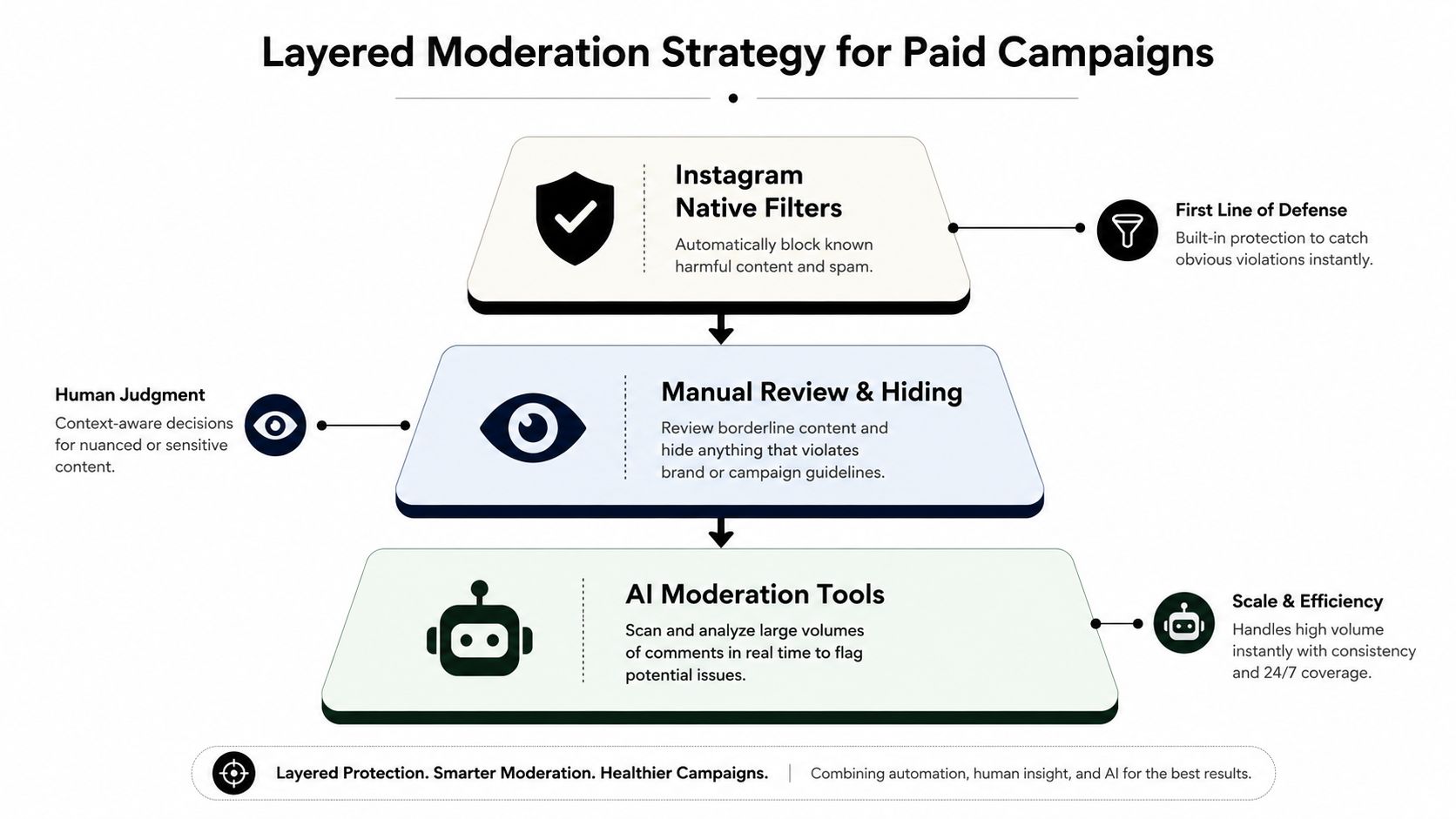
Keep the guardrails simple
Start with obvious brand-safety rules. Hide the phrases you already know are junk. Review the hidden thread regularly so you can restore anything that was suppressed by mistake. That alone cuts down a lot of wasted human attention because the same low-quality patterns stop reaching the public thread.
A layered process also protects good conversations. A real buyer asking about sizing, shipping, or price shouldn’t get buried because the thread got noisy. When moderation is too aggressive, the team ends up hiding useful demand along with spam, which is the wrong trade for a paid campaign.
The point of moderation is not silence. It’s keeping the right conversation visible.
Use AI employees where the volume hurts most
AI employees make sense when the ad account is active enough that someone is always late to the thread. They can hide spam, scam language, and negativity while keeping buyer questions moving toward a response path. In practice, that means fewer public distractions and less time spent reacting to the same junk twice.
For agencies and DTC brands, that also improves consistency. A human might be sharp in the morning and buried by evening. A system doesn’t lose focus when the campaign spikes. It keeps applying the same rules, which is what your ad spend needs when the comments start piling up.
Exerta’s moderation rules are built for that kind of workflow, with a focus on hiding spam, scams, and negativity so the thread doesn’t drag on ad performance, while sales recovery flows can convert buying intent into orders brand reputation protection. The practical benefit is not just cleaner comments. It’s a cleaner path from comment to purchase.
Your Same-Day Comment Moderation Checklist
Start with the threads that are already dragging down paid performance. Review the last few posts and look for visible spam, scam claims, or complaints that have no reply. That work takes minutes, and it shows you where the public thread is already working against the campaign.
A same-day pass keeps the team focused on revenue protection, not broad cleanup theater. On high-volume ad accounts, the goal is to remove the comments that distort first impressions, then keep real buyer questions visible long enough for someone to answer them.
Audit visible damage: Scan current ad comments and hide the replies that create the wrong first impression. Expected outcome: a cleaner public thread. Time: 10 to 15 minutes.
Enable native filters: Turn on Hide Offensive Comments and add custom keyword filters for repeat spam language. Expected outcome: fewer junk comments reaching the public thread. Time: 10 minutes.
Set a hidden-comment review habit: Check hidden comments on a fixed cadence so real questions don’t stay buried. Expected outcome: fewer moderation mistakes. Time: 5 minutes per review.
Decide which campaigns need automation: Use AI moderation on the campaigns that generate the most comment volume or the most repetitive junk. Expected outcome: less manual cleanup during peak hours. Time: 15 minutes to scope.
Track the business result: Watch whether cleaner threads support better ad performance and recovery of sales from comment traffic. Exerta’s published results note 250+ brands, 15% average sales lift, $2M+ recovered, and 99.9% uptime, which is the kind of performance case worth measuring against when you automate engagement Exerta. Expected outcome: clearer attribution for moderation work. Time: ongoing.
If your ads are already generating comments that matter to revenue, do not leave moderation to chance. Use the native Instagram controls today, then put a system in place that keeps the thread clean while the campaign keeps spending. Teams using Exerta’s moderation rules report faster response times and cleaner comment threads. Start testing automated filters today.
If you are hiding comments because spam keeps returning, configure Instagram Hidden Words first, then compare the best Instagram moderation tools for contextual replies, DMs, and escalation.

