How to Reply to Instagram Direct Message
read
·


At 11:47 p.m., a buyer taps your Story ad, opens Instagram Direct, and asks one question: “Do you ship to my country?” Your automated reply says, “We'll get back to you tomorrow.” By 9 a.m., the buyer has purchased from a competitor.
That inbox isn't a support queue. It's a checkout lane attached to your paid media. If your team treats Instagram DMs like email, the ad can do its job perfectly and still lose the sale before anyone answers.
The practical question isn't only how to reply to Instagram direct message threads politely. It's which conversations deserve immediate attention, what your team can send inside Meta's messaging rules, when a human must take over, and whether the reply can be tied to recovered revenue.
Table of Contents
Why Instagram DM Replies Are Now a Revenue Job
Paid-social operators often see the same pattern after a campaign launches. A creative drives comments and profile visits, buyers ask about shipping or sizing, and the inbox fills after the team has gone offline. The next morning, staff work from the oldest message forward, while the highest-intent buyer has already found another option.
Meta has reported that 150 million Instagram users have a conversation with a business account every month, making business messaging a high-volume commercial workflow rather than a niche support task. Meta's Instagram messaging data supports the operational conclusion: every incoming message can be a lead, a service issue, or a conversion opportunity.
That changes who owns the work. The social team isn't merely moderating a brand inbox. It's staffing a checkout lane connected to ads, product pages, inventory, and customer records.

The dashboard needs a revenue view
A reply rate can look healthy while revenue leaks through unresolved threads. A buyer may receive an answer, but not the right product link. A customer may get a discount code that isn't valid. A high-value prospect may wait behind a low-priority “love this” message.
Track these together each week:
Reply volume: How many inbound conversations entered the workflow?
Response time: How long did buyers wait for the first meaningful answer?
Intent mix: Which threads involved price, sizing, stock, delivery, returns, or purchase recovery?
Conversation-to-checkout rate: How many qualified threads reached a checkout or completed purchase?
Revenue status: Which conversations became closed-won, closed-lost, unresolved, or escalated?
The broader lesson is consistent with what three million engagements reveal about buying intent. A message is a behavioral signal, not just text to clear from a queue. “Is this still available?” and “Can I return this?” require different owners, different replies, and different measurement.
Operator rule: If your paid-social report includes ROAS and CPM but not DM response time and DM-attributed revenue, you're measuring the ad and ignoring part of the funnel.
How the 24-Hour DM Window Shapes Every Reply
Meta's 24-hour messaging window starts from the user's last message or other message-triggering action. It isn't just a countdown from the first inbound DM. When the user engages again, the window resets. While it's open, businesses can send free-form replies. Once it closes, promotional or follow-up messaging becomes restricted, and approved paths such as the HUMAN_AGENT tag can extend the response period to 7 days in certain cases, as outlined in Instagram automation rules and messaging limits.
That makes response speed a compliance concern. Your team can't wait until Monday to decide whether Friday night's buyer needed a product answer, a human review, or a service escalation.
Triage before drafting
Start with intent, not wording. A simple filter routes the message to the correct response owner and service level:
Intent bucket | Example message | Target reply time | Response owner |
|---|---|---|---|
Pricing | “How much is the bundle?” | Inside the first response queue | Sales or AI employee |
Sizing | “Is the linen version true to size?” | Promptly during active coverage | Product-trained responder |
Stock | “Will medium be restocked?” | Promptly, with inventory verification | Merchandising or sales |
Order status | “Where's my order?” | Service priority | Customer support |
Returns | “Can I send this back?” | Service priority, with policy check | Customer support or human reviewer |
The precise internal target depends on intent and staffing, but the urgency hierarchy should be explicit. Platform guidance recommends keeping the first reply inside the active window, while one expert benchmark treats under 5 minutes as the target for warm or high-intent DMs, 5 to 15 minutes as acceptable for many business-hours inquiries, and 24 or more hours as late enough that recovery may require re-engagement or retargeting. See the Instagram platform messaging guide for the operational framing.
A triage matrix beats a chronological queue because the window shrinks during weekends, launches, and overnight ad delivery. “Where's my order?” shouldn't consume the same workflow as a buyer asking for a checkout link, but both need acknowledgment before the conversation goes cold.
For the mechanics of the channel itself, the DM meaning on Instagram guide gives teams a useful starting point before they build routing rules.
Reply Templates That Match Real Buyer Intent
Good templates reduce drafting time without turning the brand voice into a robot. Each reply should do three jobs in order: acknowledge the actual message, answer with verified information, and offer one low-friction next step.
Don't send a paragraph that forces the buyer to hunt for the answer. Don't paste a generic “Thanks for reaching out” before ignoring the question that created the conversation.
Pre-purchase inquiry
Buyer: “Is the linen version true to size?”
Reply:
“Good question. The linen version fits true to size through the shoulders, with a relaxed fit through the body. You can compare your measurements with our [size chart] and tell me your usual size if you want a specific recommendation.”
The first sentence proves the message was read. The second answers the product question. The final line asks for one useful next step, rather than pushing the buyer through several links.
Warm lead from an ad
Buyer: “Saw the reel. Is the bundle still 20% off?”
Reply:
“Yes, the bundle offer is active on the products shown in that reel. Use this [bundle checkout link] and the discount will apply at checkout. If you're choosing between the two sets, tell me which colors you want and I'll point you to the right option.”
Only promise an offer that the store can verify. If the discount has expired, say so directly and provide the current alternative. A false promotion creates a service problem that no fast reply can fix.
Post-purchase support
Buyer: “Order #4821. Tracking still says label created.”
Reply:
“I found order #4821, and the carrier hasn't recorded the first scan yet. I'll check the dispatch status now and come back with the next update, or you can confirm the delivery address here if it may need correction.”
Replace the placeholders with order-specific data. Never claim to have checked a record if the responder hasn't accessed it. Support replies must preserve trust before they attempt recovery.
Objection handling
Buyer: “$48 seems steep for a tank.”
Reply:
“I understand why you're comparing the price. This tank uses the heavier linen blend shown in the product details, and the current [product link] includes the available colors and fit information. Want the lighter-weight option instead?”
Don't argue with the buyer or repeat the objection word for word. Address the reason behind it, then offer one relevant path.
Two habits damage these conversations:
Parroting the question: “You're asking if it's true to size?” adds friction without adding information.
Stacking CTAs: A size chart, product page, discount code, phone call, and email signup in one reply turn a simple decision into work.
Templates should guide judgment, not replace it. Teams can also use the Instagram welcome message examples to create a first-touch acknowledgment, but the next reply still needs to reflect the buyer's specific intent.
Manual Replies vs Chatbots vs AI Employees
Three operating models show up in most paid-social inboxes.
A human-only team provides the strongest judgment for high-AOV or consultative purchases. A trained responder can compare products, read frustration, and make a nuanced exception. The weakness is latency and capacity. Coverage drops after hours, knowledge varies by agent, and a sudden campaign surge can bury urgent threads.
A rule-based chatbot handles predictable questions well. It can recognize terms related to shipping, returns, sizing, or stock and send approved answers. It struggles when the buyer combines intents, asks an unusual follow-up, or needs order-specific context. It also tends to expose its limits through repetitive branching.
An AI employee sits between automation and human operations. It can classify intent, draft a brand-aligned reply, retrieve approved information, attach the right next step, and route exceptions. It still needs product rules, escalation boundaries, and review controls. The value is not “automate everything.” It's extending consistent coverage while keeping judgment-heavy decisions with people.
Model | Best volume fit | Avg reply latency | Top failure mode |
|---|---|---|---|
Human-only team | Low or consultative volume | Dependent on staffing and hours | Backlog during launches and after hours |
Rule-based chatbot | Repetitive FAQ volume | Fast for recognized questions | Breaks on mixed or unfamiliar intent |
AI employee | Variable paid-social volume | Fast draft and routing workflow | Incorrect action when permissions and data are poorly configured |
A viral ad can create 500 or more DMs in an hour, so design for bursts rather than average days. Don't choose a fixed break-even volume without knowing labor cost, order value, integration effort, and the percentage of messages requiring human review. Those inputs vary too much across brands to support a universal threshold.
Integration work also matters. Human teams need a shared inbox, product knowledge, and ownership rules. Chatbots need approved branches and maintenance. AI employees need access to catalog, order, promotion, and CRM data, plus logging and escalation policies. Teams evaluating public conversation data may also find an Instagram scraper resource useful for understanding collection workflows, but data collection isn't a substitute for consent, policy compliance, or a reliable reply process.
The first thing to refuse to automate is high-risk judgment. Refund exceptions, medical or legal claims, angry customers, and promises about delivery should leave the automatic layer until a qualified person approves the response. For a deeper category distinction, review chatbots versus AI.
Escalation Flows and Approval Rules That Protect the Brand
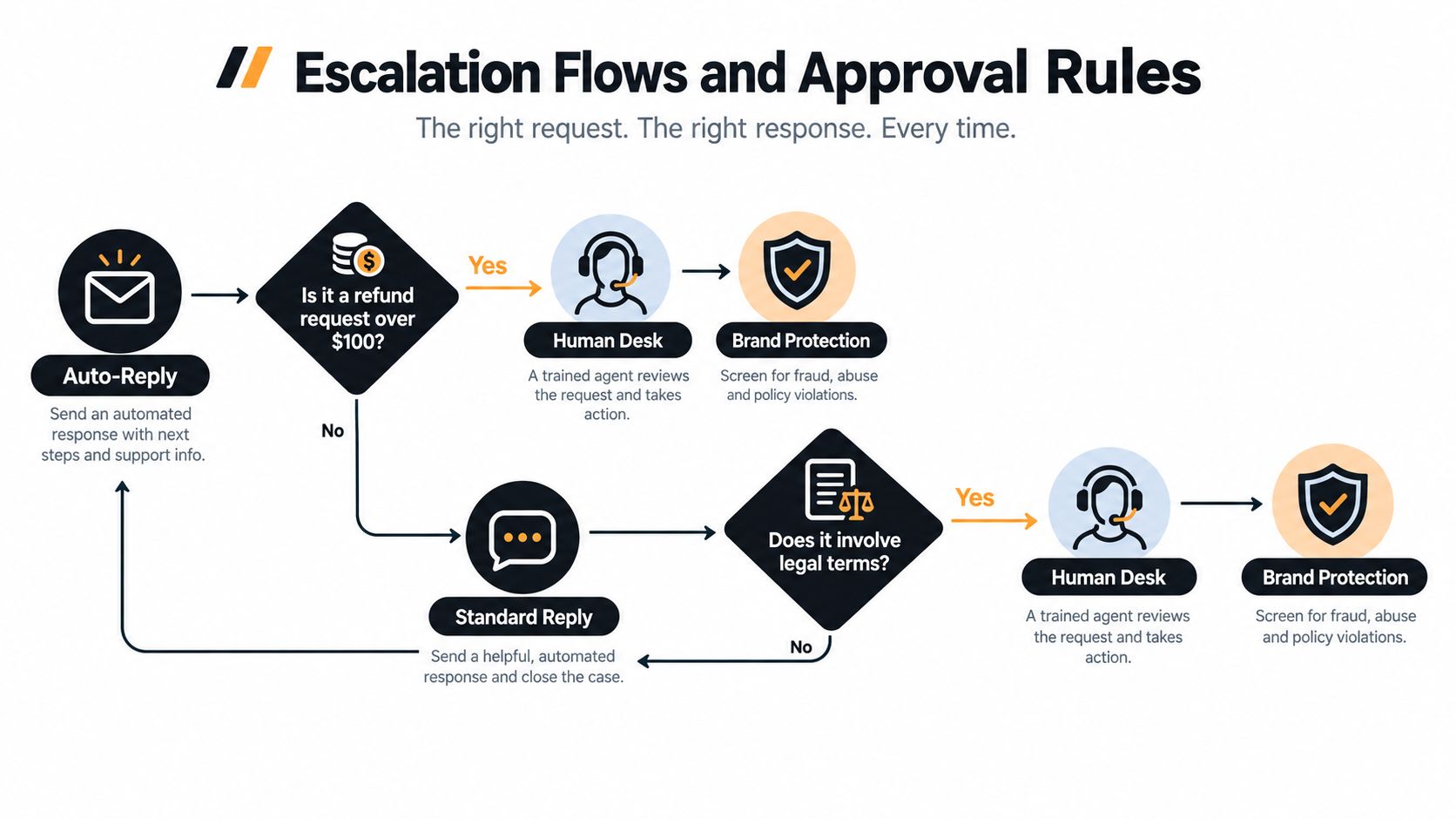
Automation should stop at a clear boundary. If the workflow can't explain why it sent a reply, which policy it used, and who owns the next step, it isn't ready for unsupervised handling.
Escalate immediately when a conversation includes:
High-value refund requests: Route refunds above the brand's chosen threshold to a human with authority to approve or deny them.
Legal language: Send claims involving lawsuits, regulators, contracts, discrimination, or formal complaints to the designated reviewer.
Medical or skin claims: Don't improvise safety, efficacy, diagnosis, or treatment language. Use approved information and human review.
Competitor comparisons: A buyer asking whether your product is better than a named alternative needs approved positioning, not an improvised claim.
Visible frustration: ALL CAPS, repeated unanswered questions, threats to post publicly, or a negative reaction should trigger a tone handoff.
The plan notes for this workflow commonly use a refund threshold of $100 and require approval for discounts above 15 percent. Those can work as internal controls if they match your margin and policy, but they shouldn't be treated as universal rules. Assign the approver by role, not by whoever happens to see the message first.
Preserve the evidence
Every escalated thread should retain:
The original ad creative or campaign reference.
The UTM values and ad identifier.
The user's intent tag.
The automated draft and final human reply.
The agent or reviewer who approved the message.
The resolution tag, such as refund-approved, purchase-recovered, or unresolved.
That record helps the team investigate a chargeback, explain a customer promise, or identify a misleading creative. It also protects brand consistency, which is part of brand reputation protection, not a separate customer-service concern.
Set an acknowledgment SLA for every inbound message, then set a shorter human-handoff SLA for escalated threads. A small team should make ownership visible by shift, keep the escalation queue separate from general FAQs, and review overdue conversations before the next ad check-in. The exact target should reflect staffing, but no message should disappear because the original responder ended the day.
Attribution and Checkout Routing Inside the Thread
“Reply fast and be human” is necessary, but it isn't a revenue system. A quick answer can still lose the sale if it sends the wrong product, drops the discount, or gives the media buyer no way to distinguish a DM conversion from a normal website purchase.
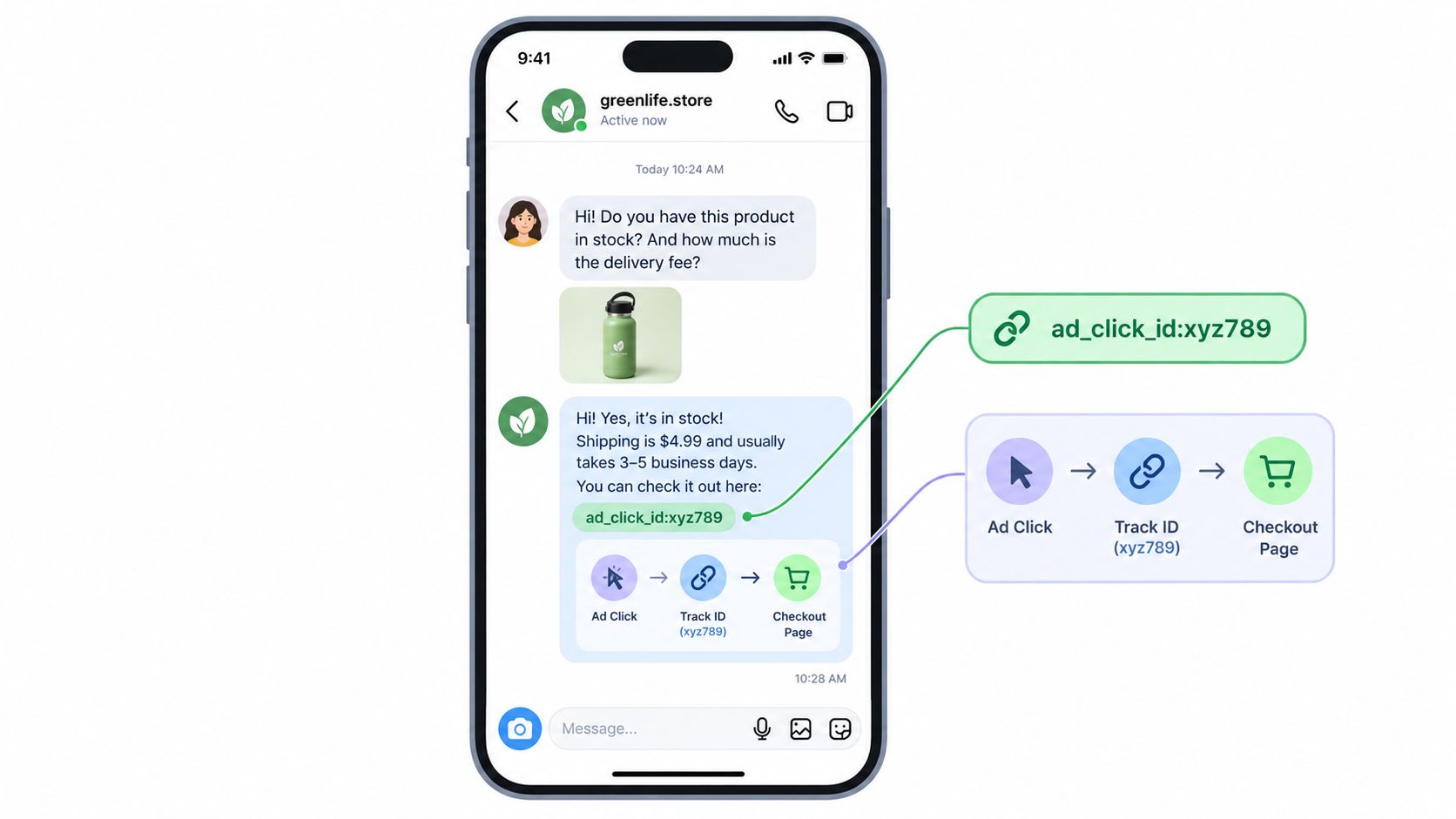
The thread needs a conversion path. When a buyer asks about a product from an ad, preserve the original campaign context and route them to the correct checkout. Use a product-specific link with approved parameters, apply the offer before sending it when possible, and avoid forcing the buyer to search the site again.
Build the link with context
A checkout URL can carry campaign information through UTM parameters such as:
utm_source=instagramutm_medium=paid_socialutm_campaign={{campaign_name}}utm_content={{ad_id}}utm_term={{intent_tag}}
Use the actual dynamic values supported by your ad and commerce setup. Don't send a generic homepage link when the buyer asked about one product. The link should preserve the conversation's context, product choice, and offer.
Tag the thread before or immediately after sending the link. Useful states include open, qualified, checkout-sent, closed-won, closed-lost, support-resolved, and escalated. “Replied” is an activity label. “Closed-won” is a revenue label.
Connect the purchase event
A commerce event should tell the reporting system which conversation influenced the order. Depending on the architecture, the brand can use Instagram order events, a partner workflow, or a server-side event to pass the purchase back into its measurement layer. The implementation needs deduplication, consent handling, and a clear attribution window chosen by the operator.
The media buyer's view should separate:
Spend by campaign and ad.
DM conversations created.
Qualified purchase-intent threads.
Checkout links sent.
Purchases attributed to those threads.
Revenue by intent tag.
Closed-lost reasons.
Human escalation rate.
A brand can then ask a better budget question: which ads generate profitable conversations, not just clicks or cheap messages? Research from Harvard Business School has found that automated comment moderation can improve commercial outcomes, including website registrations and return on ad spend, which reinforces the link between conversation handling and paid-media performance. The published research is about comment moderation, but the operational lesson applies to the broader engagement layer. Treat every reply as an event that should either advance, resolve, or explain the buyer's next action.
A One-Page DM Reply Playbook You Can Run Tomorrow
A coordinator should be able to open the workflow at 9 a.m., understand what must happen first, and start handling conversations by lunch. Keep the playbook short enough to use during a campaign spike, but specific enough that two agents won't make opposite decisions.
1. Pre-window setup
Turn on ad-to-DM routing: Make sure the campaign sends buyers into a monitored conversation path.
Show the timer: Keep the active messaging window visible in the inbox view.
Load intent templates: Prepare snippets for inquiry, lead, objection, support, shipping, stock, and returns.
Name the owner: Assign one human owner per shift, including overnight and weekend coverage.
2. Triage and intent
Classify the first message before writing. A buyer asking for a checkout link needs a sales route. A customer reporting a missing parcel needs service ownership. A general comment may need acknowledgment, while a product question needs verified catalog information.
Use these operating targets:
Warm leads: Reply in under 10 minutes.
Cold inquiries: Reply in under 60 minutes.
Window protection: Escalate to a human at the 20-hour mark if the conversation remains unresolved.
Complex cases: Send an acknowledgment immediately, then route the thread with the required context.
The benchmarks should guide staffing, not excuse unsupported promises. Speed matters, but an inaccurate answer creates a second conversation and can make recovery harder.
3. Tone and compliance
Acknowledge the exact issue: Don't paste a welcome line over a complaint.
Give one verified answer: Use current product, order, promotion, and policy data.
Set the next action: Provide one link, one question, or one resolution step.
Escalate risk: Move legal, medical, refund-exception, competitor, and visibly hostile threads to a human.
4. Revenue recovery
Capture the UTM source, ad ID, intent tag, order value, checkout link, and final resolution. Keep the link specific to the product or offer discussed, and preserve the thread so the buyer doesn't have to restart the conversation on another channel.
For teams building a broader sales process, it can help to browse sales playbook examples and adapt the structure to DM intent rather than copying a generic call script.

Before standup, review three views: reply-time distribution, conversion by intent tag, and paid-social revenue tied to conversations. Exerta provides AI employees for Facebook, Instagram, TikTok, and website chat, with logged replies, intent handling, escalation workflows, and checkout-focused revenue recovery. The platform reports adoption by 250+ brands, a 15% average sales lift, $2M+ recovered, and 99.9% uptime. Visit Exerta to see how an AI employee can handle Instagram DM triage, route high-risk conversations to humans, and connect paid-social engagement to recovered sales.

